How to Add Forex Indicators on MetaTrader 4 Charts - Adding MT4 Forex Chart Indicators
Step 1: Open Navigator Window Panel on Forex Trading Platform
Open Navigator window as shown & illustrated below: Go to "View" menu (click on it), then select "Navigator" window (click), or From Standard Tool Bar click the "Navigator" button or press keyboard short cut keys "Ctrl+N"
On Navigator window, select 'Technical Indicators', (DoubleClick)
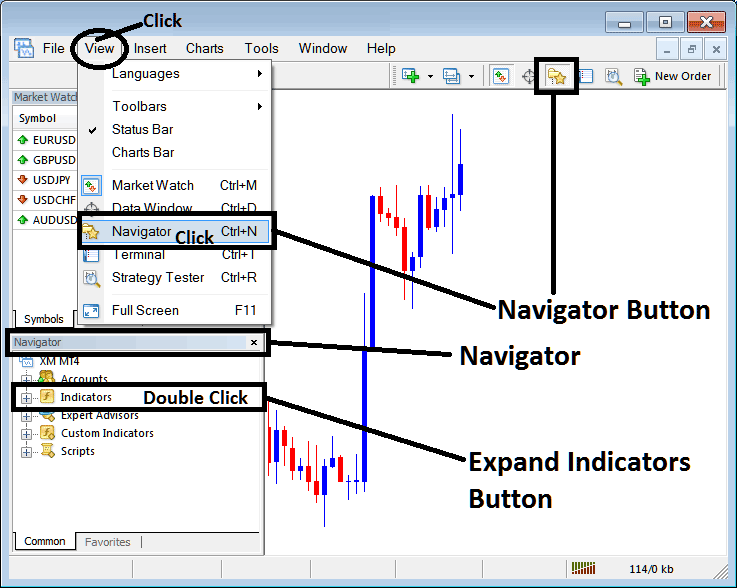
How to Add Indicator on MetaTrader 4 - MT4 Indicator - Forex Indicators MT4
Step 2: Expand the Forex Indicators Menu on the Navigator - Adding Forex MT4 Indicator
Expand the menu by clicking the expand button marker (+) or double click the "indicators" menu, after this the button will appear as (-) and will now display a list as shown below - select the Forex chart indicator from this list of forex indicators - Forex Technical Indicators MT4 - so as to add the Forex indicator on the forex chart.
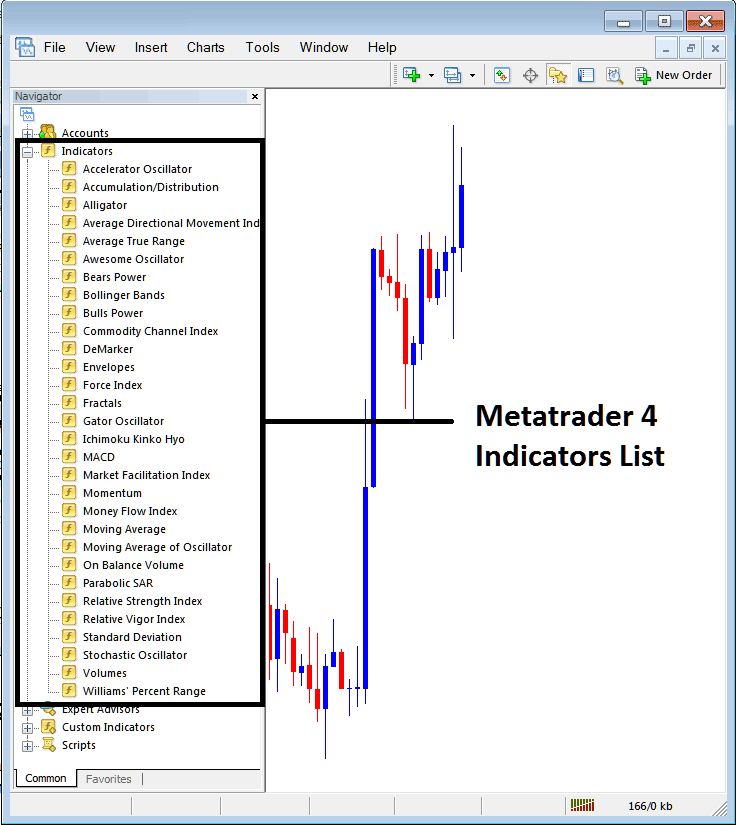
How to Add Indicator - From the Above window you can then place Forex indicator that you want on the Forex chart - Forex Chart Indicators Explained.
How to Add Custom Indicator to MT4
If the technical indicator you want to add is a custom indicator - for example if the technical indicator you want to add is a custom indicator you will need to first add this custom Forex indicator on the MetaTrader 4 platform & then compile custom Forex indicator so that the newly added Forex custom indicator pops up on the list of custom indicators on the MT4 platform - Custom Forex Indicators MT4.
Forex Chart Indicators Explained - To learn how to install Forex indicators on MT4, how to add Forex indicator window to MT4 and how to add Forex custom indicator in MT4 - How to add a custom Indicator on MetaTrader 4.
About MT4 Indicators Technical Indicator Tutorial PDF - Forex Indicators Explained
Forex Indicators List and Chart Indicators Explained
To learn Forex trading technical analysis the first thing which a trader should do is to know about all the different forex chart analysis indicators & then try to find the forex indicators that they can use.
A
- Acceleration/Deceleration: AC
- Alligator
- Aroon
- Aroon Oscillator
- Awesome Oscillator
- Accumulation/Distribution
- ADX
- Average True Range (ATR)
B
- Bollinger Bands: Fibonacci Ratios
- Bears Power
- Bollinger Band Indicator
- Bollinger Bandwidth
- Bulls Power
- Balance of Power
- Bollinger Percent B or %b
C
- Chaos Fractals
- Chande Q-Stick
- Choppiness Index
- Chande Trend Score
- Coppock Curve
- Chaikin Money Flow
- Chande Dynamic Momentum Index
- Chande Momentum Oscillator
- Commodity Channel Index (CCI)
D
E
G
H
I
K
L
M
- MACD
- McClellan Histogram
- McClellan Oscillator
- McGinley Dynamic
- Momentum
- Envelopes
- Moving Average Indicator
P
R
S
T
- T3 Average
- Trailing Stop loss Levels
- Trend Trigger Factor
- Triple Exponential Average (TRIX)
- Triple Exponential MA (TEMA)
- True Strength Index (TSI)
U
W
You can navigate these learn forex chart indicators explained tutorials from the right navigation menu or using the above links.
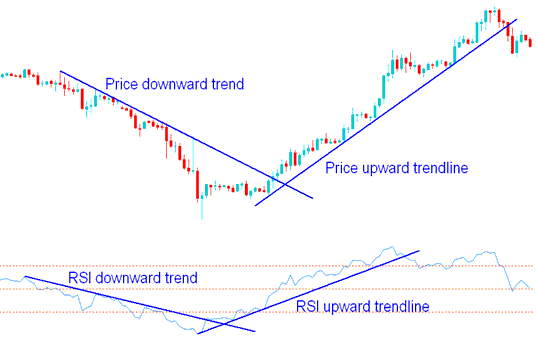
RSI Indicator - Technical Analysis
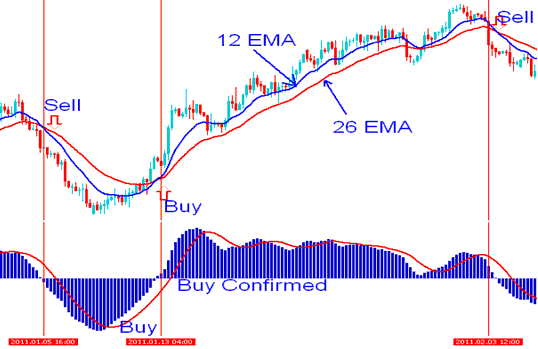
MACD Indicator - Technical Analysis
Forex Chart Indicators Technical Analysis
Most forex technical indicators are displayed separately from the chart usually below the forex chart. This is because these forex chart indicators often use a different scale than that of the forex price chart.
Other Forex technical analysis indicators are shown on the chart itself, such as Moving Averages and Bollinger Bands - these are referred to as price overlays forex chart indicators.
Some of the popular forex chart indicators when it comes to forex analysis are:
Moving Average (MA) forex indicator - Using a variety of Forex analysis studies, various types of forex trading signals can be generated from the forex charts using the moving averages. The Moving Average indicator indicates buy signals when prices rise above the moving average lines. Sell trading signals occur when price falls below the moving average lines. Another method to trade with moving averages is using the Moving Average crossover forex trading signals.
MACD indicator is one of the forex trend following indicators, MACD indicator has a signal line that is used to generate a buy signal (above the MACD indicator center line) or a sell signal (below the MACD indicator center line).
Volume based forex market analysis indicators are used to determine momentum of forex trends. High volume, especially near the bottoms of the market can indicate the starting of a new forex trend while low volume might show ranging markets or sideways market movements.
Bollinger Bands indicator shows potential points where the market movements are likely to change. Technical analysis setups of this Bollinger Bands indicator that show sharp moves in price action tend to occur when the Bollinger Bands tighten (the Bollinger band squeeze). While prices that touch one of the outer Bollinger Band tends to go all the way to the other band. Bollinger Bands move in a particular direction up or down when there is a forex trend.
Forex Indicators MT4 - these indicators are some of the most commonly used technical indicators when it comes to daily Forex technical analysis. To learn more about how to combine these forex technical analysis indicators to form a forex trading strategy navigate to the Forex Strategies Tutorial - Forex Chart Indicators Discussed and learn how to come up with an Indicator Based Forex Trading System.




