How to Add Ehlers Laguerre RSI on MT4 Charts - Adding MT4 Ehlers Laguerre RSI Indicator
Step 1: Open Navigator Window Panel on FX Trading Platform
Open Navigator window as shown & illustrated below: Go to "View" menu (click on it), then select "Navigator" window (click), or From Standard Tool Bar click the "Navigator" button or press keyboard short cut keys "Ctrl+N"
On Navigator window, select 'Technical Indicators', (DoubleClick)
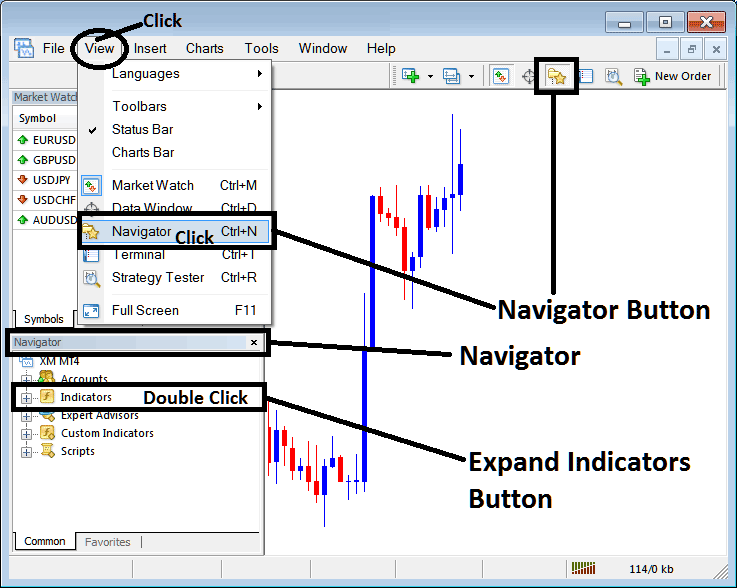
How to Add Ehlers Laguerre RSI Indicator on MetaTrader 4 - MT4 Ehlers Laguerre RSI Technical Indicator
Step 2: Expand the Indicators Menu on the Navigator - Adding Ehlers Laguerre RSI MT4 Indicator
Expand the menu by clicking the expand button marker (+) or double click the "indicators" menu, after this the button will appear as (-) and will now display a list as shown below - select the Ehlers Laguerre RSI forex chart indicator from this list of forex indicators so as to add the Ehlers Laguerre RSI indicator on the forex chart.
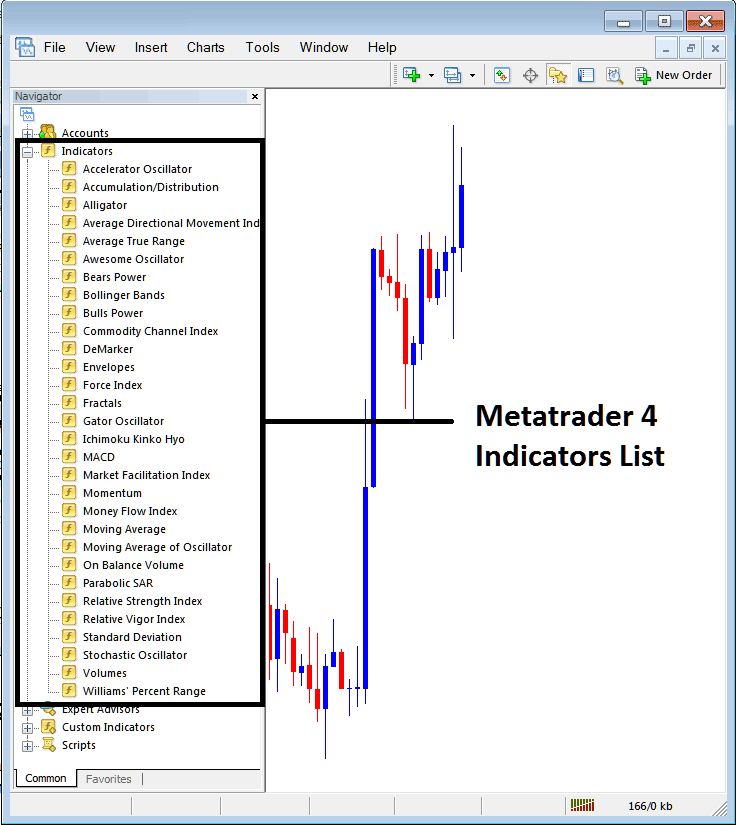
How to Add Ehlers Laguerre RSI Indicator - From the Above window you can then place Ehlers Laguerre RSI indicator that you want on the Forex chart
How to Add Custom Ehlers Laguerre RSI Indicator to MT4
If the technical indicator you want to add is a custom indicator - for example if the Ehlers Laguerre RSI technical indicator you want to add is a custom indicator you will need to first add this custom Ehlers Laguerre RSI indicator on the MetaTrader 4 platform & then compile custom Ehlers Laguerre RSI indicator so that the newly added Ehlers Laguerre RSI custom indicator pops up on the list of custom indicators in MetaTrader 4 software.
To learn how to install Ehlers Laguerre RSI indicators on MT4, how to add Ehlers Laguerre RSI indicator window to MT4 and how to add Ehlers Laguerre RSI custom indicator in MT4 - How to add a custom Ehlers Laguerre RSI indicator in MetaTrader 4.
About Ehlers Laguerre RSI Technical Indicator Described
Ehlers Laguerre RSI Technical Analysis & Ehlers RSI Signals
Developed by John Ehlers.
Originally used to trade stocks and commodities.
Ehlers RSI uses a 4-Element Laguerre filter to provide a "time distort" such that the low frequency components/price spikes are delayed much more than the higher frequency components. This indicator enables much smoother filters to be created using short amounts of data.
The Ehlers RSI uses a scale of 0- 100, the center line is used to generate Forex signals & the 80/20 levels represents overbought-oversold areas.
The only parameter which can be optimized for this technical indicator is damping gamma factor, usually 0.5 to 0.85, to best suit your trading method.
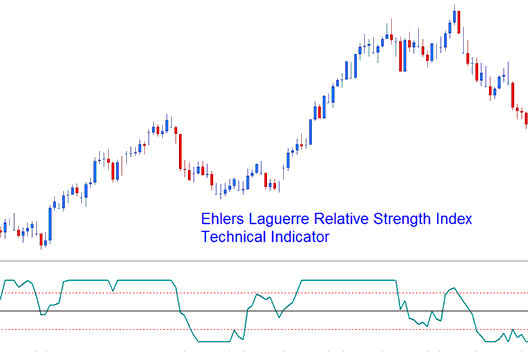
Ehlers Laguerre Relative Strength Index
FX Technical Analysis & How to Generate Signals
This implementation of the Laguerre RSI uses scale of 0-100.
FX Crossover Signals
Buy Trading Signal- A buy trading signal is generated when the Ehlers RSI crosses above 50 level Mark.
Sell Forex Signal- A sell trading signal is generated when Ehlers RSI crosses below 50 level Mark.
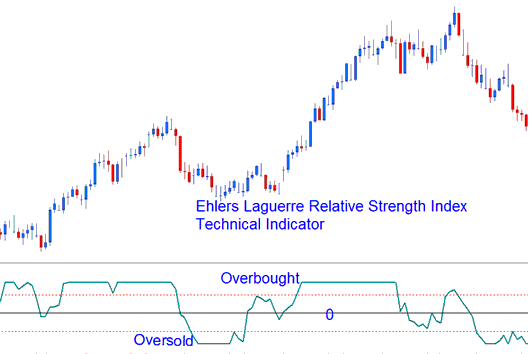
Oversold/Overbought Levels on Technical Indicator
Oversold/Overbought Levels on Indicator
A typical use of the Laguerre RSI is to buy after it crosses back above the 20% level & sell after it crosses back below the 80% level.




