How to Add Balance of Power Indicator on MT4 Charts - Adding MT4 Balance of Power Indicator
Step 1: Open Navigator Window on FX Trading Platform
Open Navigator window as shown & illustrated below: Go to 'View' menu (click on it), then select 'Navigator' window (click), or From Standard Tool Bar click the 'Navigator' button or press keyboard short cut keys 'Ctrl+N'
On Navigator window, choose 'Indicators', (Double-Click)
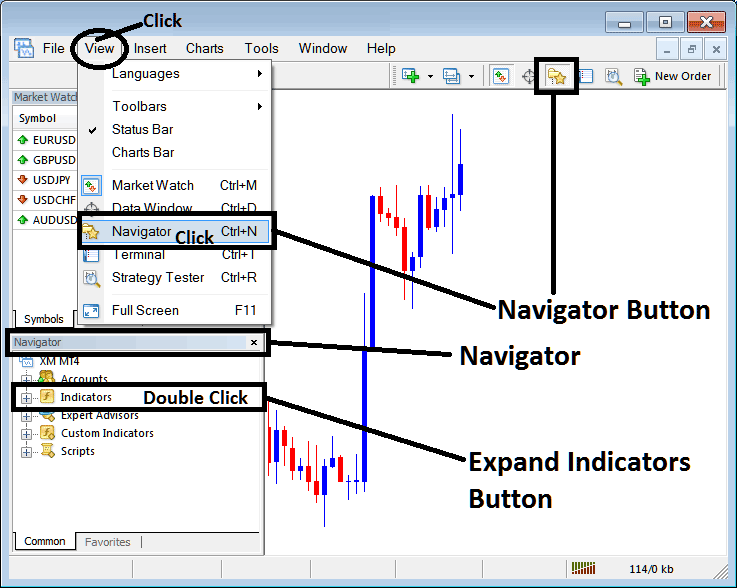
How to Add Balance of Power Indicator on MetaTrader 4 - MT4 Balance of Power Indicator
Step 2: Expand the Indicators Menu on the Navigator - Adding Balance of Power MT4 Indicator
Expand the menu by clicking the expand button marker (+) or double click the 'indicators' menu, after this the button will appear as (-) and will now display a list as shown below - select the Balance of Power forex chart indicator from this list of forex indicators so as to add the Balance of Power indicator on the forex chart.
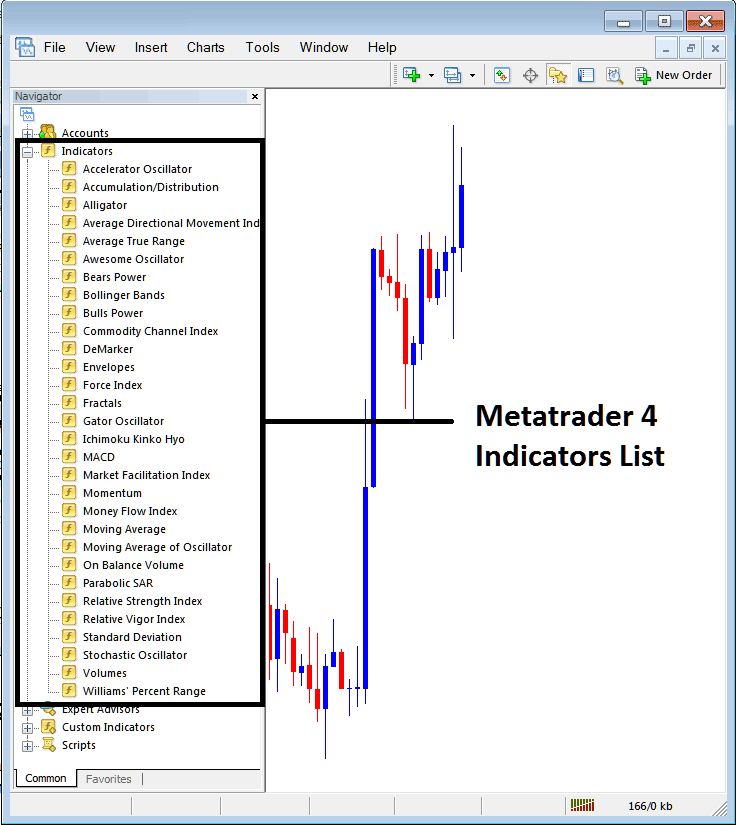
How to Add Balance of Power Indicator - From the Above window you can then place Balance of Power indicator that you want on the Forex chart
How to Add Custom Balance of Power Indicator to MT4
If the technical indicator you want to add is a custom indicator - for example if the Balance of Power technical indicator you want to add is a custom indicator you will need to first add this custom Balance of Power indicator on the MT4 platform & then compile custom Balance of Power indicator so that the newly added Balance of Power custom indicator pops up on the list of custom indicators in MetaTrader 4 software.
To learn how to install Balance of Power indicators on MT4, how to add Balance of Power indicator window to MT4 and how to add Balance of Power custom indicator in MT4 - How to add a custom Balance of Power indicator in MetaTrader 4.
About Balance of Power Technical Indicator Guide
Balance of Power Technical Analysis and Balance of Power Signals
Developed by Igor Livshin
Balance of Power indicator measures the strength of the bulls versus the bears by assessing ability of each to push price to extreme levels.
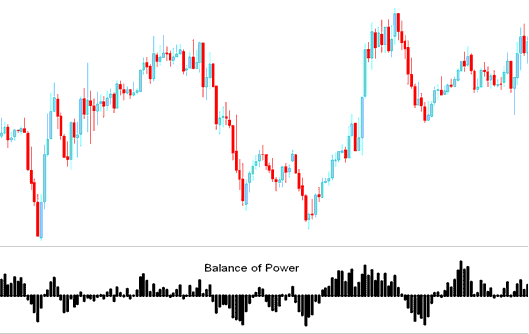
FX Technical Analysis & How to Generate Signals
When using this technical indicator, the zero line crossovers are used to generate Forex signals.
Center is marked as the zero line, levels oscillating above or below are used to generate trading signals.
Buy - The scale is marked from Zero to +100 for bullish market movements
Sell - The scale is marked from Zero to -100 for bearish market movements
How to Generate Buy & Sell FX Signals
Buy Signal
When the BOP crosses above zero a buy signal is given.
Also when the BOP is rising, the market is in an upward trend, some traders use this as a buy signal but it is best to wait for the confirmation by moving above the zero mark. As this will be a buy signal in bearish territory & this type of signal is more likely to be a whipsaw.
Sell Signal
When BOP crosses below zero a sell signal is given.
Also when the BOP is declining, the market is in a downward trend, some traders use this as a sell signal but it's best to wait for a confirmation by moving below the zero mark because this will be a sell signal in bullish territory and this type of signal is more likely to be a whipsaw.
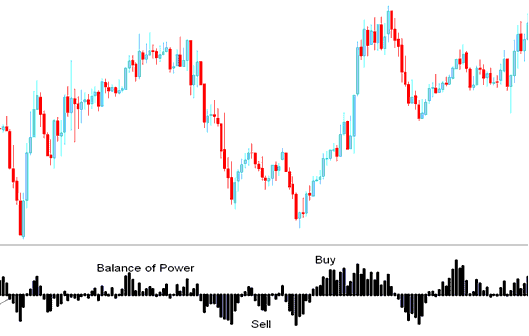
Sell and Buy Signals
Forex Divergence FX Trading
In forex trading, divergences between the BOP and price can be used to effectively spotting potential reversal and/or trend continuation points in currency movement. There are several types of divergences:
Classic Divergence - Trend reversal signal
Hidden Divergence - Trend continuation
Forex Trading Overbought Oversold Conditions
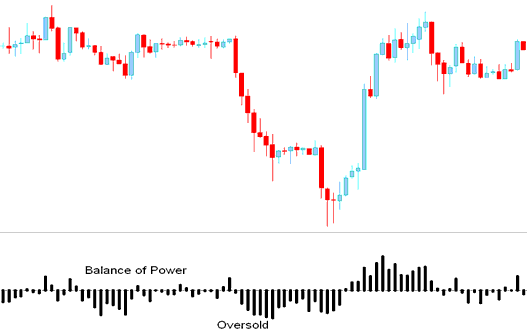
This Balance of Power can be used to identify potentially overbought and over-sold conditions in price movement.
- Overbought-Oversold levels can be used to provide an early signal for potential trend reversals.
- These levels are generated when indicator clusters its tops and bottoms thus setting up the overbought & oversold levels around those values.
However, price may also stay at these overbought and oversold levels and continue moving in that direction for a while and thus its always good to wait until the BOP crosses over the Zero mark.
From the example below, even though the Balance of Power showed the price was oversold, price continued heading downward until the indicator crossed over to above Zero.
Technical Analysis in FX Trading




