Acceleration/Deceleration AC Indicator Technical Analysis Signals
Created by Bill Williams
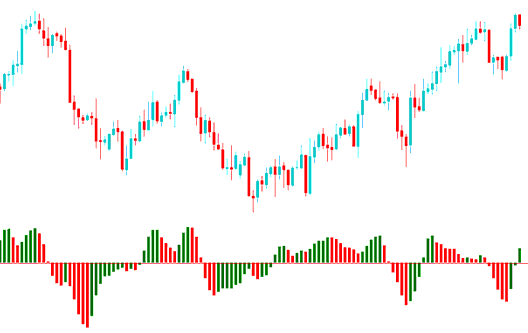
Acceleration/Deceleration measures acceleration & deceleration of the trend momentum - it's popularly used to analyze both stock markets and forex market movements.
This indicator changes direction before the price changes its direction.
The Acceleration/Deceleration is used to generate early trading signals of trend reversals.
If AC changes direction then price direction will soon follow.
FX Technical Analysis & Generating Signals
The Zeroline is the spot where the momentum is at balance with acceleration or deceleration.
If Acceleration/Deceleration is higher than Zero, then it's easier for the acceleration to continue in the upwards movement.
If Acceleration/Deceleration is lower than Zero, then it's easier for the deceleration to continue in the downwards movement.
The Zero point is not regarded as a buy or sell signal when it is crossed.
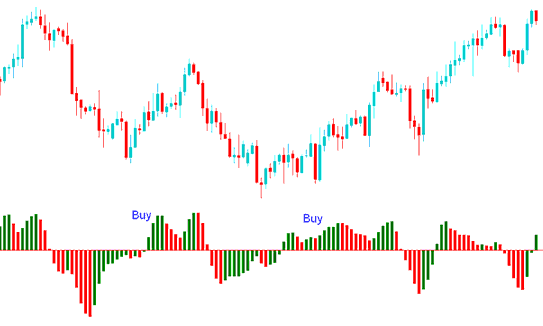
A buy or sell trade is generated when color of the AC changes from red to green.
Buy Forex Signal
When the current column changes from red to green this is interpreted as a buy.
When the current column is colored red, you can't buy.
When the indicator is higher than Zero and the current bar is green a buy signal is generated.
When the AC is lower than zero & the current bar is green a confirmation signal is required for a buy. Three green bars is usually another confirmation.
Sell Trading Signal
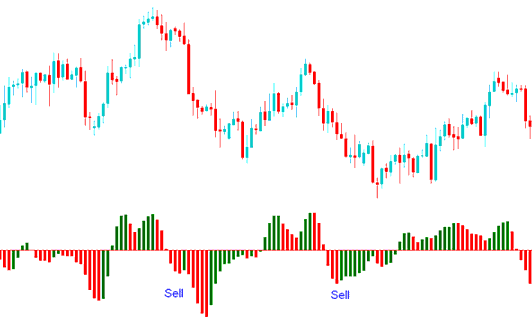
When the current column changes from green to red this is analyzed as a sell.
When the current column is colored green, you can't sell.
When the indicator is lower than Zero & the current bar is red is a sell signal is generated.
When the AC is higher than zero and the current bar is red a confirmation signal is required for a sell. Three green bars is usually another confirmation.
Technical Analysis in Forex Trading
