Trade S&P 500 in MT4 - How to Trade S&P 500 Stock Indexes MetaTrader 4 Charts & How to Trade S&P Stock Index with MetaTrader 4 Trading S&P Stock Index Trade Software
How to Trade S&P 500 in MT4
To trade S&P 500 Stock Indexes trade chart in MT4 Forex & in MT4 - Follow This MetaTrader 4 S&P 500 on MT4 Guide Tutorial
If in the MT4 Forex & Stock Indices trade software quotes S&P 500 trade quote is not shown like on the MT4 example that is displayed below - you can learn from this guide on how to trade S&P 500 Stock Indexes which gives an explanation of how to find the S&P Stock Indexes in the MT4 S&P Trading Software.
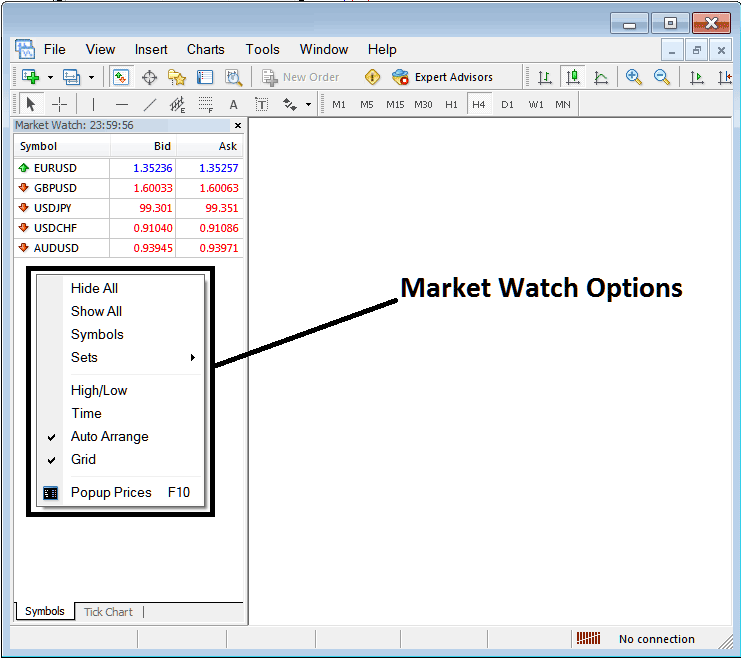
To get Stock Indexes symbols that are not shown on the MT4 including S&P 500 Stock Indexes, you can right-click inside this market-watch window pop up as shown and illustrated below - the following MetaTrader 4 symbols pop up window will appear.
You can then select 'Show All' MetaTrader 4 forex & stock indices symbols button which will display all the MT4 forex & stock indices symbols available on the MT4 forex & stock indices trade software, from the list you will then select S&P 500 Stock Indexes symbol and then open the S&P 500 Stock Indexes quote so as to show MT4 S&P 500 Stock Indexes trade chart on this MT4 stock indices trading software.
S&P 500 Trading Guide and Trade S&P Stock Indexes Tutorial - MetaTrader 4 S&P 500 on MT4 Guide Tutorial
S&P 500 Trading Guide and Trade S&P Stock Indexes Tutorial - MetaTrader 4 S&P 500 on MT4 Guide Tutorial
To show a list of other MetaTrader 4 forex & stock indices symbols including S&P 500 Stock Indexes symbol, choose 'Show All' button, this then will display all available MT4 trade chart symbols including that of S&P 500 Stock Indexes symbol and you can then select & open S&P 500 Stock Indexes symbol from the MT4 symbols list & double-click on the S&P 500 Stock Indexes quote to open the S&P 500 Stock Indexes Trade Charts in MT4.
How Do I Add S&P 500 Quotes in MT4? - How to Trade S&P Stock Index with MetaTrader 4
How to Open MT4 Market-Watch for Adding S&P 500 Quotes - How to Trade S&P500
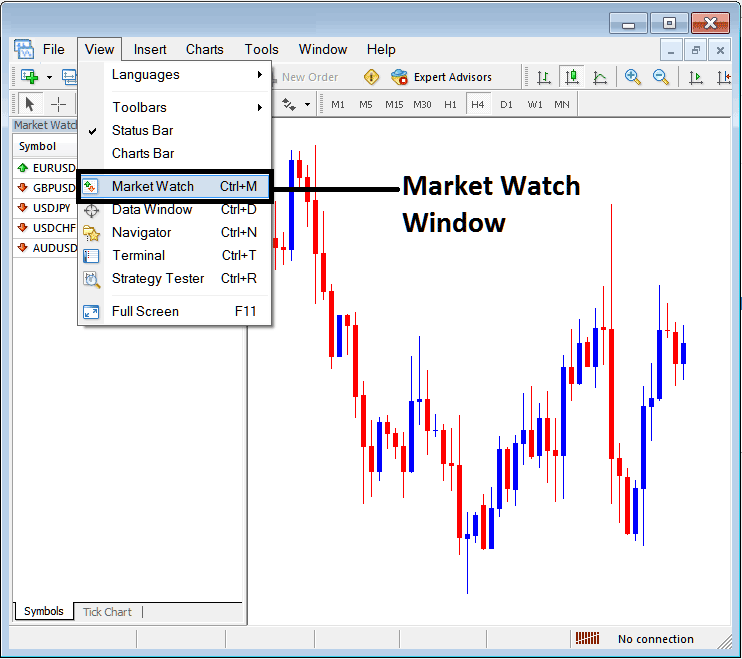
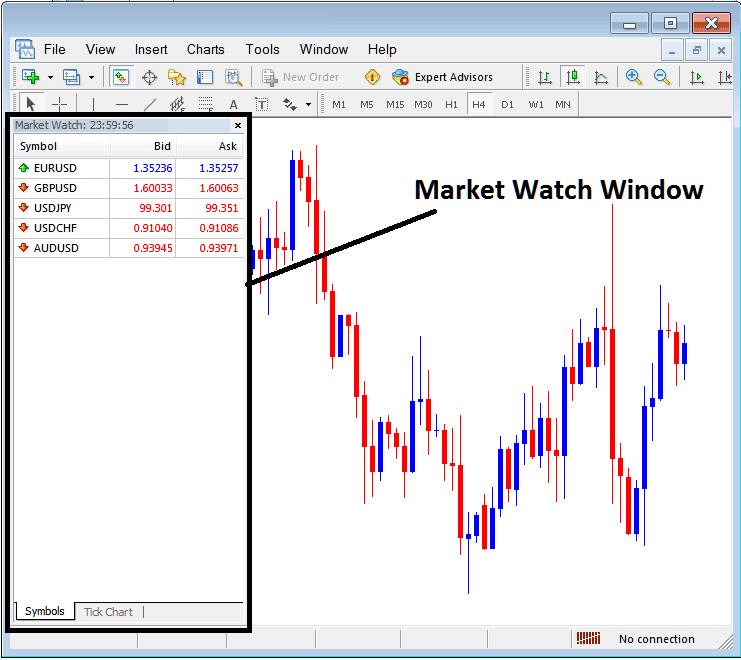
Market watch window pop up on MT4 software is used to show a list of Forex Symbols for forex pairs & also other instruments such as Stock Indexes like S&P 500 stock index - available for trading in the MT4 Trade Software.
To get this MetaTrader 4 Market-Watch list of Forex quotes & Stock Indices quotes in the MetaTrader 4 Software one should go to view menu as is shown below & select Market-Watch Window by Clicking it. (Ctrl+M is shortcut for accessing this pop up window as is shown below, by pressing this MetaTrader 4 trade software shortcut, you can enable MT4 market-watch window pop up without having to go to 'view' menu)
How to Trade S&P 500 in MT4 Stock Indexes Trade Software - How to Add S&P 500 Stock Indexes Quote on MT4
How to Trade S&P 500 in MT4 Forex & Stock Indices Trade Software
Once a trader chooses market-watch window, following pop up window will appear
How to Add S&P 500 Stock Indexes Quote on MT4 Trading S&P Stock Index Trade Software
To Show all Forex Currency Pairs & Stock Indices Quotes Available for online trading including S&P500 Stock Indexes Trade Chart, Right Click on the MT4 Market-Watch Window as Shown and Illustrated on the example Below, then choose the 'Show All' Option & from the quote symbols list choose S&P 500 Stock Indexes Trade Chart Quote and open the MT4 Chart for trading S&P 500 Stock Indexes.
How to Trade S&P Stock Indexes - S&P 500 on MT4 Stock Indexes Trading in MT4 S&P Stock Index Trade Software
How to Trade S&P Stock Indexes - S&P 500 on MT4 Stock Indexes Trading in MT4 S&P Stock Index Trade Software
Trade S&P Stock Indexes Tutorial - How to Trade S&P 500 Stock Indexes
How to Trade S&P Stock Indexes - How to Trade S&P500 Tutorial to Trading S&P 500 Stock Indexes
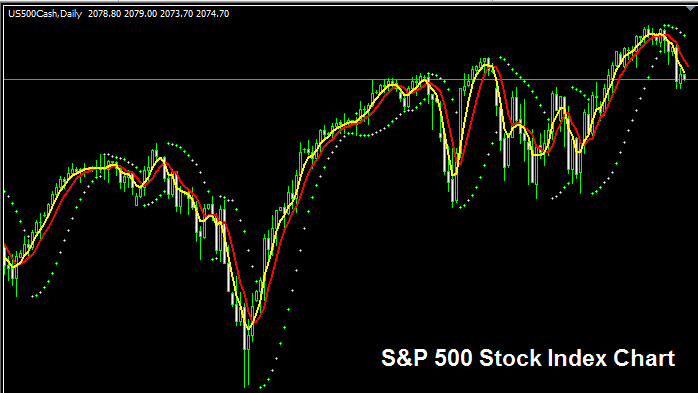
Standard and Poor's 500 Stock Indexes is a Stock Indices that keeps track of the capitalization of 500 stocks that represent major industries in American economy.
S & P 500 Stock Indexes Trade Chart - SPX or SPX:IND
S & P 500 Stock Index - Standard and Poor's 500 Stock Index is also Named as US 500 or SP 500 or S&P500
S & P 500 Stock Indexes Trade Chart - Standard and Poor's 500 Stock Index is also Named as US 500 or SP 500 or S&P500
The S&P 500 Stock Indexes MetaTrader 4 Chart
The S&P 500 Stock Indexes trade chart is shown above on the MT4 Software. On the above example this instrument is named US 500CASH. As a trader you want to find a stock indices broker that provides S&P 500 Stock Indexes trade chart so that you can start to trade S&P 500 Stock Indexes Trade Charts in the MT4 Software. The example shown above is of S&P 500 Stock Indexes on the MetaTrader 4 Forex & Indices Trading Software.




