How to Trade CFD Trend Line Bounce CFD Trend Continuation Signals Technical Analysis
CFD Trendline Analysis
The cfd trend-line bounce is a cfd continuation trading signal where the price bounces off the trend-line and continues moving in same direction as that of the cfds trend.
CFD Trend Line Bounce CFD Trend Line Technical Analysis in CFD Upwards Trend
- In an up cfd market trend, the cfd price will bounce upwards after touching this upwards trend line level which is the support level - CFD Trend Line Analysis.
CFD Upward Trend - CFD Trendline Bounce Technical Analysis after Touching The Support Levels Provided by the Upwards CFD Trend Line
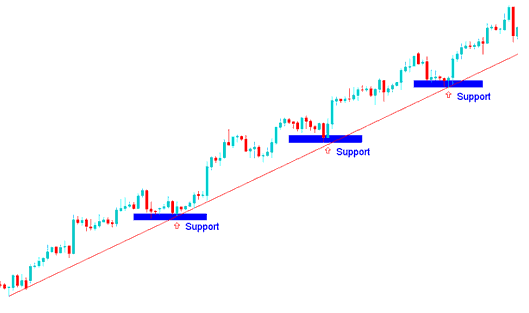
CFD Trend Line Bounce CFD Trend Line Technical Analysis in CFD Upwards Trend
CFD Trend Line Bounce CFD Trend Line Technical Analysis in CFD Downwards Trend
- In a down cfd trend, the cfds market price will bounce downwards after touching this down cfd trend line level which is the resistance level - CFD Trend Line Analysis.
CFD Down Trend - CFD Trend-Line Bounce Technical Analysis after Touching The Resistance Levels Provided by the Downwards CFD Trend Line
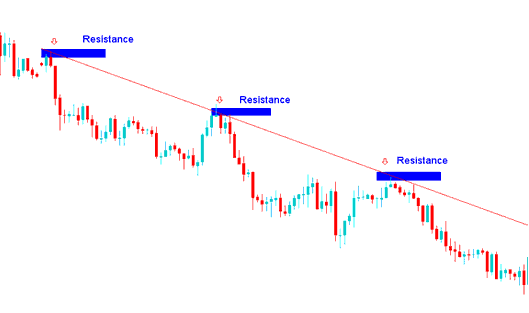
CFD Trend Line Bounce CFD Trend Line Technical Analysis in CFDs Downwards Trend
CFD Trendline Analysis
The MetaTrader 4 cfds platform provides cfd charting tools for drawing the trend lines on MetaTrader 4 cfd charts. To draw cfd trend-lines on a cfd chart on MT4 software, cfds traders can use trend-line drawing tool that is provided in MetaTrader 4 software that is shown on the cfd examples explained and illustrated below.
How to Draw CFDs Trend Lines & Analysis of CFDs Trend Lines in CFDs
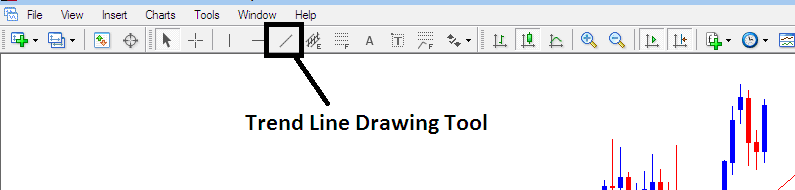
How to Draw CFD Trendlines on MetaTrader 4 Platform - How to Draw CFD Trendlines Technical Analysis
To draw cfd trend-lines on a cfd chart - just click the MT4 cfd trend-line plotting tool above on MetaTrader 4 technical analysis software and select point A where you want to start plotting the trend-line & then point B where you want the trend line to touch. You can also right click on the MT4 cfd trend line and on the cfd trend line properties option select the option to extend its ray by ticking the "ray check box", if you do not want to extend the trend-line, then uncheck this option in your MT4 cfds platform - cfd trend line properties. You can also change other cfd trend line properties such as color and width on this cfd trend line property popup window of the MT4 cfd trend line properties. You can download MetaTrader 4 cfd platform & learn how to draw cfd trend lines & learn cfd trendline technical analysis with it.




