How to Add Kaufman Efficiency Ratio Indicator in MT4 Charts
Step 1: Open Navigator Window on CFDs Trading Software
Open Navigator panel as shown and illustrated below: Navigate to "View" menu (click on it), then select "Navigator" window (click), or From Standard Toolbar click the "Navigator" button or press key-board short-cut keys "Ctrl+N"
On Navigator window, select 'Technical Indicators', (Double-Click)
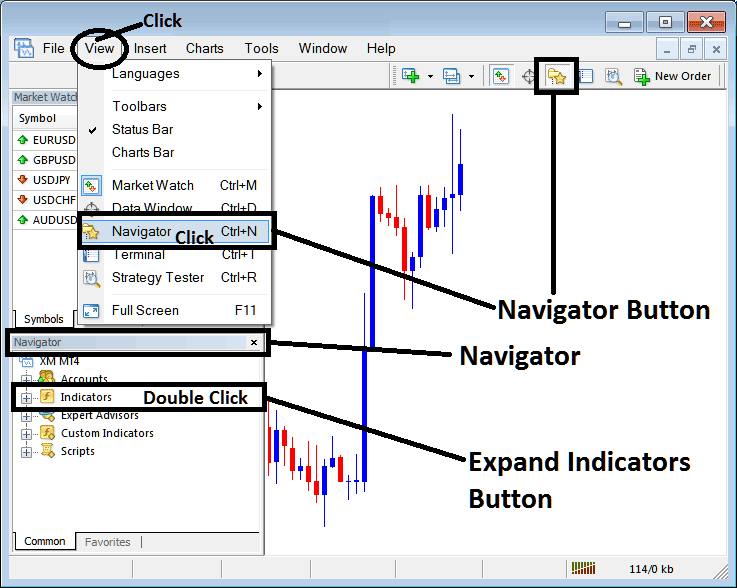
How to Add Kaufman Efficiency Ratio Indicator in MT4 - MT4 Kaufman Efficiency Ratio Technical Indicator
Step 2: Expand the Indicators Menu on the Navigator - Adding Kaufman Efficiency Ratio MT4 Indicator
Expand the menu by clicking the expand button marker (+) or double click the "indicators" menu, after this the button will appear as (-) and will now display a list as shown below - select the Kaufman Efficiency Ratio cfds chart indicator from this list of cfds indicators so as to add the Kaufman Efficiency Ratio indicator on the cfd trading chart.
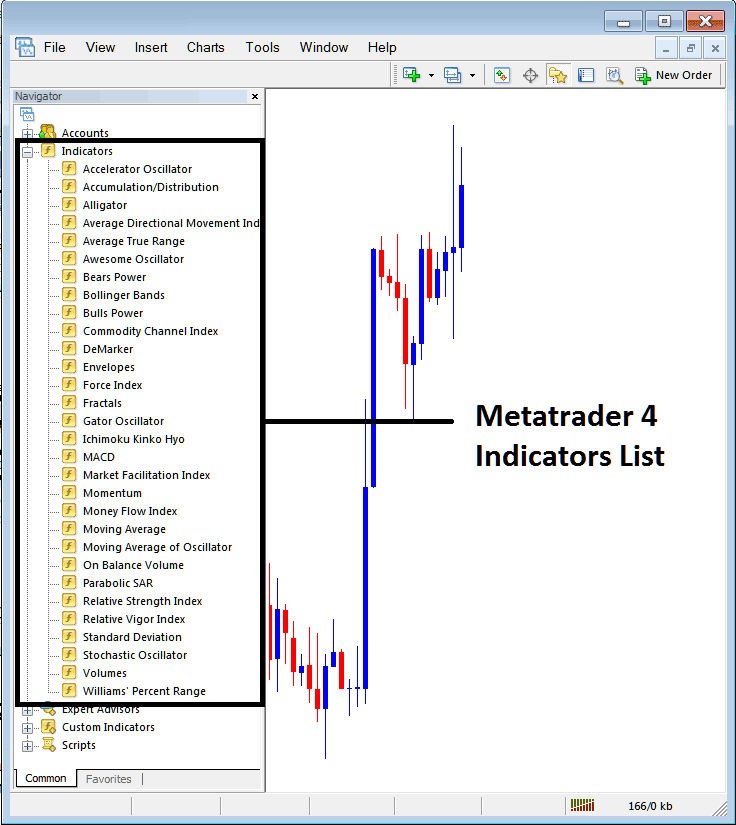
How to Add Kaufman Efficiency Ratio Indicator - From the Above window you can then place Kaufman Efficiency Ratio indicator that you want on the CFDs chart
How to Add Custom Kaufman Efficiency Ratio Indicator to MT4
If the technical indicator you want to add is a custom indicator - for example if the Kaufman Efficiency Ratio technical indicator you want to add is a custom indicator you will need to first add this custom Kaufman Efficiency Ratio indicator on the MT4 software & then compile the custom Kaufman Efficiency Ratio indicator so that the newly added Kaufman Efficiency Ratio custom indicator appears on the list of custom indicators on the MT4 platform.
To learn how to install Kaufman Efficiency Ratio indicators on MT4, how to add Kaufman Efficiency Ratio indicator window to MT4 and how to add Kaufman Efficiency Ratio custom indicator on MetaTrader 4 - How to add a custom Kaufman Efficiency Ratio indicator in MT4.
About Kaufman Efficiency Ratio Technical Indicator Tutorial PDF
Kaufman Efficiency Ratio CFDs Technical Analysis Trading Signals
Developed by Perry Kaufman. Described in his book entitled "New Systems and Methods".
The Kaufman Efficiency measures the ratio of the relative market speed in relation to the volatility. Kaufman efficiency is often used by traders as a filter to help avoid trading when the market is "choppy" or flat ranging markets. The indicator also helps to identify smoother cfds market trends. This is an oscillator indicator that oscillates between +100 and -100, where zero is the center point. +100 is upward trending market and -100 is downwards trending markets.
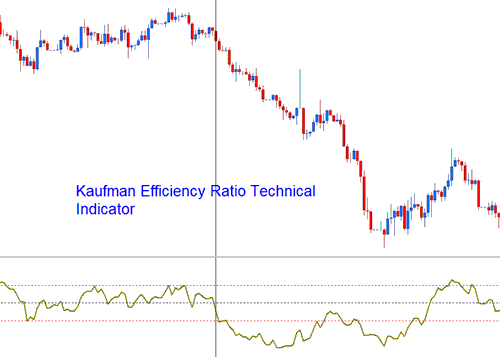
Kaufman Efficiency Ratio
The Efficiency indicator is calculated by dividing the net change in price movement over an n number of periods by the sum of all the bar-to-bar price changes taken as a absolute values over these same n periods.
CFD Technical Analysis & Generating Trading Signals
The Kaufman is used to generate trading signals as follows:
The smoother the manner in which the cfds market is trending then the greater the Efficiency Ratio shown by the indicator. Efficiency Ratio value readings of around zero indicate a lot of inefficiency or "choppiness" in the market trend movements (ranging cfds markets).
- If the Efficiency Ratio shows a reading of +100 for a cfds pair, then that cfds pair is trending upwards with perfect efficiency.
- If the Efficiency Ratio shows a reading of -100 for a cfds pair, then that cfds is trending downwards with perfect efficiency.
However, it is almost impossible for a market trend to have a perfect efficiency ratio since any retracement movement against the current trend direction during the time period being used to calculate the indicator would decrease the efficiency ratio.
Bullish/Buy Trading Signal
Efficiency Ratio values above +30 indicate a smoother uptrend.
Buy trading signal is generated above center-line mark.
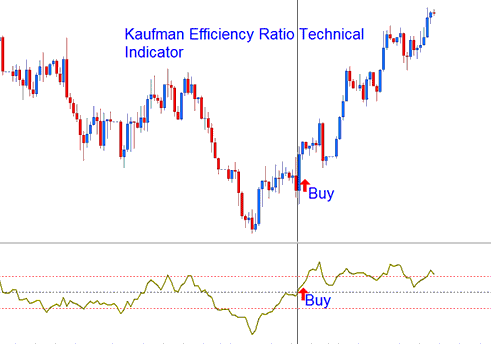
Buy Trading Signal
Bearish/Sell Trading Signal
Efficiency Ratio values below -30 indicate a smoother downtrend.
Sell Signal is generated below zero center-line mark.
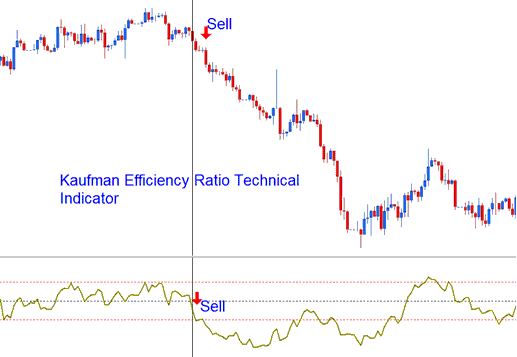
Sell Trading Signal
However, it is good you experiment with other values to determine the most appropriate levels for the cfds pair being traded and the value that is the best for your CFDs trading technique that you are using.




