How to Add Commodity Channel Index Indicator in MT4 Charts - Adding MT4 CCI Indicator
Step 1: Open Navigator Window Panel on CFDs Trading Software
Open Navigator window panel as illustrated below: Navigate to 'View' menu (click on it), then select 'Navigator' window panel (click), or From Standard Toolbar click the 'Navigator' button key or press keyboard shortcut key 'Ctrl+N'
On Navigator window, choose 'Technical Indicators', (Double-Click)
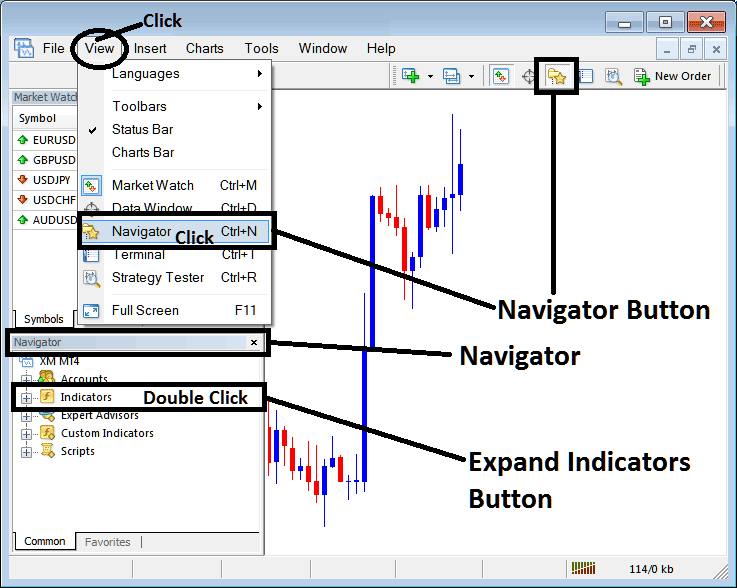
How to Add Commodity Channel Index - CCI Indicator in MT4 - MT4 Commodity Channel Index - CCI Technical Indicator
Step 2: Expand the Indicators Menu on the Navigator - Adding Commodity Channel Index - CCI MT4 Indicator
Expand the menu by clicking the expand button marker (+) or double click the 'indicators' menu, after this the button will appear as (-) and will now display a list as shown below - select the Commodity Channel Index - CCI cfds chart indicator from this list of cfds indicators so as to add the Commodity Channel Index - CCI indicator on the cfd chart.
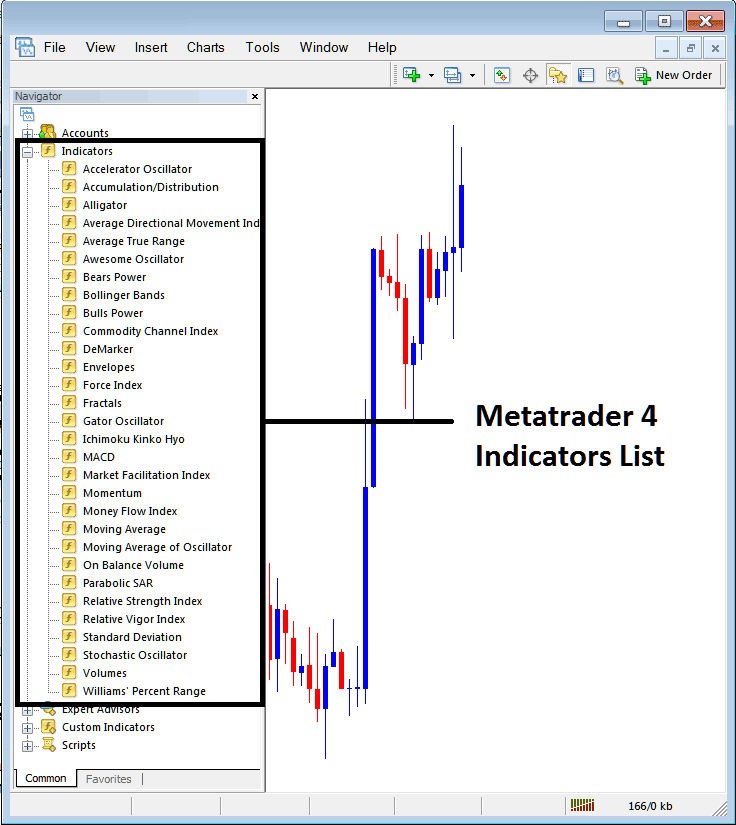
How to Add Commodity Channel Index - CCI CFDs Indicator - From the Above window you can then place Commodity Channel Index - CCI indicator that you want on the CFDs chart
How to Add Custom Commodity Channel Index - CCI Indicator to MT4
If the technical indicator you want to add is a custom indicator - for example if the Commodity Channel Index - CCI technical indicator you want to add is a custom indicator you will need to first add this custom Commodity Channel Index - CCI indicator on the MetaTrader 4 software & then compile the custom Commodity Channel Index - CCI indicator so that the newly added Commodity Channel Index - CCI custom indicator pops up on the list of custom indicators in MetaTrader 4 software.
To learn how to install Commodity Channel Index - CCI indicators on MT4, how to add Commodity Channel Index - CCI indicator window to MT4 and how to add Commodity Channel Index - CCI custom indicator in MT4 - How to add a custom Commodity Channel Index - CCI indicator in MetaTrader 4.
About CCI Technical Indicator Explained
Commodity Channel Index (CCI) Technical Analysis & CCI Trading Signals
Developed by Donald Lambert
Commodity Channel Index measures the variation of a commodity price from its statistical mean/statistical average.
This indicator is an oscillator which oscillates between high levels & low levels
When the CCI is high it shows that price is unusually high compared to the its average.
When the CCI is low it shows that price is unusually low compared to the its average.
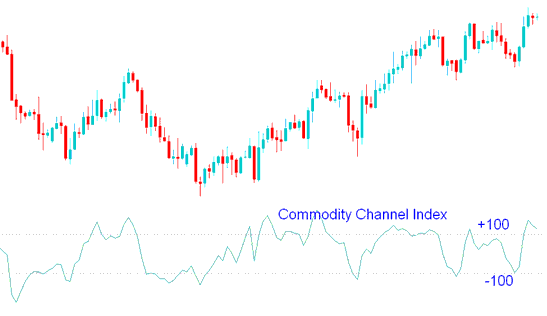
CFD Technical Analysis and Generating Trading Signals
Overbought/ Oversold Levels
The CCI typically oscillates between ±100.
Indicator values above +100 indicate an overbought conditions & an impending market correction.
Indicator values below -100 indicate an oversold conditions & an impending market correction
Buy Trading Signal
If the Commodity Channel Index indicator is over-sold, levels below -100, then there is a pending market correction.
The over-sold levels will remain intact until Commodity Channel Index indicator starts to move above -100.
When price starts moving above -100 then that is interpreted as a buy.
The Commodity Channel buy trading signal should be combined with a trend-line break signal to confirm the buy.
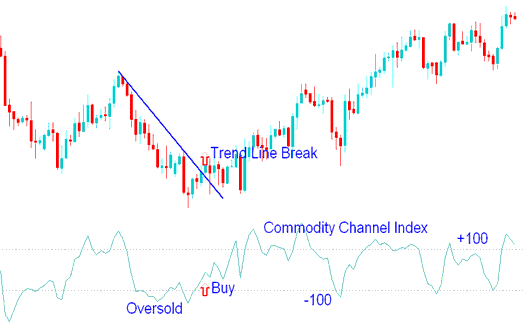
Buy Trade
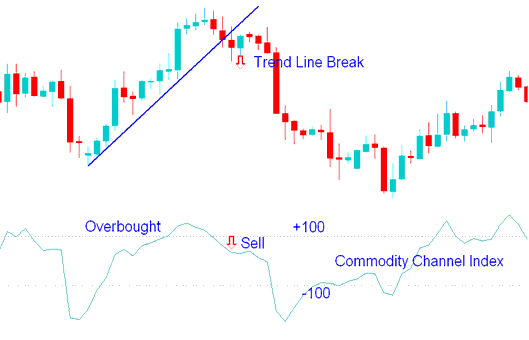
Sell Trading Signal
If the Commodity Channel Index is overbought, zones above +100, then there is a pending market correction.
Overbought levels will remain intact until Commodities Channel Index trading indicator starts to move below +100.
When price starts moving below +100 then that is a interpreted as sell.
This Commodity Channel sell trading signal should be combined with a trend-line break signal to confirm the sell.
Sell Trade
CFD Trading Divergence CFDs Trading
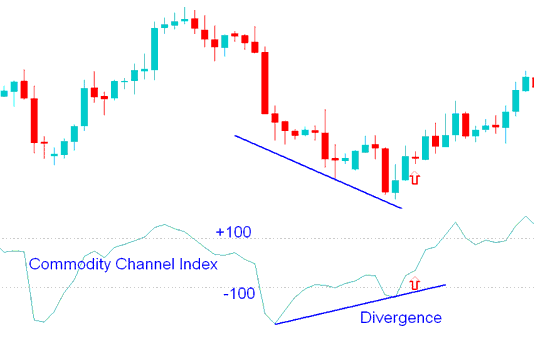
Bullish CFD Trading Divergence Setup
Bullish divergence forms when price is making new lows while the Commodities Channel Index technical indicator is failing to surpass its previous low.
This is a bullish trading signal because the divergence will be followed by an upwards market correction.
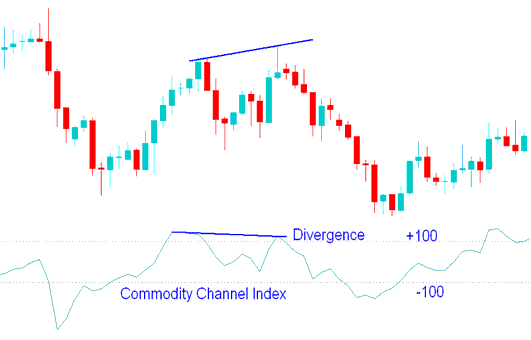
Bearish CFDs Trading Divergence Setup
Bearish Divergence occurs when price is making new highs while the CCI technical indicator is failing to surpass its previous high.
This is a bearish trading signal because the divergence will be followed by a downwards market correction.
Technical Analysis in CFD Trading




