How to Add Ehlers Fisher Transform Indicator in MT4 Charts
Step 1: Open Navigator Window on CFD Trading Software
Open Navigator panel as shown and illustrated below: Navigate to "View" menu (click on it), then select "Navigator" window (click), or From Standard Toolbar click the "Navigator" button or press key-board short-cut keys "Ctrl+N"
On Navigator window, select 'Technical Indicators', (Double-Click)
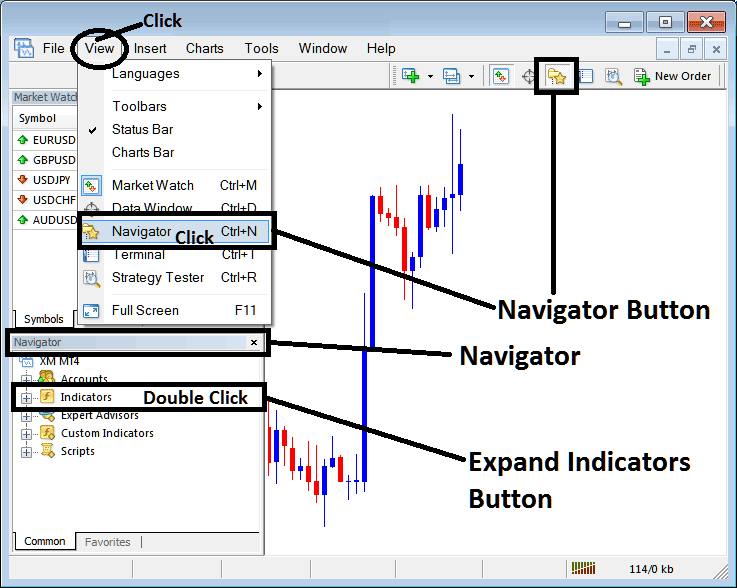
How to Add Ehlers Fisher Transform Indicator in MT4 - MT4 Ehlers Fisher Transform Technical Indicator
Step 2: Expand the Indicators Menu on the Navigator - Adding Ehlers Fisher Transform MT4 Indicator
Expand the menu by clicking the expand button marker (+) or double click the "indicators" menu, after this the button will appear as (-) and will now display a list as shown below - select the Ehlers Fisher Transform cfds chart indicator from this list of cfds indicators so as to add the Ehlers Fisher Transform indicator on the cfd trading chart.
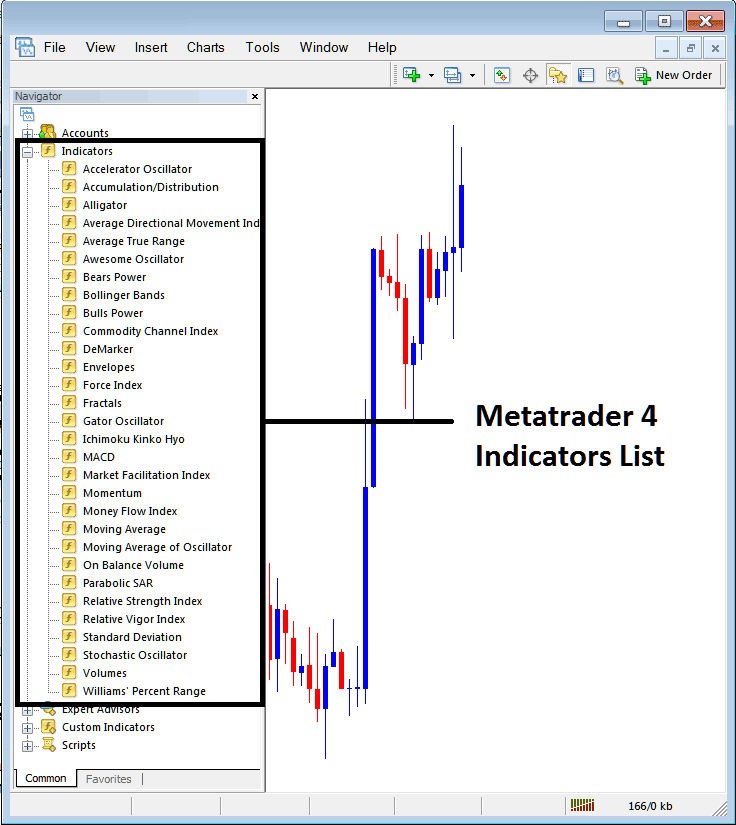
How to Add Ehlers Fisher Transform Indicator - From the Above window you can then place Ehlers Fisher Transform indicator that you want on the CFDs chart
How to Add Custom Ehlers Fisher Transform Indicator to MT4
If the technical indicator you want to add is a custom indicator - for example if the Ehlers Fisher Transform technical indicator you want to add is a custom indicator you will need to first add this custom Ehlers Fisher Transform indicator on the MT4 software & then compile the custom Ehlers Fisher Transform indicator so that the newly added Ehlers Fisher Transform custom indicator appears on the list of custom indicators on the MT4 platform.
To learn how to install Ehlers Fisher Transform indicators on MT4, how to add Ehlers Fisher Transform indicator window to MT4 and how to add Ehlers Fisher Transform custom indicator on MetaTrader 4 - How to add a custom Ehlers Fisher Transform indicator in MT4.
About Ehlers Fisher Transform Technical Indicator Explained
Ehlers Fisher Transform CFDs Technical Analysis Trading Signals
Developed by John Ehlers,
Originally used to trade Stocks and Commodities Market.
Ehlers Fisher Transform has 2 lines, the Fisher Transform line & the signal line: signals are generated when there is a crossover of these two lines which looks like the stochastic oscillator.
It was designed to define major price reversals using the rapid response time and sharp, distinct turning points making it a leading indicator.
This indicator is based on the assumption that prices do not have a Gaussian probability density function (bell shaped curved movement), but that by normalizing price and applying the Fisher Transform you can create a nearly Gaussian probability density function on the lines drawn.
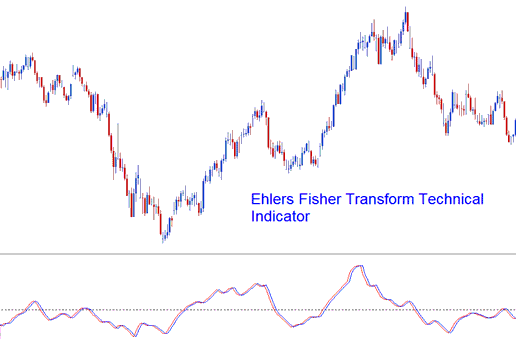
Ehlers Fisher Transform
CFDs Technical Analysis and How to Generate Trading Signals
Trading signals can be generated with pin-point accuracy by using the cross over points of the Fisher Transform & its signal line.
However, this Ehlers Fisher Transform is not very accurate, as with all leading technical indicators, it gives many false signals & it is prone to whipsaws, it's therefore recommended to trade it in combination with other indicators.




