How to Add DeMark Range Expansion Index Indicator in MT4 Charts
Step 1: Open Navigator Window on CFD Trading Software
Open Navigator panel as shown and illustrated below: Navigate to "View" menu (click on it), then select "Navigator" window (click), or From Standard Toolbar click the "Navigator" button or press key-board short-cut keys "Ctrl+N"
On Navigator window, select 'Technical Indicators', (Double-Click)
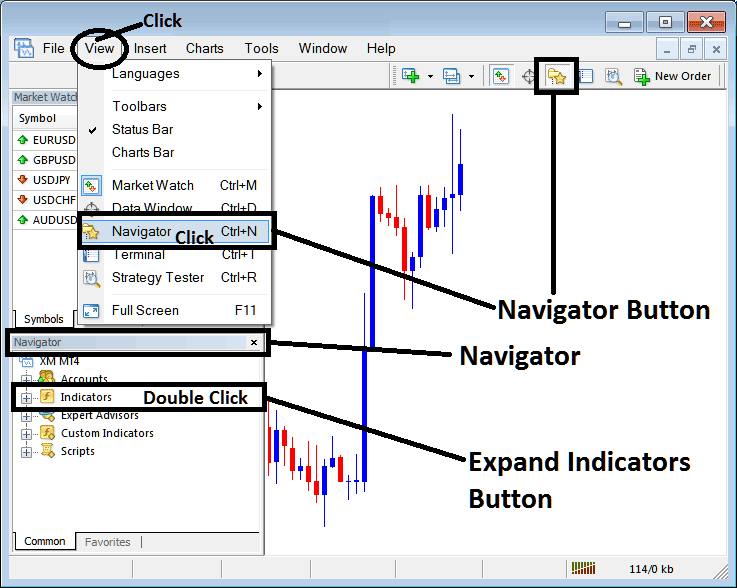
How to Add DeMark Range Expansion Index Indicator in MT4 - MT4 DeMark Range Expansion Index Technical Indicator
Step 2: Expand the Indicators Menu on the Navigator - Adding DeMark Range Expansion Index MT4 Indicator
Expand the menu by clicking the expand button marker (+) or double click the "indicators" menu, after this the button will appear as (-) and will now display a list as shown below - select the DeMark Range Expansion Index cfds chart indicator from this list of cfds indicators so as to add the DeMark Range Expansion Index indicator on the cfd trading chart.
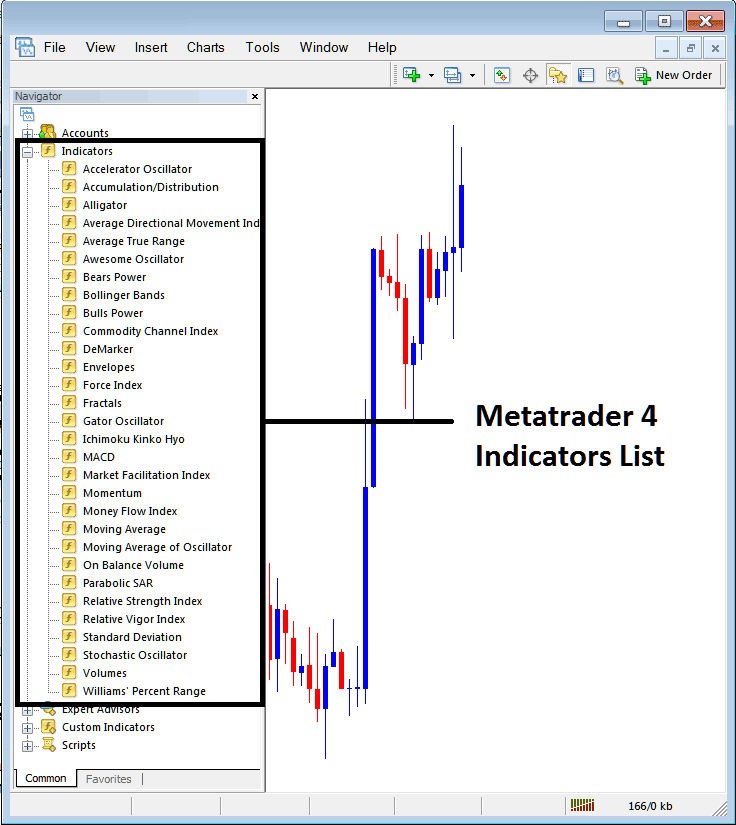
How to Add DeMark Range Expansion Index Indicator - From the Above window you can then place DeMark Range Expansion Index indicator that you want on the CFDs chart
How to Add Custom DeMark Range Expansion Index Indicator to MT4
If the technical indicator you want to add is a custom indicator - for example if the DeMark Range Expansion Index technical indicator you want to add is a custom indicator you will need to first add this custom DeMark Range Expansion Index indicator on the MT4 software & then compile the custom DeMark Range Expansion Index indicator so that the newly added DeMark Range Expansion Index custom indicator appears on the list of custom indicators on the MT4 platform.
To learn how to install DeMark Range Expansion Index indicators on MT4, how to add DeMark Range Expansion Index indicator window to MT4 and how to add DeMark Range Expansion Index custom indicator on MetaTrader 4 - How to add a custom DeMark Range Expansion Index indicator in MT4.
About DeMarks Technical Indicator Explained
DeMarks Technical Analysis and Range Expansion Index Trading Signals
Developed by Tom DeMark.
DeMark used the Range Expansion Index trading indicator to trade options, in his trading strategy. This indicator is an oscillator.
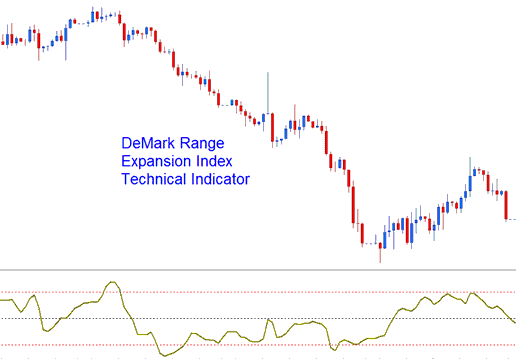
DeMark Range Expansion Index
This Oscillator is used as a market-timing oscillator which attempts to overcome problems with exponentially calculated oscillators, which are calculated arithmetically & these indicators tend to lag the market.
CFDs Technical Analysis and How to Generate Trading Signals
This Oscillator typically oscillates between the values of -100 to +100.
Over-bought Zones - Readings of +45 or higher indicates over bought conditions.
Over-sold Zones - Readings of -45 or lower indicates oversold conditions.
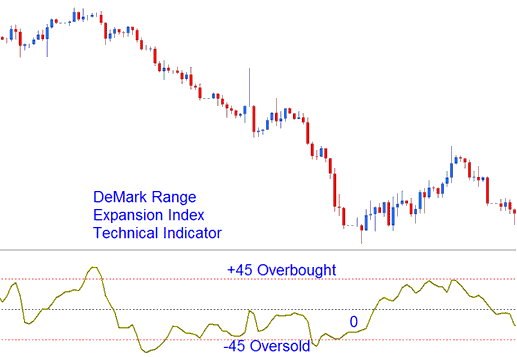
Overbought and Oversold Levels on Technical Indicator
Exit Trading Signals - DeMark advises against trading in extreme overbought conditions indicated by six bars above +45, exit for buy signals is generated six bars after price hits +45.
Exit Trading Signals - extreme oversold conditions indicated by six or more bars below the -45 thresholds will generate exit signal for short trades.




