How to Add Bollinger Bands Fibonacci Ratios Indicator in MT4 Charts
Step 1: Open Navigator Window on CFDs Trading Software
Open Navigator panel as shown and illustrated below: Navigate to "View" menu (click on it), then select "Navigator" window (click), or From Standard Toolbar click the "Navigator" button or press key-board short-cut keys "Ctrl+N"
On Navigator window, select 'Technical Indicators', (Double-Click)
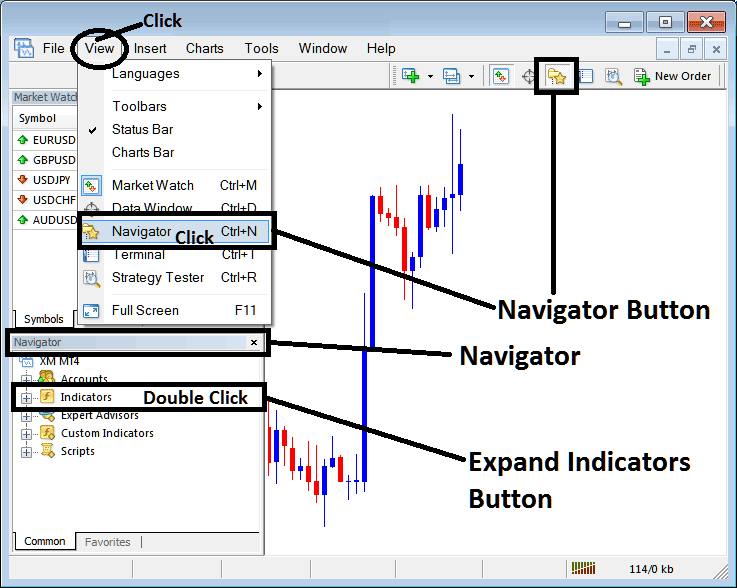
How to Add Bollinger Bands - Fibonacci Ratios Indicator in MT4 - MT4 Bollinger Bands - Fibonacci Ratios Technical Indicator
Step 2: Expand the Indicators Menu on the Navigator - Adding Bollinger Bands - Fibonacci Ratios MT4 Indicator
Expand the menu by clicking the expand button marker (+) or double click the "indicators" menu, after this the button will appear as (-) and will now display a list as shown below - select the Bollinger Bands - Fibonacci Ratios cfds chart indicator from this list of cfds indicators so as to add the Bollinger Bands - Fibonacci Ratios cfds indicator on the cfd trading chart.
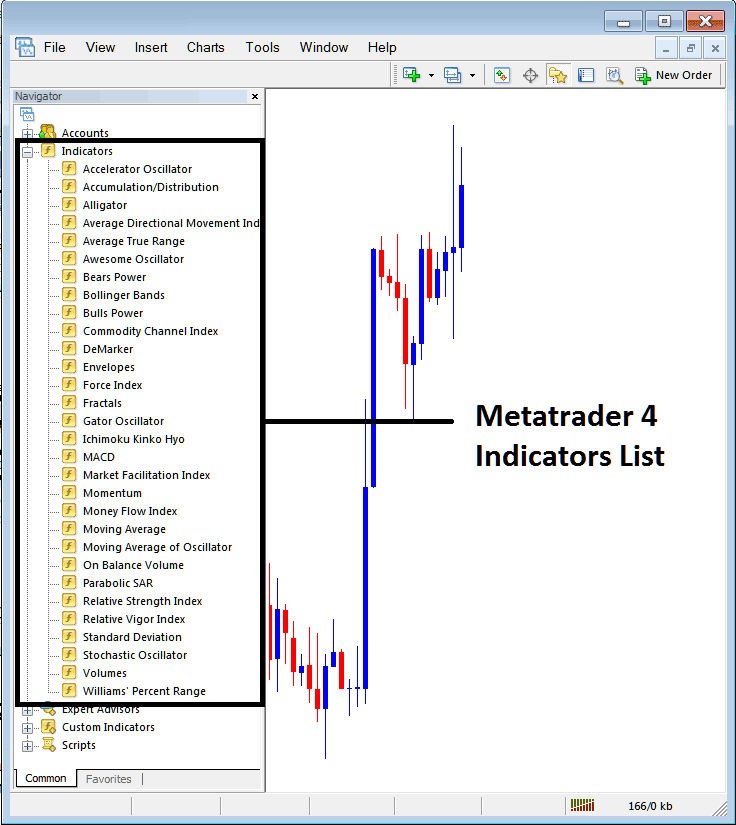
How to Add Bollinger Bands - From the Above window you can then place Bollinger Bands - Fibonacci Ratios indicator that you want on the CFDs chart
How to Add Custom Bollinger Band - Fibonacci Ratios Indicators to MT4
If the technical indicator you want to add is a custom indicator - for example if the Bollinger Bands - Fibonacci Ratios technical indicator you want to add is a custom indicator you will need to first add this custom Bollinger Bands - Fibonacci Ratios indicator on the MT4 software & then compile the custom Bollinger Bands - Fibonacci Ratios indicator so that the newly added Bollinger Bands - Fibonacci Ratios custom indicator appears on the list of custom indicators on the MT4 platform.
To learn how to install Bollinger Bands - Fibonacci Ratios indicators on MT4, how to add Bollinger Bands - Fibonacci Ratios indicator window to MT4 and how to add Bollinger Bands - Fibonacci Ratios custom indicator on MetaTrader 4 - How to add a custom Bollinger Band - Fibonacci Ratios cfd indicator in MT4.
About Bollinger Bands - Fibonacci Ratios Technical Indicator Tutorial PDF
Bollinger Bands - Fibonacci Ratios Technical Analysis and Trading Signals
Derived from the original Bollinger bands.
The Bollinger Fibonacci ratios is a volatility based indicators but it does not use the standard deviations to calculate the width of the bands instead it uses a smoothed ATR that are multiplied with Fibo ratios of 1.618, 2.618, & 4.236.
The smoothed lines that are multiplied with Fibonacci ratios are then added or subtracted from the moving average.
This forms 3 upper Fibo bands and Three lower Fibo bands
The middle band forms the basis of the trend.
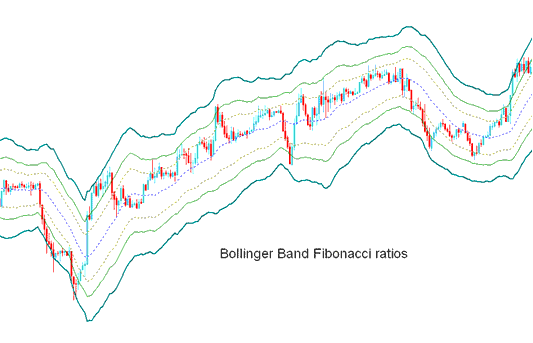
CFD Technical Analysis & Generating Trading Signals
This indicator used to determine point of support and resistance for a cfds pair.
Lines below represent support points while those above are resistance zones.
The outermost bands provide the strongest resistance/support.
Inner most bands provide least support/resistance.
The innermost band represents Fibo 38.2% retracement level
The second band represents Fibonacci 50% retracement level
The outermost band represents Fibonacci 61.80% retracement level
The Indicator is used to determine points where price might reverse. (Price Pullback Levels)
When price hits one of the lines and reverses then an entry or exit signal is generated.
However, it's always good to combine the signal with other confirmation indicators such as the moving average to confirm the signal as displayed below.
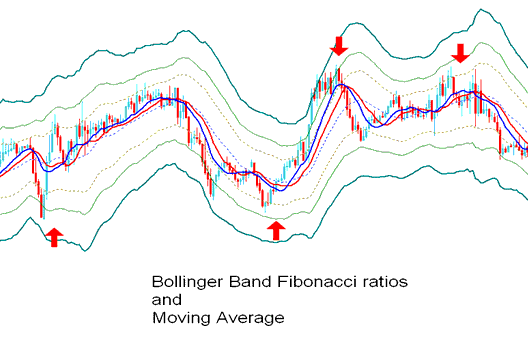
Technical Analysis in CFD Trading




