How to Add Stochastic Momentum Index Indicator in MT4 Charts - Adding MT4 SMI Indicator
Step 1: Open Navigator Window on CFDs Trading Software
Open Navigator panel as shown and illustrated below: Navigate to "View" menu (click on it), then select "Navigator" window (click), or From Standard Toolbar click the "Navigator" button or press key-board short-cut keys "Ctrl+N"
On Navigator window, select 'Technical Indicators', (Double-Click)
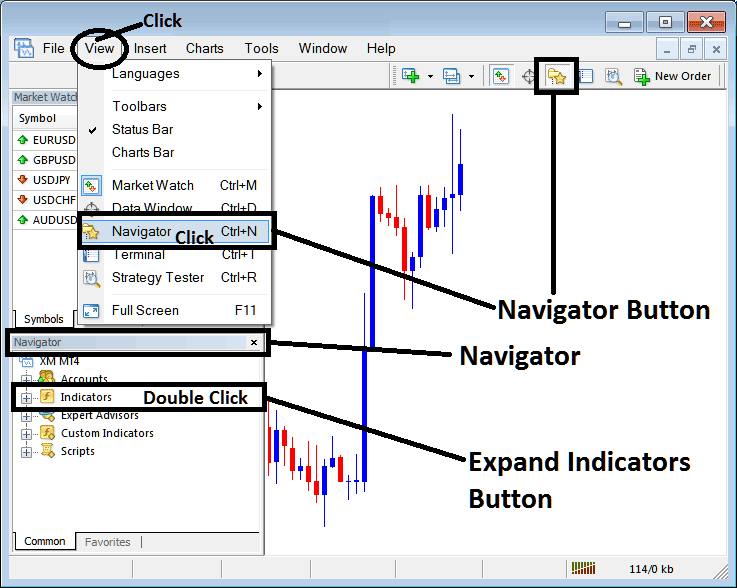
How to Add Stochastic Momentum Index Indicator in MT4 - MT4 Stochastic Momentum Index Technical Indicator
Step 2: Expand the Indicators Menu on the Navigator - Adding Stochastic Momentum Index MT4 Indicator
Expand the menu by clicking the expand button marker (+) or double click the "indicators" menu, after this the button will appear as (-) and will now display a list as shown below - select the Stochastic Momentum Index cfds chart indicator from this list of cfds indicators so as to add the Stochastic Momentum Index indicator on the cfd trading chart.
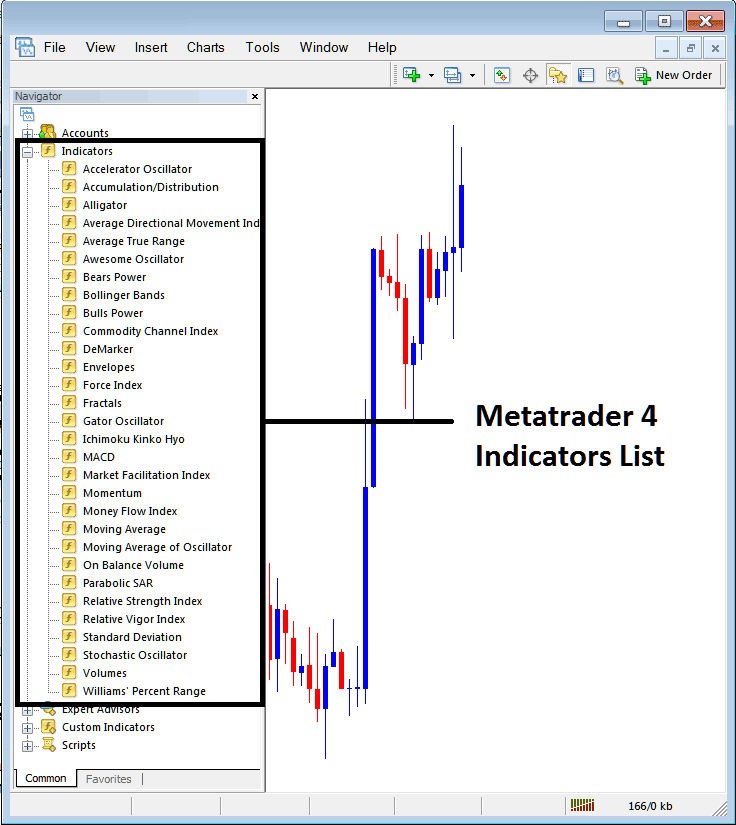
How to Add Stochastic Momentum Index Indicator - From the Above window you can then place Stochastic Momentum Index indicator that you want on the CFDs chart
How to Add Custom Stochastic Momentum Index Indicator to MT4
If the technical indicator you want to add is a custom indicator - for example if the Stochastic Momentum Index technical indicator you want to add is a custom indicator you will need to first add this custom Stochastic Momentum Index indicator on the MT4 software & then compile the custom Stochastic Momentum Index indicator so that the newly added Stochastic Momentum Index custom indicator appears on the list of custom indicators on the MT4 platform.
To learn how to install Stochastic Momentum Index indicators on MT4, how to add Stochastic Momentum Index indicator window to MT4 and how to add Stochastic Momentum Index custom indicator on MetaTrader 4 - How to add a custom Stochastic Momentum Index indicator in MT4.
About Stochastic Momentum Index Technical Indicator Tutorial PDF
Stochastic Momentum Index CFDs Technical Analysis Trading Signals
Developed by William Blau.
The Stochastic Momentum Index, SMI indicator is an adaptation of the classic Stochastic Oscillator indicator which smoothes out the stochastic oscillations.
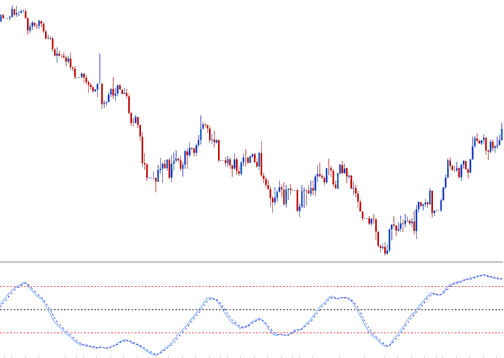
Construction of Stochastic Momentum Index Technical Indicator
This indicator is calculated by comparing the cfd price relative to the average of an n number of periods.
Then instead of plotting these values directly, smoothing using an Exponential Moving Average is applied and then the values plotted to form the SMI.
When the closing price is greater than the average of the range, the SMI will move up.
When the closing price is less than the average of the range, the SMI will move downwards.
This oscillator ranges between the values of +100 & -100, this indicator is also less prone to whipsaws compared to the stochastic oscillator.
CFDs Technical Analysis and How to Generate Trading Signals
Buy & Sell CFD Trading Signals/ CFD Crossover Trading Signals
The Stochastic Momentum Index can be used to generate buy & sell signals using the technique shown below, Buy when the SMI is heading upward & sell when its moving downwards.
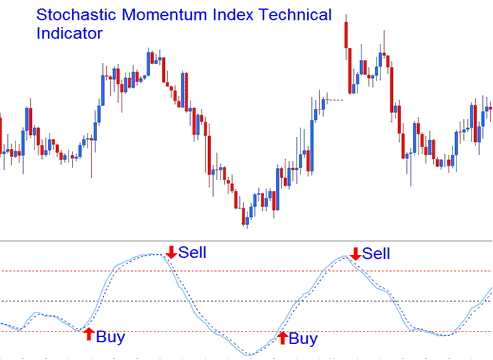
Buy & Sell CFD Trading Signals/ CFD Crossover Trading Signals
Overbought/Oversold Level CFD Trading Crossovers
- Overbought levels above +40
- Oversold levels below -40
Buy trading signal is generated when this oscillator falls below over-sold level & then rises above this level and starts to move upward.
Sell Signal is generated when this oscillator rises above overbought level and then falls below this level and starts to move downwards.
CFDs Trading Divergence CFD Trading
The example below shows a bearish classic divergence between the price and the SMI. When the Stochastic Momentum Index showed this divergence the price trend reversed and started to move in a downward direction.
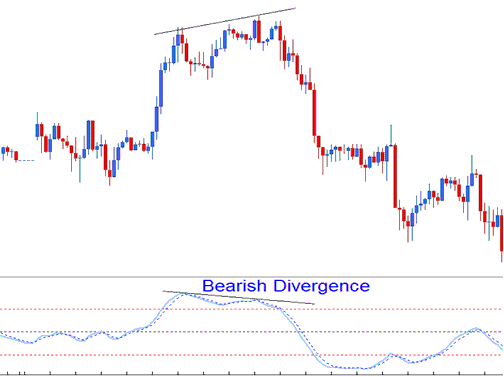
Bearish CFDs Trading Divergence




