How to Add Accumulation/Distribution Indicator in MT4 Charts
Step 1: Open Navigator Window Panel on CFD Trading Software
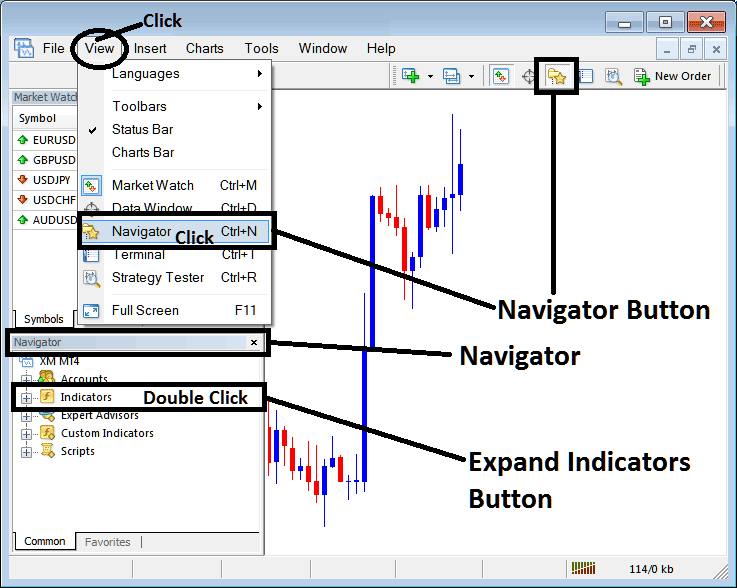
Open Navigator window panel as illustrated below: Navigate to 'View' menu (click on it), then select 'Navigator' window panel (click), or From Standard Toolbar click the 'Navigator' button key or press keyboard shortcut key 'Ctrl+N'
On Navigator window, choose 'Technical Indicators', (Double-Click)
How to Add Accumulation/Distribution Indicator in MT4 - MT4 Accumulation/Distribution Technical Indicator
Step 2: Expand the Indicators Menu on the Navigator - Adding Accumulation/Distribution MT4 Indicator
Expand the menu by clicking the expand button marker (+) or double click the 'indicators' menu, after this the button will appear as (-) and will now display a list as shown below - select the Accumulation/Distribution cfds chart indicator from this list of cfds indicators so as to add the Accumulation/Distribution indicator on the cfd chart.
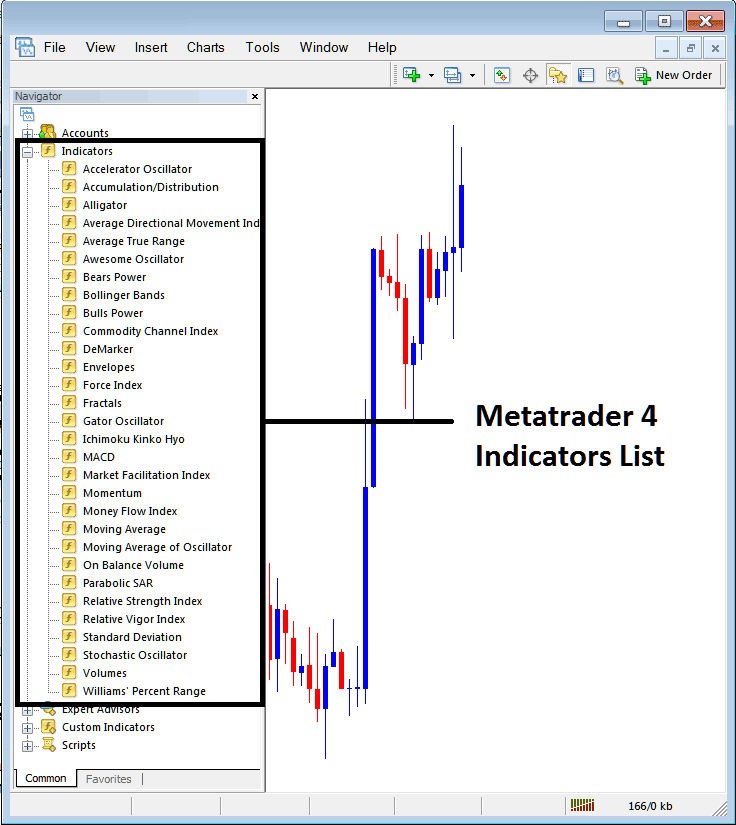
How to Add Accumulation/Distribution Indicator - From the Above window you can then place Accumulation/Distribution indicator that you want on the CFDs chart
How to Add Custom Accumulation/Distribution Indicator to MT4
If the technical indicator you want to add is a custom indicator - for example if the Accumulation/Distribution technical indicator you want to add is a custom indicator you will need to first add this custom Accumulation/Distribution indicator on the MetaTrader 4 software & then compile the custom Accumulation/Distribution indicator so that the newly added Accumulation/Distribution custom indicator pops up on the list of custom indicators in MetaTrader 4 software.
To learn how to install Accumulation/Distribution indicators on MT4, how to add Accumulation/Distribution indicator window to MT4 and how to add Accumulation/Distribution custom indicator in MT4 - How to add a custom Accumulation/Distribution indicator in MT4.
About Accumulation/Distribution Technical Indicator Tutorial PDF
Accumulation/Distribution CFDs Technical Analysis Trading Signals
Developed by Marc Chaikin
This indicator is used to assess the cumulative flow of money into and out of a CFDs cfds pair.
Originally used for stocks trading, when it comes to stocks trading "volume" is the amount of shares traded in a particular stock, this volume is a direct reflection of the money that is coming into and out of a stock.
The basic principle behind AD is that volume(or money flow) is a leading indicator of the price. (Volume precedes price).
When it comes to the cfds market-CFDs, there is no central exchange for CFDs trades as compared to stock trades where there is a central exchange for stocks, for example the NYSE- New York stock exchange.
Since there is no true measure of volume (actual money) that is flowing into and out of a cfds market, CFDs brokers have come up with a substitute for the actual money volume, this substitute is known as "tick volume".
Tick volume is the measure of price changes (ticks) received by a broker during a particular trading period/interval. The tick volume is incorporated by many CFDs brokers in their charting software.
Interpretation
This volume indicator is used to determine if volume is increasing or decreasing as the price of a cfds pair is rising or falling.
UpCFDs Trading Trend
If the price of a cfds pair is rising then the Accumulation/Distribution should also be rising. This shows that the price move is being supported by volumes and the move upwards has strength and is sustainable.
If on the other hand price is moving up and the volumes are not, the strength behind the move is reducing; this creates divergence between price and indicator and warns of a possible move in opposite direction.
DownCFD Trading Trend
If the price of a cfds pair is falling then the AD should also be falling. This shows that the price move is being supported by volumes and the move downwards has strength behind it.
If on the other hand price is moving down and the volumes are not, the strength behind the move is reducing; this creates divergence between price and AD and warns of a possible move in opposite direction.
CFDs Technical Analysis and Generating Trading Signals
Below is an example of a chart and the technical analysis explanation
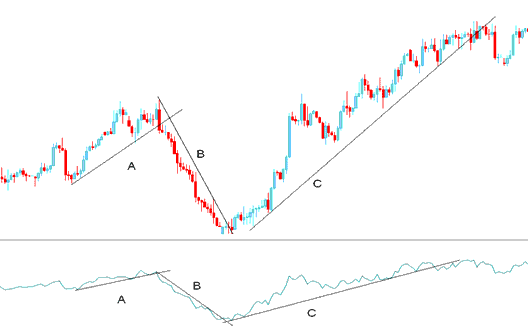
From the chart above we can separate the chart into 3 parts, part A, B and C.
A - Upward trendline on chart as well as on the Accumulation/Distribution
B - Downward trendline on chart as well as on the Accumulation/Distribution
C - Upward trendline on chart as well as on the Accumulation/Distribution
As long as the price and the indicator are moving in the same direction then the price move has enough momentum to continue moving in that direction as shown above
CFDs Trend-Line Break
From the above chart we can see that once the trend line on the AD was broken then the price trend line was also broken.
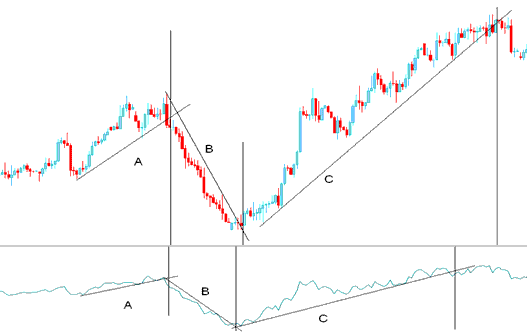
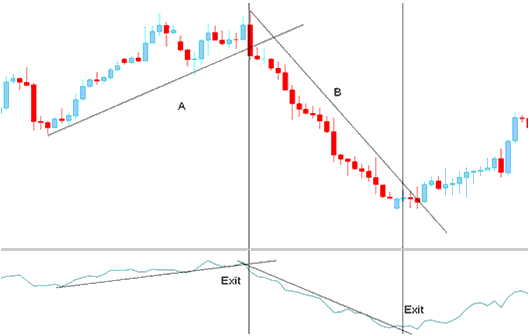
Looking at the chart below we have added vertical lines to represent the points where the trend lines were broken, both on the price chart and the indicator.
Comparing the trend lines on the indicator and the price those of the AD were broken before those of the chart. This is because volume always precedes price.
Trading Signals
Exit
Exit trading signals are generated when the trend line on the Accumulation/Distribution is broken. A trend-line break on the indicator warns of a possible reversal.
Entry
Once the trend line on the AD is broken it warns of a possible reversal in the direction of the market.
However if we want to take a trade in the opposite direction it is always best to wait for a confirmation signal.
A confirmation signal is considered complete once both the indicator and the price breaks both their trend lines.
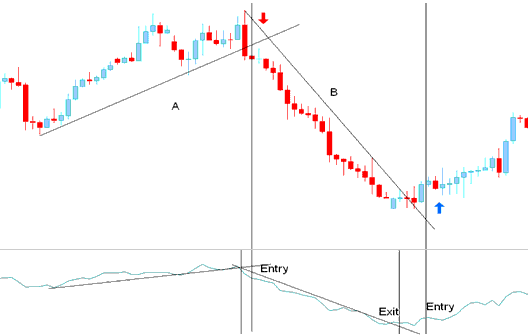
Entry Signal Generated by Trend Reversal




