How to Add Choppiness Index Indicator on MT4 Charts - Adding MT4 Choppiness Index Indicator
Step 1: Open Navigator Window on CFDs Trading Software
Open Navigator panel as shown and illustrated below: Navigate to "View" menu (click on it), then select "Navigator" window (click), or From Standard Toolbar click the "Navigator" button or press key-board short-cut keys "Ctrl+N"
On Navigator window, select 'Technical Indicators', (Double-Click)
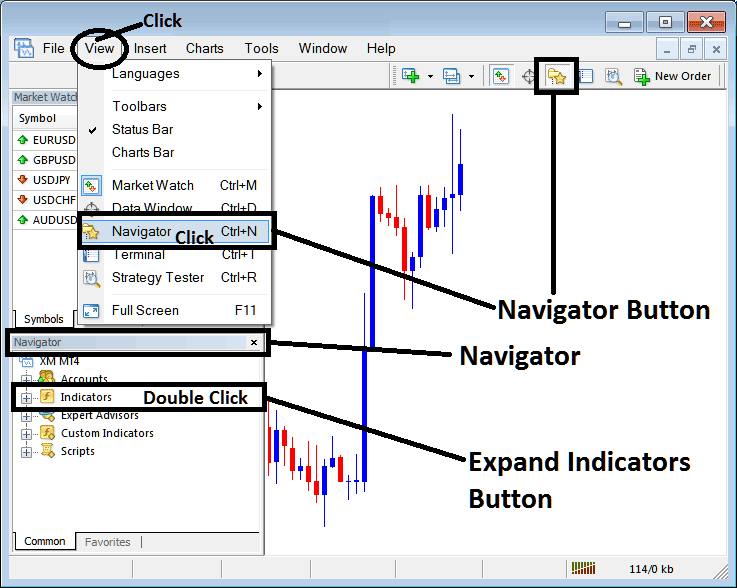
How to Add Choppiness Index Indicator in MT4 - MT4 Choppiness Index Technical Indicator
Step 2: Expand the Indicators Menu on the Navigator - Adding Choppiness Index MT4 Indicator
Expand the menu by clicking the expand button marker (+) or double click the "indicators" menu, after this the button will appear as (-) and will now display a list as shown below - select the Choppiness Index cfds chart indicator from this list of cfds indicators so as to add the Choppiness Index indicator on the cfd trading chart.
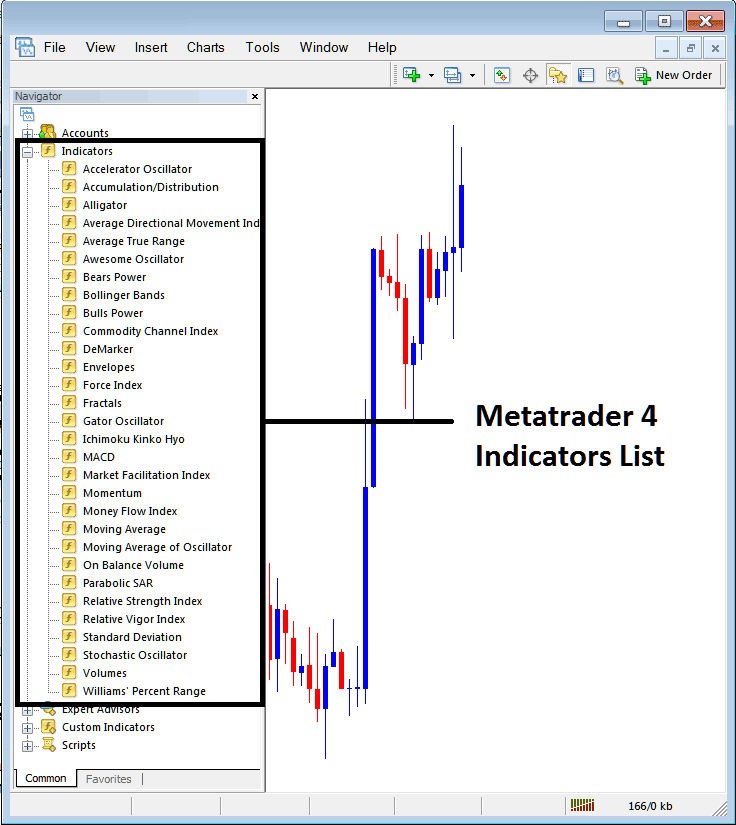
How to Add Choppiness Index Indicator - From the Above window you can then place Choppiness Index indicator that you want on the CFDs chart
How to Add Custom Choppiness Index Indicator to MT4
If the technical indicator you want to add is a custom indicator - for example if the Choppiness Index technical indicator you want to add is a custom indicator you will need to first add this custom Choppiness Index indicator on the MT4 software & then compile the custom Choppiness Index indicator so that the newly added Choppiness Index custom indicator appears on the list of custom indicators on the MT4 platform.
To learn how to install Choppiness Index indicators on MT4, how to add Choppiness Index indicator window to MT4 and how to add Choppiness Index custom indicator on MetaTrader 4 - How to add a custom Choppiness Index indicator in MT4.
About Choppiness Index Technical Indicator Guide
Choppiness Index Technical Analysis and Choppiness Index Trading Signals
Developed by E.W. Dreiss
Choppiness Index was designed to be an easy but practical indicator to help CFDs traders to determine if the cfd prices are trending or consolidating.
This Indicator is similar to ADX which is also designed to evaluate the strength or momentum of a trend and determine if the market is trending or consolidating.
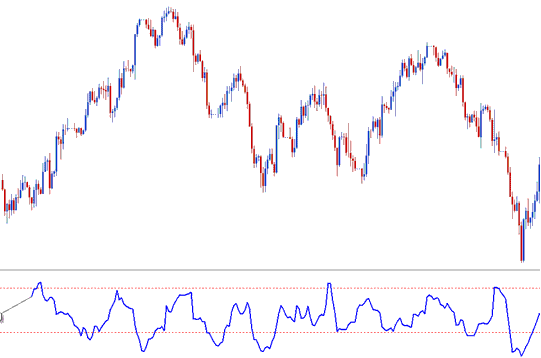
The Choppiness Index uses a scale of between 0 and 100. It also typically uses upper & lower bands at 61.8 & 38.2 respectively.
This indicator is plotted by first calculating the true range for each period and then adding the values of n-periods.
Second, it calculates the highest value & lowest value over n-periods & calculates their difference.
Third, it divides the sum of the true ranges & calculates the base-10 logarithm of this value.
Finally, it divides this value by the base-10 logarithm of n-periods & multiplies the results by 100.
CFD Technical Analysis and How to Generate Trading Signals
Choppiness Index is a directionless indicator meaning it does not determine in which direction the cfds market is moving.
Its basic principle is that the more heavily the market is trending over the last number of n-periods the closer to zero the Choppiness Index will be and the more heavily the market is consolidating that is moving sideways in a ranging or chopping manner, over the last n-periods the closer to 100 the Choppiness Index will be.
Indicator values of above 61.8 indicate that the market is ranging/ choppy (moving sideways and consolidating).
Higher values occur during/after a strong consolidation phase. Higher values could also be interpreted as a signal of a potential upcoming breakout after a significant consolidation has occurred.
Choppiness Index values of below 38.2 indicate that the market is trending.
Lower values occur during/after a strong trending phase. Lower values could also be interpreted as a signal of a potential upcoming consolidation & choppiness after a strong trend phase has occurred.




