How to Add DeMark Projected Range Indicator in MT4 Charts
Step 1: Open Navigator Window on CFDs Trading Software
Open Navigator panel as shown and illustrated below: Navigate to "View" menu (click on it), then select "Navigator" window (click), or From Standard Toolbar click the "Navigator" button or press key-board short-cut keys "Ctrl+N"
On Navigator window, select 'Technical Indicators', (Double-Click)
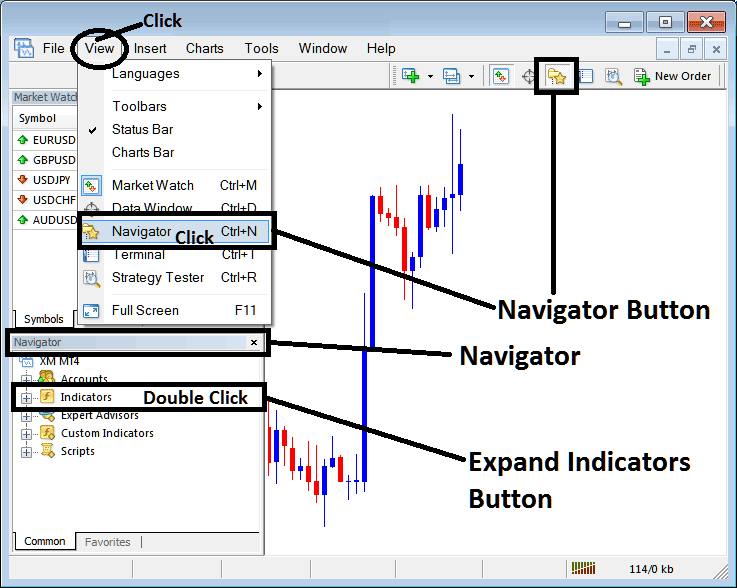
How to Add DeMark Projected Range Indicator in MT4 - MT4 DeMark Projected Range Technical Indicator
Step 2: Expand the Indicators Menu on the Navigator - Adding DeMark Projected Range MT4 Indicator
Expand the menu by clicking the expand button marker (+) or double click the "indicators" menu, after this the button will appear as (-) and will now display a list as shown below - select the DeMark Projected Range cfds chart indicator from this list of cfds indicators so as to add the DeMark Projected Range cfds indicator on the cfd trading chart.
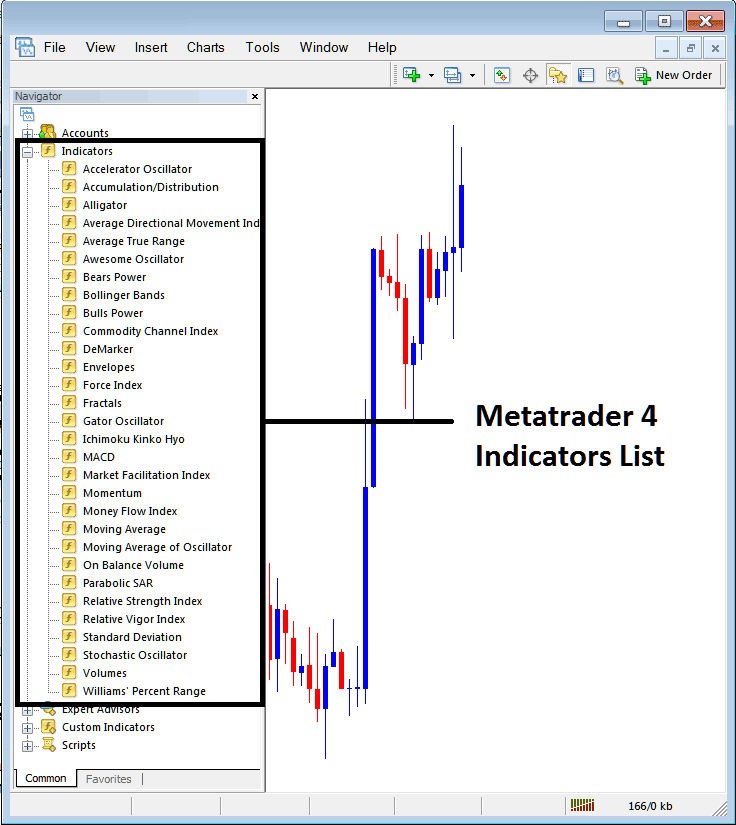
How to Add DeMark Projected Range Indicator - From the Above window you can then place DeMark Projected Range indicator that you want on the CFDs chart
How to Add Custom DeMark Projected Range Indicator to MT4
If the technical indicator you want to add is a custom indicator - for example if the DeMark Projected Range technical indicator you want to add is a custom indicator you will need to first add this custom DeMark Projected Range indicator on the MT4 software & then compile the custom DeMark Projected Range indicator so that the newly added DeMark Projected Range custom indicator appears on the list of custom indicators on the MT4 platform.
To learn how to install DeMark Projected Range indicators on MT4, how to add DeMark Projected Range indicator window to MT4 and how to add DeMark Projected Range custom indicator on MetaTrader 4 - How to add a custom DeMark Projected Range cfd indicator in MT4.
About DeMark Projected Range Technical Indicator Explained
DeMark Projected Range Technical Analysis and DeMark Projected Range Trading Signals
Developed by Tom Demark.
This indicator is used to signal the potential high and low prices that a chart price is likely to reach.
This is referred to as the range projection and it is calculated using the open and the close prices of the most recent price period.

DeMark Projected Range
CFD Technical Analysis and How to Generate Trading Signals
This indicator will show two points, the projected high and the projected low of a specific price period. This will be used as the reference point.
Bullish Uptrend Trading Signal
If the next price bar opens above the projected high then the market will continue in an upwards CFDs trend.
Bearish downtrend Trading Signal
If the next price bar opens below the projected low then the market will continue in a downwards CFDs trend.
Ranging CFDs Market
If the next price bar opens within the projected range, then this is a signal that the market will remain in a range base.




