How to Add Linear Regression Indicator in MT4 Charts
Step 1: Open Navigator Window Panel on CFDs Trading Software
Open Navigator window panel as illustrated below: Navigate to 'View' menu (click on it), then select 'Navigator' window panel (click), or From Standard Toolbar click the 'Navigator' button key or press keyboard shortcut key 'Ctrl+N'
On Navigator window, choose 'Technical Indicators', (Double-Click)
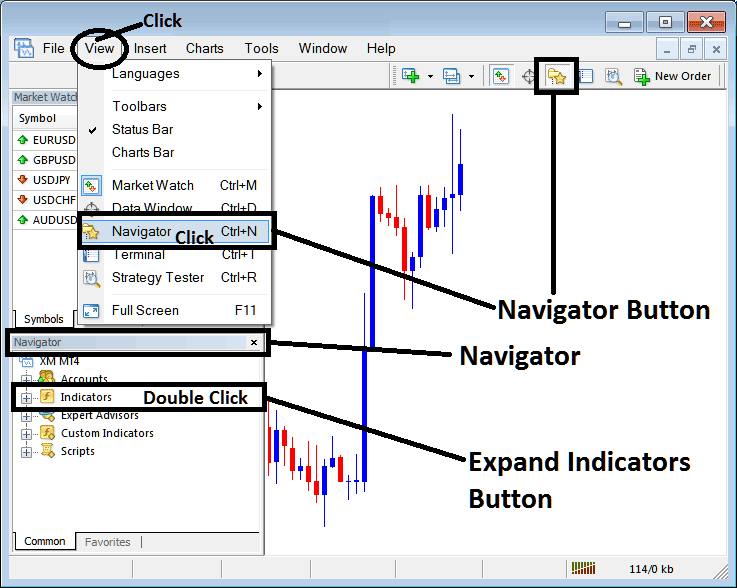
How to Add Linear Regression Indicator in MT4 - MT4 Linear Regression Technical Indicator
Step 2: Expand the Indicators Menu on the Navigator - Adding Linear Regression MT4 Indicator
Expand the menu by clicking the expand button marker (+) or double click the 'indicators' menu, after this the button will appear as (-) and will now display a list as shown below - select the Linear Regression cfds chart indicator from this list of cfds indicators so as to add the Linear Regression indicator on the cfd chart.
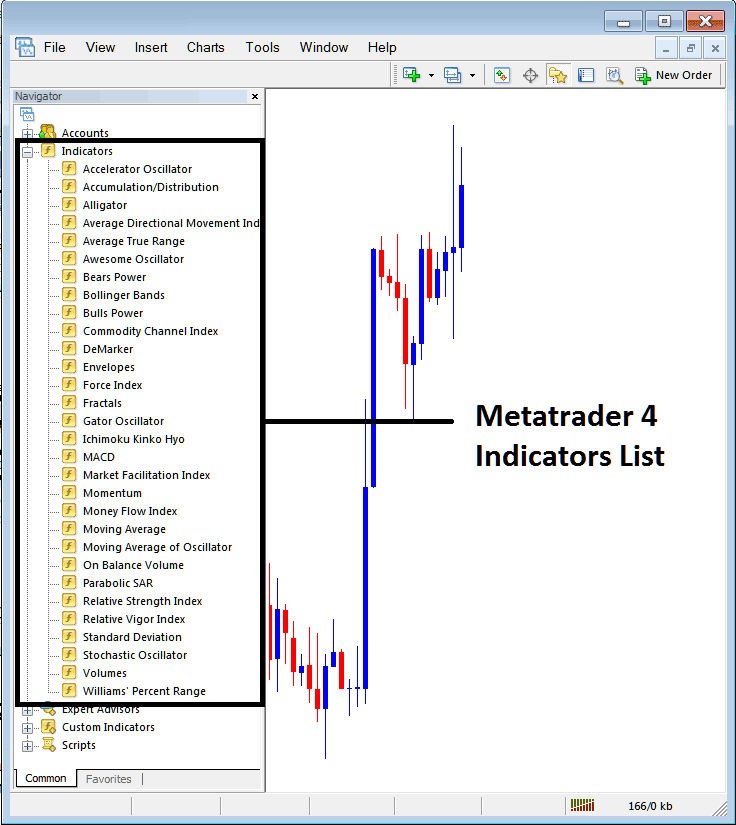
How to Add Linear Regression Indicator - From the Above window you can then place Linear Regression indicator that you want on the CFDs chart
How to Add Custom Linear Regression Indicator to MT4
If the technical indicator you want to add is a custom indicator - for example if the Linear Regression technical indicator you want to add is a custom indicator you will need to first add this custom Linear Regression indicator on the MetaTrader 4 software & then compile the custom Linear Regression indicator so that the newly added Linear Regression custom indicator pops up on the list of custom indicators in MetaTrader 4 software.
To learn how to install Linear Regression indicators on MT4, how to add Linear Regression indicator window to MT4 and how to add Linear Regression custom indicator in MT4 - How to add a custom Linear Regression indicator in MT4.
About Linear Regression Technical Indicator Explained
Linear Regression Technical Analysis and Linear Regression Trading Signals
Another name for a regression line is a line of the best fit/best fit line. This indicator plots the trend of the cfd price over a specified duration of time. The market trend is determined by calculating a Linear Regression Trend Line using the "least squares fit" method. This method helps to minimize the distance between the price data points and the line of best fit.

Unlike the straight Regression Trend-Line technical indicator, the technical indicator plots the end values of multiple Linear Regression trend lines. Any single point along the Linear Regression will be equivalent to the end value of a Regression Trend-line, but resulting trendline looks like the Moving Average.
But unlike the Moving Average, this indicator does not show as much delay since it is fitting a line onto data points rather than averaging them.
The Linear Regression is a prediction of the tomorrow's price plotted today, one day before. When the prices are steadily higher or lower than the forecast price, then a trader can expect them to quickly return to more realistic fore-casted levels.
In other terms, this indicator shows where the chart prices "should" be trading based on a statistical basis & any disproportionate deviation from the regression line is likely to be short-lived.
CFD Technical Analysis and Generating Trading Signals
This indicator allows for price selection, adjusting number of periods and smoothing of price data before applying the calculation and the selection of smoothing type.
This technical indicator looks like a moving average but it has a bi-color representation.
- Bullish Signal (Blue color) - A rising line (greater than its previous value 1 previous bar before) is displayed in the up trend blue color, while
- Bearish Signal (Red color) - a declining line (lower than its previous value 1 previous bar before) is displayed in the down trend red color.
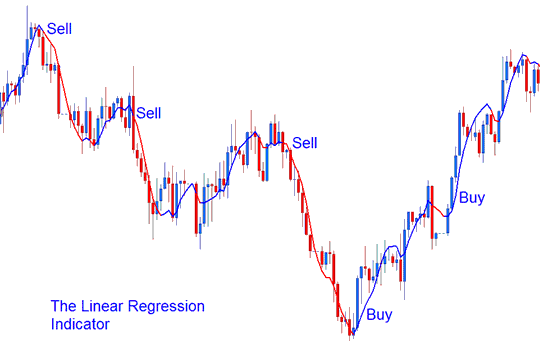
Technical Analysis in CFD Trading




