How to Add Darvas Box Indicator in MT4 Charts
Step 1: Open Navigator Window Panel on CFD Trading Software
Open Navigator window panel as illustrated below: Navigate to 'View' menu (click on it), then select 'Navigator' window panel (click), or From Standard Toolbar click the 'Navigator' button key or press keyboard shortcut key 'Ctrl+N'
On Navigator window, choose 'Technical Indicators', (Double-Click)
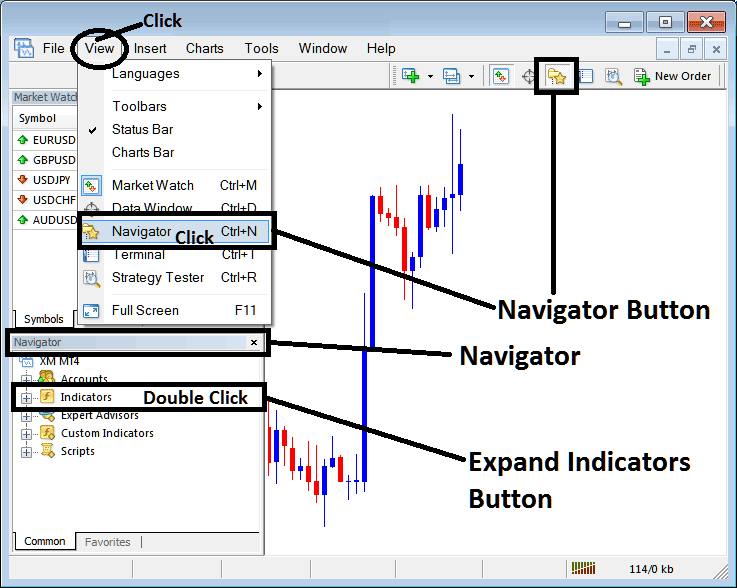
How to Add Darvas Box Indicator in MT4 - MT4 Darvas Box Technical Indicator
Step 2: Expand the Indicators Menu on the Navigator - Adding Darvas Box MT4 Indicator
Expand the menu by clicking the expand button marker (+) or double click the 'indicators' menu, after this the button will appear as (-) and will now display a list as shown below - select the Darvas Box cfds chart indicator from this list of cfds indicators so as to add the Darvas Box indicator on the cfd chart.
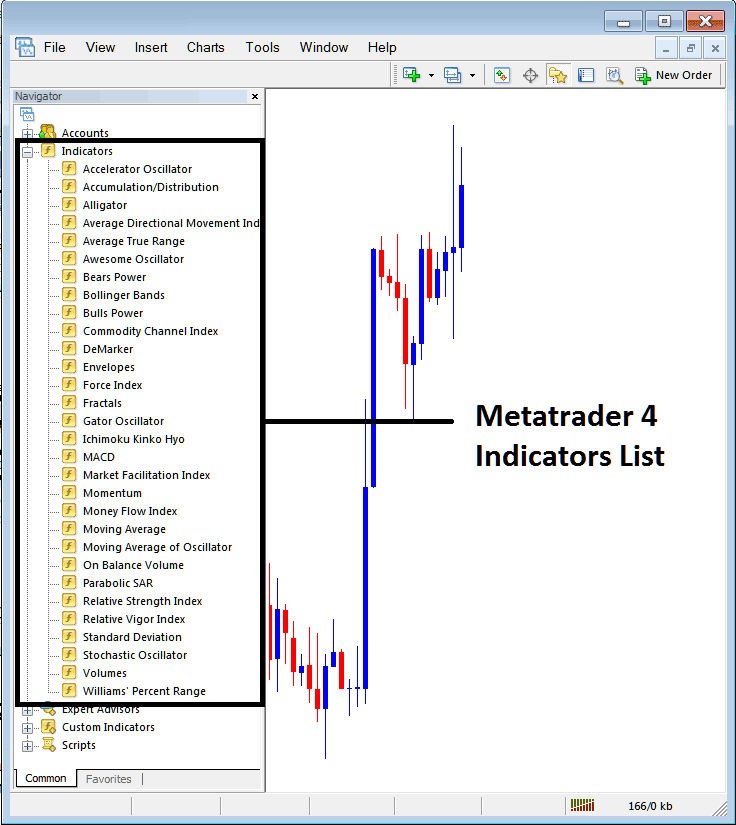
How to Add Darvas Box Indicator - From the Above window you can then place Darvas Box indicator that you want on the CFDs chart
How to Add Custom Darvas Box Indicator to MT4
If the technical indicator you want to add is a custom indicator - for example if the Darvas Box technical indicator you want to add is a custom indicator you will need to first add this custom Darvas Box indicator on the MetaTrader 4 software & then compile the custom Darvas Box indicator so that the newly added Darvas Box custom indicator pops up on the list of custom indicators in MetaTrader 4 software.
To learn how to install Darvas Box indicators on MT4, how to add Darvas Box indicator window to MT4 and how to add Darvas Box custom indicator in MT4 - How to add a custom Darvas Box indicator in MT4.
About Darvas Box Technical Indicator Tutorial Explained
Darvas Box Technical Analysis and Darvas Box Trading Signals
Developed by Nicolas Darvas
Nicolas Darvas is a famous trader who made 2 million dollars trading the stocks market. Darvas started with an account of 10,000 dollars and made a profit of over 2 million dollars.
This is one of the methodologies that Darvas combined to form his stocks trading system. Along with this methodology he made accurate trading decisions.
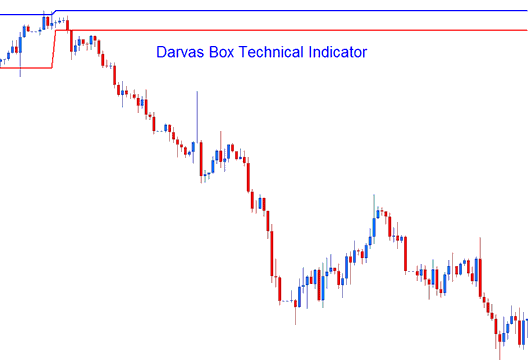
Darvas Box
CFDs Technical Analysis and Generating Trading Signals
This trading method is used to generate trading signals based on a simple break-out strategy of the Darvas Box lines.
Bullish Trading Signal
If the price of a cfds pair breaks out at the top box line , then this is a bullish signal
Bearish Trading Signal
If the price of a cfds pair breaks out to the lower line, then this is a bearish trading signal.
The example below shows a bearish signal generated from the Darvas Box Indicator.
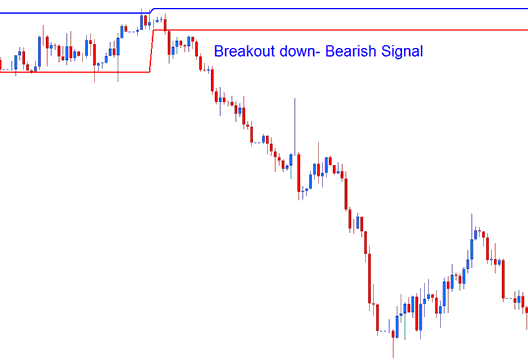
Break-Out - Bearish Signal




