How to Add Linear Regression Acceleration Indicator in MT4 Charts
Step 1: Open Navigator Window Panel on CFD Trading Software
Open Navigator window panel as illustrated below: Navigate to 'View' menu (click on it), then select 'Navigator' window panel (click), or From Standard Toolbar click the 'Navigator' button key or press keyboard shortcut key 'Ctrl+N'
On Navigator window, choose 'Technical Indicators', (Double-Click)
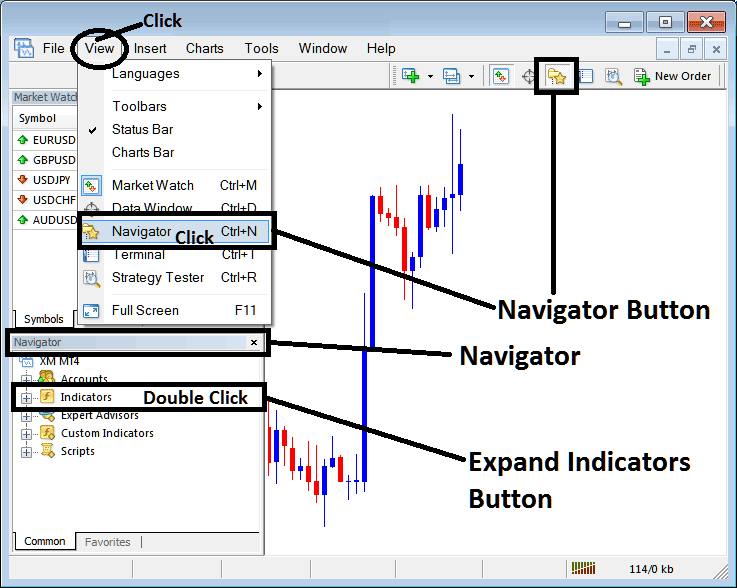
How to Add Linear Regression Acceleration Indicator in MT4 - MT4 Linear Regression Acceleration Technical Indicator
Step 2: Expand the Indicators Menu on the Navigator - Adding Linear Regression Acceleration MT4 Indicator
Expand the menu by clicking the expand button marker (+) or double click the 'indicators' menu, after this the button will appear as (-) and will now display a list as shown below - select the Linear Regression Acceleration cfds chart indicator from this list of cfds indicators so as to add the Linear Regression Acceleration indicator on the cfd chart.
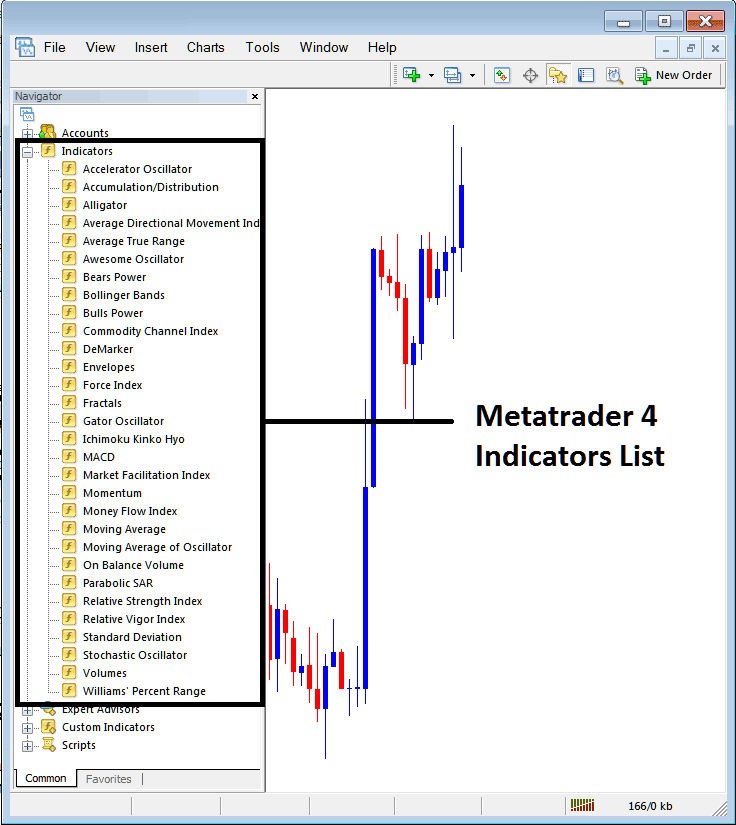
How to Add Linear Regression Acceleration Indicator - From the Above window you can then place Linear Regression Acceleration indicator that you want on the CFDs chart
How to Add Custom Linear Regression Acceleration Indicator to MT4
If the technical indicator you want to add is a custom indicator - for example if the Linear Regression Acceleration technical indicator you want to add is a custom indicator you will need to first add this custom Linear Regression Acceleration indicator on the MetaTrader 4 software & then compile the custom Linear Regression Acceleration indicator so that the newly added Linear Regression Acceleration custom indicator pops up on the list of custom indicators in MetaTrader 4 software.
To learn how to install Linear Regression Acceleration indicators on MT4, how to add Linear Regression Acceleration indicator window to MT4 and how to add Linear Regression Acceleration custom indicator in MT4 - How to add a custom Linear Regression Acceleration indicator in MetaTrader 4.
About Linear Regression Acceleration Technical Indicator Explained
Linear Regression Acceleration Technical Analysis and Trading Signals
Linear Regression Acceleration calculates the change in the regression line's gradient on the current price bar from its gradient from the previous price bar. The value used to calculate the linear regression is referred to as the normalized acceleration value which is plotted for each price bar formed on the price chart.
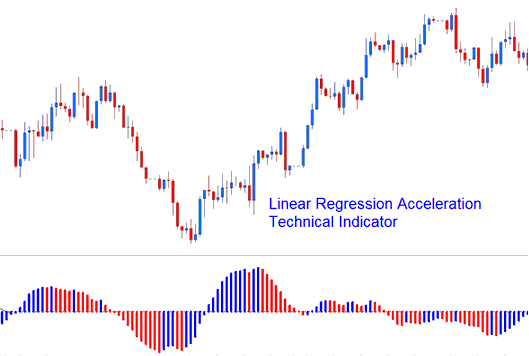
Linear Regression Acceleration
If the normalized acceleration is 0.30, then regression line normalized slope will be rising at the rate of 0.30 per price bar.
Similarly, a normalized slope of -0.40 would indicate that regression line normalized slope is declining at the rate of -0.40 per price bar.
For example, if the current price bar normalized slope value is 0.40 and the previous price bar normalized slope value is 0.20, then the normalized acceleration of the current price bar would be calculated as 0.40 - 0.20 = 0.20.
NB: It is important to realize that a positive acceleration value doesn't equate to a positive slope value, it simply means gradient of slope is increasing. A negative acceleration value does not equate to a negative slope value, it simply means gradient of slope is decreasing.
Implementation of Linear Acceleration Regression Indicator
The Linear Regression Acceleration indicator allows for the following; price selection, regression periods, smoothing of raw price before applying the regression and selection of the smoothing type.
Resulting regression slope is displayed as a bi-colored histogram which oscillates above & below 0.
reference line is set at the 0 level mark.
- A rising slope: (greater than its previous value of One bar before) is displayed in the up slope color.
- A declining slope: (lower than its previous value of One bar before) is shown using the down slope color.




