MetaTrader 4 Platform - MT4 Platforms - MT4 (MT4) - MetaTrader 4 Brokers
MetaTrader 4 Stock Index Platform Technical Analysis - MetaTrader 4 Technical Indicators
The following tutorials explain how to use the MetaTrader 4 software, each guide is accompanied by numerous screen-shots so as to help beginners to understand the concepts described & make it easier to learn about this online Stock Index platform.
Introduction
File
- Opening a Demo Account Procedure
- Open a Stock Index Chart
- Opening Offline Chart
- Opening a Deleted Chart
- Saving a Profile
- Login to an Account
- Printing Stock Index Charts
View
- Changing Language
- Tool Bars
- Connection Bars
- Charts Bar
- Market Watch Window
- Data Window
- Navigator Window
- MT4 Terminal Window
- Stock Index Strategy Tester
Insert
- Indicators Insert Menu
- Insert Line Studies
- Placing Channels
- Gann Lines
- Placing Fibonacci Lines
- Insert Shapes
- Placing Arrows
- Insert Andrew's Pitchfork, Cycle Lines, Text Label
Charts
- Indicators List
- Objects List
- Bar Chart
- Line Chart
- Candlesticks
- Time frames - Periodicity
- Saving a Template
- Grid, Volumes, Auto Scroll and Shift
- Zoom in, Zoom Out & Step by Step
- Setting Properties
Tools
- Place New Order
- History Center on Tools Menu
- Options Settings
- MetaEditor Custom Indicators
- MetaEditor Expert Advisors
Window Menu
Help Menu
Tool-Bars
Advanced Topics
- MQL5 Signals - Copy Top MetaTrader 4 Traders
- Advantages MQL5 Signals
- Signal Seller Advantages
- MQL5 Expert Advisors
How to Place Stock Indices Indicators
- Accelerator Oscillator
- Accumulation Distribution
- Alligator
- ADX
- Average True Range Indicator
- Awesome Oscillator
- Bears Power
- Bollinger Band Indicator
- Bulls Power
- Commodity Channel Index
- Demarker
- Force Index
- Fractals
- Gator Oscillator
- Heiken Ashi
- Ichimoku Kinko Hyo Indicator
- MACD
- Market Facilitation Index
- Momentum
- Money Flow Index
- Moving Average Envelopes
- Moving Average Indicator
- Moving Average Oscillator
- On Balance Volume
- Parabolic SAR
- Relative Strength Index
- Relative Vigor Index
- Standard Deviation
- Stochastic Oscillator Indicator
- Volumes
- Williams Percentage Range
- Zigzag
Most popular search is how to save a work space in MT4, or how to save a system/template. Before beginning the guide, the screen shot below shows how to save a template or a trading system & also how to save a work space. The same button keys are also used to load the chart template on another separate trading chart. (click on these buttons to get options on your MT4 platform)
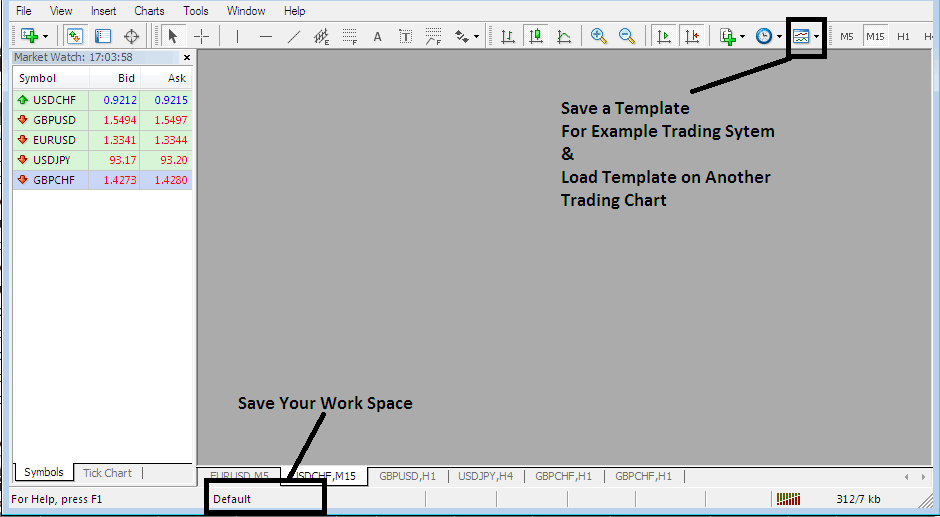
How to Save a Work Space, How to Save a Template
The MT4 is part of the online stock index market. The MT4 software is installed on a client's computer.
The screen shot below shows the user interface of the MetaTrader 4.
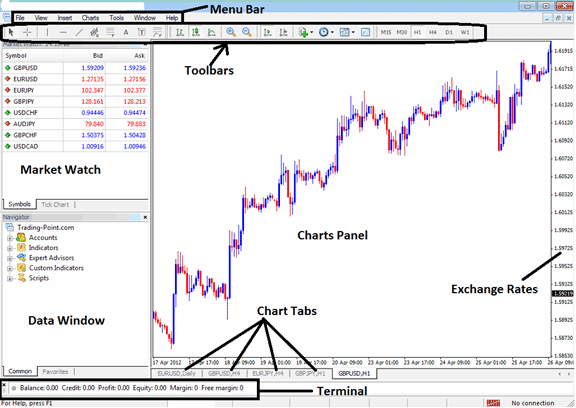
MT4 platform Workspace
According to Stock Index trading platforms reviews, MT4 is the most widely used Stock Index trading platform. This is because it is easy to learn & can do the following tasks.
The MT4 software is installed on a trader's computer & it is intended to accomplish the following:
- Plot graphical Information about exchange rates in the form of a grid/chart
- Receive streaming exchange quotes from the Stock Index brokers
- Perform trade operations: buying and selling of currencies
- Show the open transactions & orders within the platform workspace
- Perform technical analysis
- Testing of strategies on practice demo accounts
- Coding of custom indicators & Expert Advisors for the purpose of automated stock index trading.
- Provide statements of transaction history & a summary of profits/losses.
The MetaTrader 4 online trading platform which is also referred to as MT4, is designed to provide technical tools that can be used by Stock Index traders to make buy or sell decisions. This stock index trading software provides online quotes and streaming data about price movement plotted in the form of price charts. This information is delivered direct to the MT4 platform interface. This information that is delivered in the form of realtime quotes is then analyzed using the technical tools that are provided within this online trading platform.
This is a free Stock Index software which is provided for by online Stock Index brokers. You can download the platform from online brokers sites, once you download it, you should then setup and install the platform on a Desktop computer which has an inter net connection and then connect to your broker & start receiving streaming quotes.
The MT4 has different window & chart panels, each designed to deliver a different type of market data, starting with the exchange rate quotes used to plot stock index graphs to the market data window panel, toolbars for attaching technical indicators & the main menu bar used to navigate the platform.




