How Do You Use Darvas Box MetaTrader 4 Technical Indicator?
Darvas Box Indicator Analysis Buy & Sell Signals
Developed by Nicolas Darvas
Darvas Box indicator technical analysis.
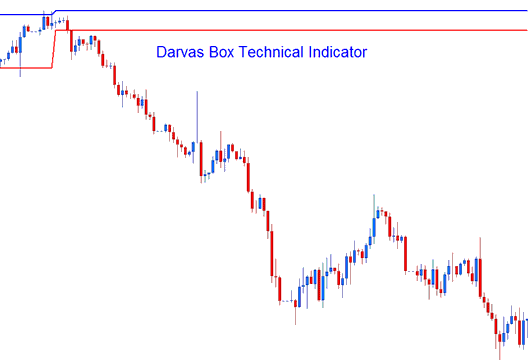
How to Add MetaTrader 4 Darvas Box Indicator on MetaTrader 4 Charts
How to Generate Buy and Sell Signals
Darvas Box indicator trading method is used to generate forex trading signals based on a simple forex price breakout strategy of the Darvas Box lines.
Buy Forex Signal
If the forex price breaks out at the Darvas Box indicator top line - then this forex trading signal is analyzed as a buy signal
Sell Forex Signal
If the forex price breaks out to the Darvas Box indicator lower line - then this forex trading signal is analyzed as forex sell trading signal.
The Darvas Box indicator example below shows a forex sell trading signal generated from the Darvas Box indicator.
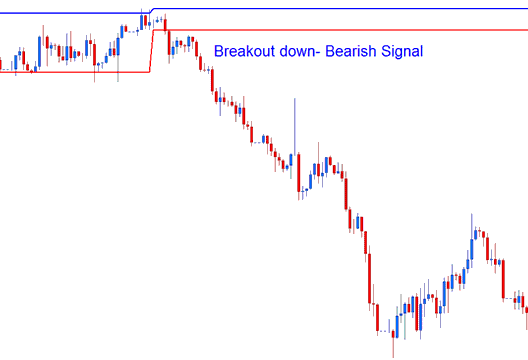
Analysis of MetaTrader 4 Indicator Darvas Box Trading Indicator
How to Add MetaTrader 4 Darvas Box Indicator on MetaTrader 4 Charts
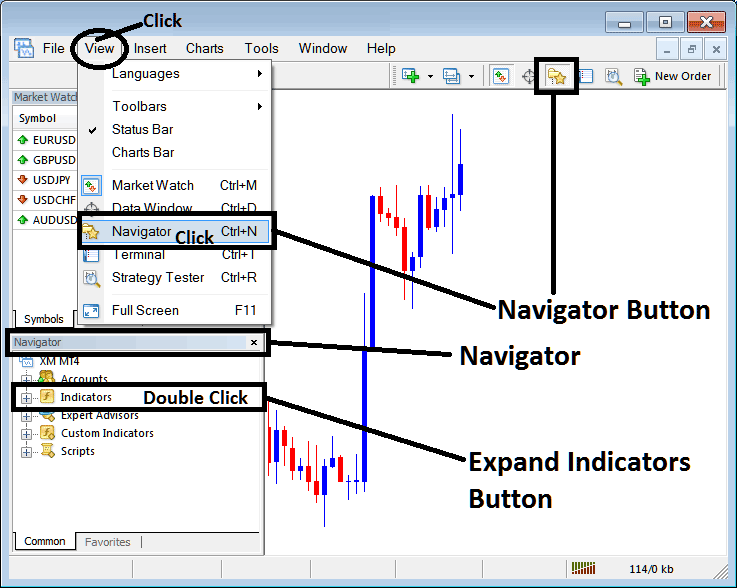
Step 1: Open MT4 Platform Navigator Panel
Open MT4 Navigator window as shown below: Go to "View" menu (click), then select "Navigator" window (click), or From Standard Tool Bar click the "Navigator" button or press keyboard MetaTrader 4 shortcut keys "Ctrl+N"
On MT4 Navigator window, select "Indicators", by Double Clicking
How Do You Use MetaTrader 4 Darvas Box Technical Indicator?
How to Add Darvas Box MetaTrader 4 Indicator
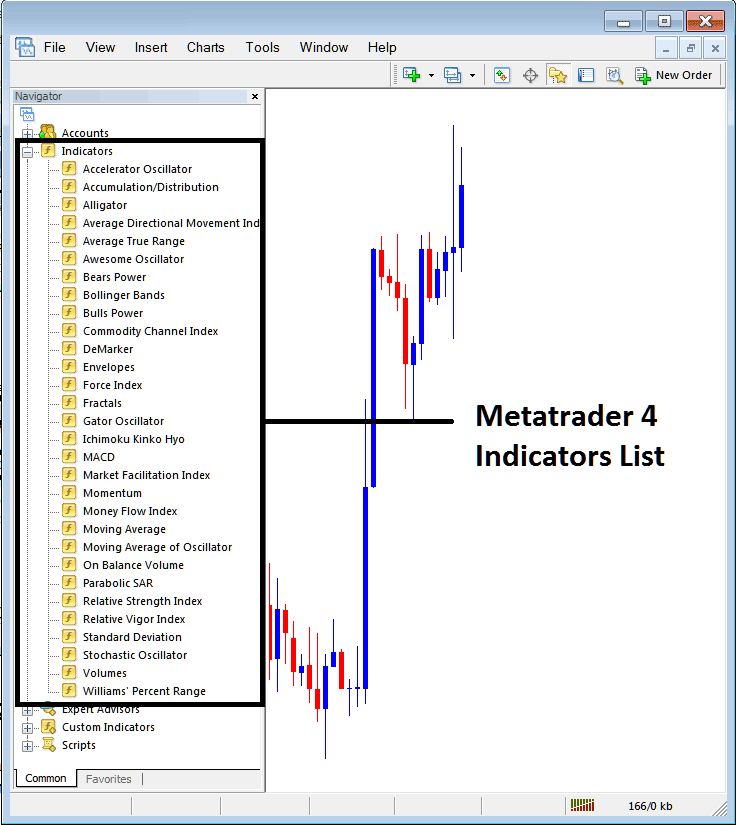
Expand the menu by clicking the expand button (+) or double click the "indicators" menu, after this the button will appear as (-) and it will then display a list of MetaTrader 4 indicators as shown below - choose the Darvas Box technical indicator from this list of MetaTrader 4 indicators so that you can add the Darvas Box MetaTrader 4 indicator on the MetaTrader 4 forex chart.
How Do You Use MetaTrader 4 Darvas Box Technical Indicator?
How Install and Add Custom Darvas Box Indicator on MetaTrader 4?
If the MetaTrader 4 indicator that you want to add on the MetaTrader 4 charts is a custom MT4 indicator - for example if the Darvas Box indicator that you want to add is a custom MetaTrader 4 indicator you will need to first add this custom Darvas Box MetaTrader 4 indicator on the MetaTrader 4 platform and then compile this custom Darvas Box technical indicator so that this newly added Darvas Box MetaTrader 4 forex custom indicator appears on the custom technical indicators list on the MetaTrader 4 software.
To learn how to add Darvas Box indicators on MT4 platform - how do you add Darvas Box indicator window to MT4 platform? - how do you add Darvas Box forex custom indicator on MT4 platform? - How to add a custom Darvas Box custom forex indicator on MetaTrader 4.
How Do You Use MetaTrader 4 Darvas Box Technical Indicator?




