How Do You Use Accumulation/Distribution MetaTrader 4 Indicator?
Accumulation/Distribution Indicator Technical Analysis Buy & Sell Signals
Developed by Marc Chaikin
Accumulation/Distribution indicator is used to assess the cumulative flow of money into and out of a Forex instrument.
The basic principle behind Accumulation/Distribution is that volume (or money flow) is a leading indicator of the forex price. (Volume precedes forex price).
Interpretation of Accumulation/Distribution MetaTrader 4 Indicator
Accumulation/Distribution volume indicator is used to determine if volume is increasing or decreasing as the forex price is rising or falling.
Upward Forex Trend
If the forex price is rising then the Accumulation/Distribution indicator should also be rising. This shows that the forex price move is being supported by volumes and the forex price move upward has strength and is sustainable.
If on the other hand forex price is moving up and the Accumulation/Distribution volumes are not - the strength behind the upward forex price move is reducing; and this creates a divergence between forex price and Accumulation/Distribution indicator & warns of a possible forex trend reversal in opposite direction.
Downwards Forex Trading Trend
If the forex price is falling then the Accumulation/Distribution indicator should also be falling. This shows that the forex price move is being supported by Accumulation/Distribution volumes and the forex price move downward has strength behind it.
If on the other hand forex price is moving down and the Accumulation/Distribution volumes are not - the strength behind the move is reducing; and this creates a divergence between forex price and Accumulation/Distribution indicator & warns of a possible forex trend reversal in opposite direction.
How to Generate Buy and Sell Signals
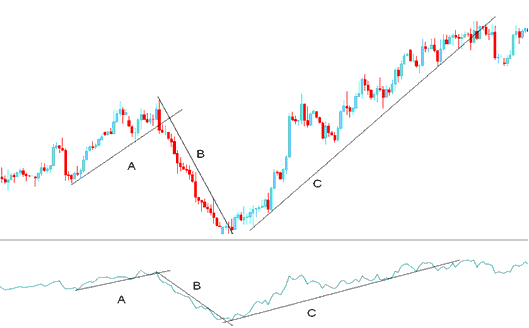
Shown Below is example of Accumulation/Distribution technical analysis explanation:
How to Add MetaTrader 4 Accumulation/Distribution Indicator on MetaTrader 4 Charts
From the forex chart example above we can separate the forex chart into three parts, part A, B and C.
A - Upward trend line on forex chart as well as on the Accumulation/Distribution MetaTrader 4 indicator
B - Downward trend line on forex chart as well as on the Accumulation/Distribution MetaTrader 4 indicator
C - Upward trend line on forex chart as well as on the Accumulation/Distribution MetaTrader 4 indicator
As long as the forex price & the Accumulation/Distribution indicator are moving in the same direction then the forex price move has enough momentum to continue moving in that direction as explained on the example above
Forex Trendline Break
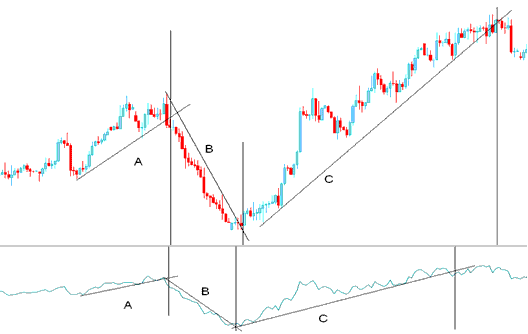
From the above forex chart - once the trend line on the Accumulation/Distribution indicator was broken then the forex price trend line was also broken.
Looking at the forex chart below we have added vertical lines to represent the points where the trend lines were broken - both on the MetaTrader 4 forex chart and the Accumulation/Distribution MetaTrader 4 indicator.
Comparing the trend lines on the Accumulation/Distribution MetaTrader 4 indicator & the forex price those of the Accumulation/Distribution indicator were broken before those on the forex price chart. This is because volume always precedes forex price.
How Do You Use MetaTrader 4 Accumulation/Distribution Technical Indicator?
Accumulation/Distribution Signals
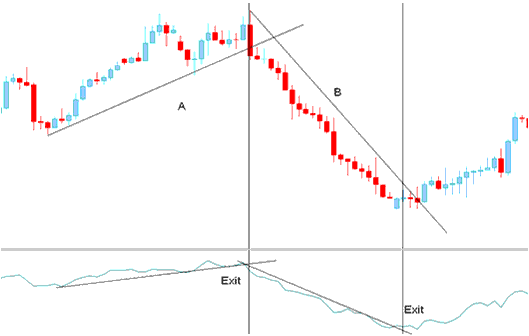
Exit Signals
Exit forex trading signals are generated when the trend line on the Accumulation/Distribution MetaTrader 4 indicator is broken. A forex trendline break on the Accumulation/Distribution indicator warns of a possible forex trend reversal.
Entry Signals
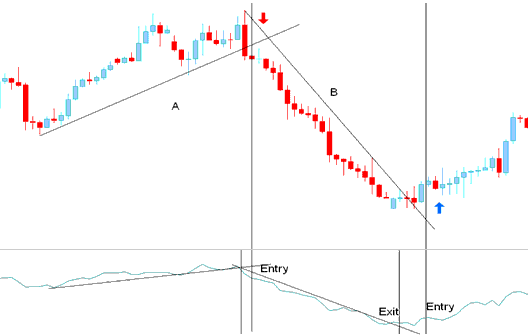
Once the trend line on the Accumulation/Distribution MetaTrader 4 indicator is broken it warns of a possible forex trend reversal in the direction of the market.
However, if you want to open a forex trade the opposite direction it is always best to wait for a confirmation forex trading signal.
A confirmation forex trading signal is considered complete once both the Accumulation/Distribution indicator & the forex price breaks both their forex trend lines.
How Do You Use MetaTrader 4 Accumulation/Distribution Technical Indicator?
How to Add MetaTrader 4 Accumulation/Distribution Indicator in MetaTrader 4 Charts
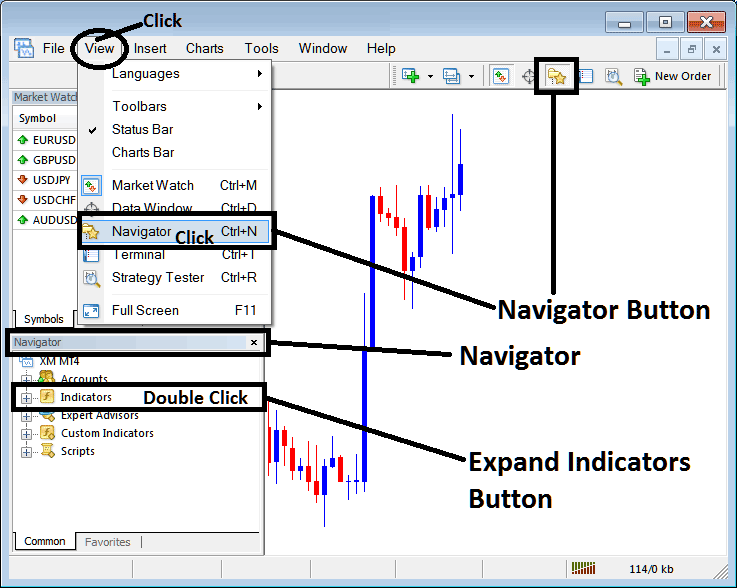
Step 1: Open MT4 Software Navigator Window Panel
Open MT4 Navigator window as shown below: Go to "View" menu (click), then select "Navigator" window (click), or From Standard Tool Bar click the "Navigator" button or press keyboard MetaTrader 4 shortcut keys "Ctrl+N"
On MT4 Navigator window, select "Indicators", by Double Clicking
How Do You Use MetaTrader 4 Accumulation/Distribution Technical Indicator?
How to Add Accumulation/Distribution MetaTrader 4 Indicator
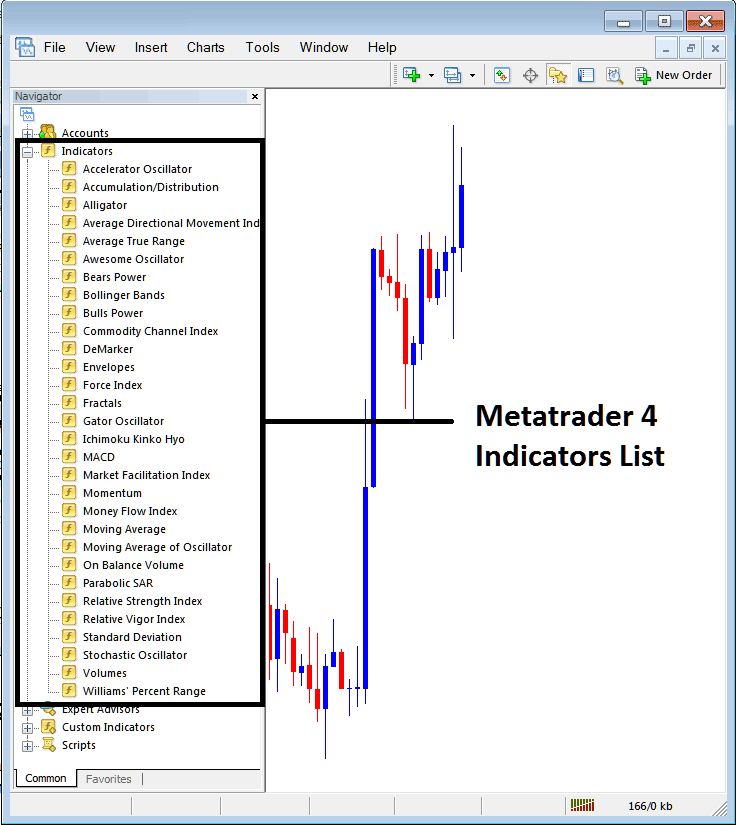
Expand the menu by clicking the expand button (+) or double click the "indicators" menu, after this the button will appear as (-) and it will then display a list of MetaTrader 4 indicators as shown below - choose the Accumulation/Distribution technical indicator from this list of MetaTrader 4 indicators so that you can add the Accumulation/Distribution MetaTrader 4 indicator on the MetaTrader 4 forex chart.
How Do You Use MetaTrader 4 Accumulation/Distribution Technical Indicator?
How Install and Add Custom Accumulation/Distribution Indicator on MetaTrader 4?
If the MetaTrader 4 indicator that you want to add on the MetaTrader 4 charts is a custom MT4 indicator - for example if the Accumulation/Distribution indicator that you want to add is a custom MetaTrader 4 indicator you will need to first add this custom Accumulation/Distribution MetaTrader 4 indicator on the MetaTrader 4 platform and then compile this custom Accumulation/Distribution technical indicator so that this newly added Accumulation/Distribution MetaTrader 4 forex custom indicator appears on the custom technical indicators list on the MetaTrader 4 software.
To learn how to add Accumulation/Distribution indicators on MT4 platform - how do you add Accumulation/Distribution indicator window to MT4 platform? - how do you add Accumulation/Distribution forex custom indicator on MT4 platform? - How to add a custom Accumulation/Distribution custom forex indicator on MetaTrader 4.
How Do You Use MetaTrader 4 Accumulation/Distribution Technical Indicator?




