How Do You Use Bollinger Bands MetaTrader 4 Technical Indicator?
Bollinger Bands Indicator Technical Analysis Buy & Sell Signals
Developed by John Bollinger
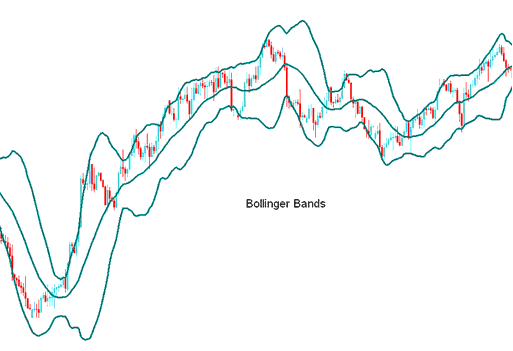
Bollinger bands are formed by three lines. The middle Bollinger Bands indicator line is a Moving Average - 20 period Simple Moving Average.
The Bollinger Bands are then drawn at a distance away from the moving average - these are the bands that form the lower line and upper line.
The distance where the Bollinger Bands are drawn is determined by another forex indicator called the standard deviation. Standard deviation forex indicator is a measure of forex price volatility in the forex market.
Since the forex market volatility keeps on changing - the standard deviation forex indicator will keep varying - and because Bollinger bands are drawn using the standard deviation calculation - the distance of the Bollinger Bands indicator will keep on adjusting themselves to the forex market conditions.
When the FX trading prices becomes more volatile, the Bollinger Bands indicator widens and when the prices become less volatile, the Bollinger Bands indicator contracts during less volatile periods.
The 3 Bollinger Bands are designed to enclose the majority of forex price action movement. The middle Bollinger band forms the basis for the forex trend - typically a 20 period simple moving average forms the middle Bollinger Band.
This middle Bollinger band also serves as the basis for the upper and lower Bollinger bands. The upper band and lower band distance from the middle band is determined by FX price volatility. The upper Bollinger band is drawn at +2 standard deviations above the middle Bollinger band while the lower Bollinger band is drawn at -2 standard deviations below the middle Bollinger band.
How to Add MetaTrader 4 Bollinger Bands Indicator on MetaTrader 4 Charts
How to Generate Buy and Sell Signals
- Bollinger Bands provide a relative definition of forex price high and forex price low
- Bollinger Bands indicator is used to identify periods of high forex price volatility and low forex price volatility
- Bollinger Bands indicator is also used to identify periods when prices are at extreme zones
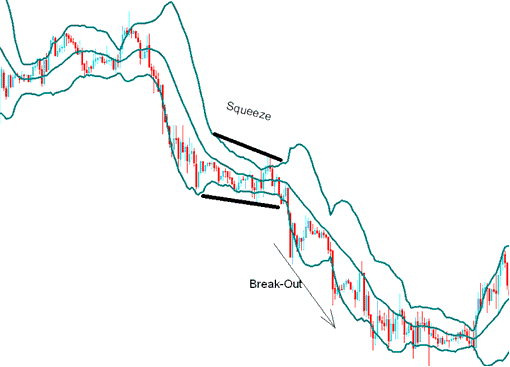
Bollinger Bands FX Indicator Squeeze
The Bollinger Bands indicator tightens as forex volatility lessens - this identifies periods of forex price consolidation. Sharp break outs in forex price tend to occur after the Bollinger Bands indicator tightens.
Bollinger Bands Squeeze
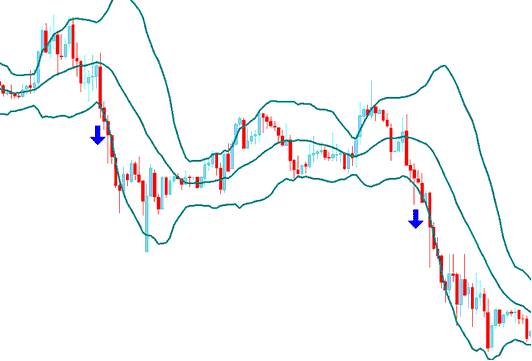
Bollinger Bands FX Indicator Bulge
If forex prices breaks through the upper Bollinger band or lower Bollinger band and moves outside the Bollinger bands a continuation of the current forex trend is expected.
Forex Trading Trend Continuation Signal
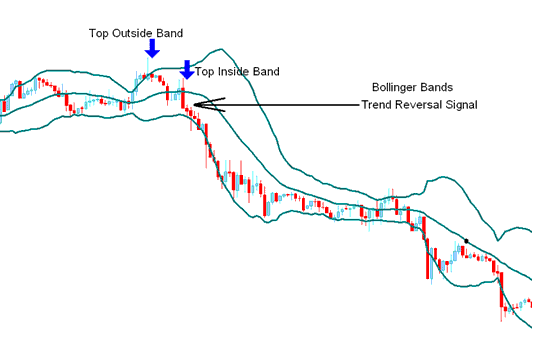
Double Top and Double Bottoms Reversal Patterns Combined with Bollinger Bands Indicator
Bottoms and Tops made outside the Bollinger bands followed by Bottoms and Tops made inside the Bollinger bands signal forex reversals in the forex trend direction
Whipsaw
Forex traders should be on the lookout for false forex price breakouts known as forex whipsaw signals or Bollinger bands head fakes.
Forex price often breaks out in one direction immediately following the Bollinger Band Squeeze causing many traders to think the forex price breakout will continue in that direction - only for the forex price to quickly reverse and make the true and more significant forex price break out in opposite direction.
Forex traders acting quickly on the initial forex price break out often get caught on the wrong side of the forex trade - while those forex traders expecting a "false breakout" or a head fake forex whipsaw signal can quickly close out their original forex trade positions and enter forex trades in the direction of the trend reversal. Traders should combine Bollinger bands forex indicator with other confirmation forex indicators.
How to Add MetaTrader 4 Bollinger Bands Indicator on MetaTrader 4 Charts
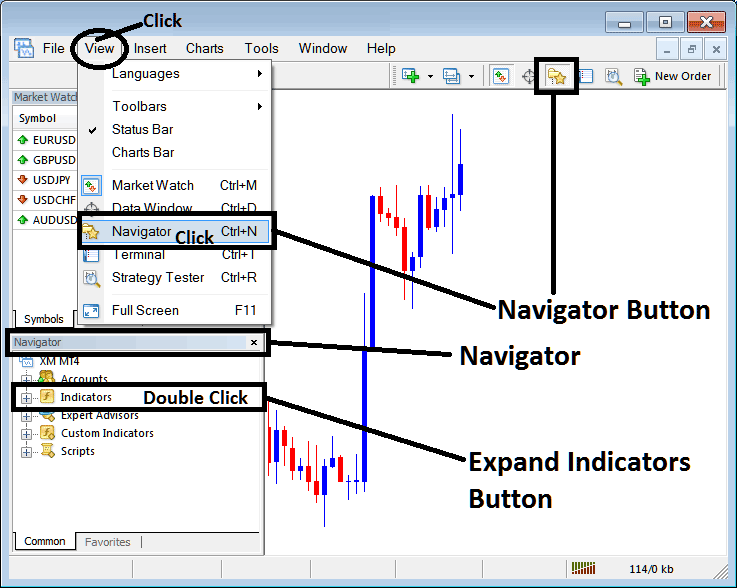
Step 1: Open MT4 Software Navigator Window Panel
Open MT4 Navigator window as shown below: Go to "View" menu (click), then select "Navigator" window (click), or From Standard Tool Bar click the "Navigator" button or press keyboard MetaTrader 4 shortcut keys "Ctrl+N"
On MT4 Navigator window, select "Indicators", by Double Clicking
How Do You Use MetaTrader 4 Bollinger Bands Technical Indicator?
How to Add Bollinger Bands MetaTrader 4 Indicator
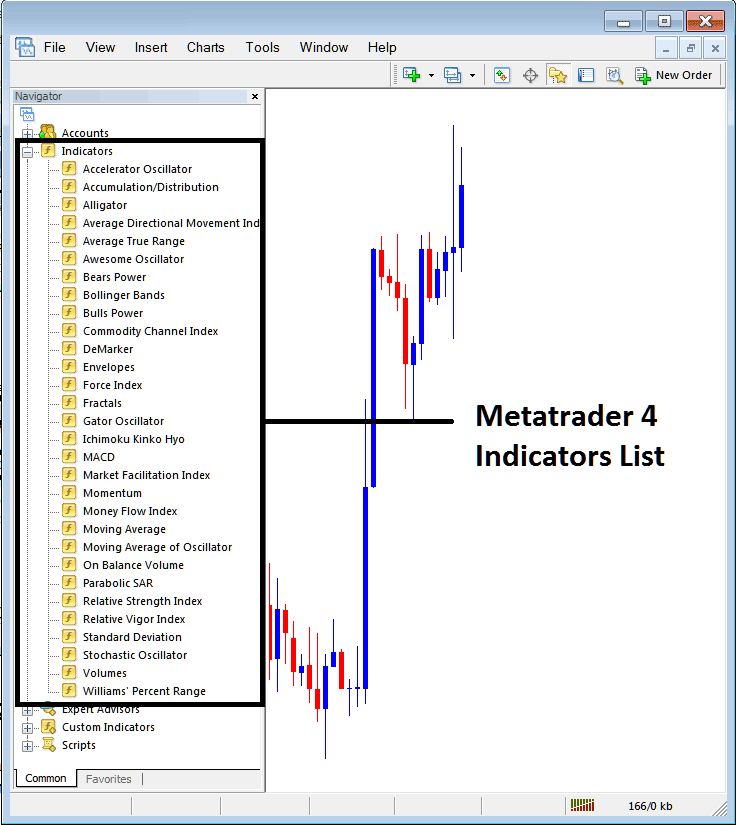
Expand the menu by clicking the expand button (+) or double click the "indicators" menu, after this the button will appear as (-) and it will then display a list of MetaTrader 4 indicators as shown below - choose the Bollinger Bands technical indicator from this list of MetaTrader 4 indicators so that you can add the Bollinger Bands MetaTrader 4 indicator on the MetaTrader 4 forex chart.
How Do You Use MetaTrader 4 Bollinger Bands Technical Indicator?
How Install and Add Custom Bollinger Bands Indicator on MetaTrader 4?
If the MetaTrader 4 indicator that you want to add on the MetaTrader 4 charts is a custom MT4 indicator - for example if the Bollinger Bands indicator that you want to add is a custom MetaTrader 4 indicator you will need to first add this custom Bollinger Bands MetaTrader 4 indicator on the MetaTrader 4 platform and then compile this custom Bollinger Bands technical indicator so that this newly added Bollinger Bands MetaTrader 4 forex custom indicator appears on the custom technical indicators list on the MetaTrader 4 software.
To learn how to add Bollinger Bands indicators on MT4 platform - how do you add Bollinger Bands indicator window to MT4 platform? - how do you add Bollinger Bands forex custom indicator on MT4 platform? - How to add a custom Bollinger Band custom forex indicator on MetaTrader 4.
How Do You Use MetaTrader 4 Bollinger Bands Technical Indicator?




