
Drawing Candlesticks Charts in MetaTrader 4
The fourth option on the MetaTrader 4 charts menu is the candles button - used to choose the chart to trade with as candles.
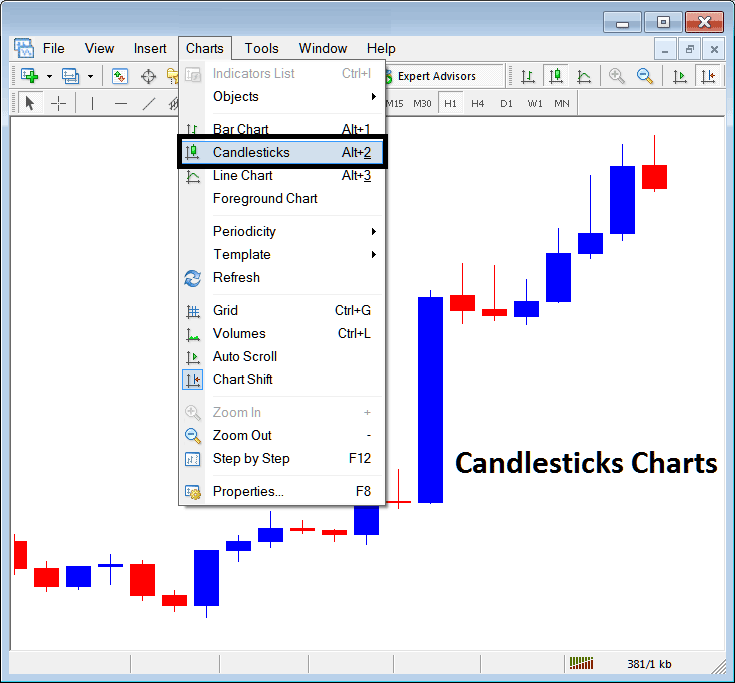
To trade with these candlesticks, the above buttons shows where a trader should choose the button do select this option.
These are drawn using also color coding:
Red - XAUUSD Price went down
Blue - XAUUSD Price went up
This chart type is also preferred by many traders because they are more appealing for technical analysis & easier to trade with. A lot of information can be analyzed from these charts.
These will show the Opening, High, Low, Closing gold price of a specific time period. This is abbreviated O-H-C-L.
The body of the candles will show xauusd instrument movement that was within the opening & closing gold price of a specific trading period - it is also used to determine a lot of information. For examples in the above chart the long blue body meant there were a lot of buyers and therefore the gold trading price movement was likely to continue in upwards bullish xauusd trend direction.
The upper and lower shadow, the wicks of the candlestick will show the highest point & the lowest point that the gold price reached.
Japanese Gold Candles Lessons
The Japanese patterns guides can be used to learn how to determine xauusd trend reversal signals or xauusd trend continuation trading signals from the different patterns & formations.
To learn and know more about the various xauusd strategies for trading these patterns, a trader can read these tutorials:
Inverted Hammer Candlestick Pattern & Shooting Star Candlestick Pattern
Piercing Line XAUUSD Candle Pattern & Dark Cloud Cover Candlestick Pattern
Morning Star Candlesticks and Evening Star Candlesticks