How to Use MetaTrader 4 Guide for Commodities Trading Beginner Traders
How to Use MT4 Guide for Commodities Trading Beginner Traders
If you want to learn how to use MetaTrader 4 an online commodity tutorial with a list of MetaTrader 4 commodities platform tutorials is the best place to start learning how to use the MT4 software.
This online learn commodity tutorial provides commodity traders with how to use MetaTrader 4 commodities platform tutorials listed below - from the basics of how to download MT4 platform, how to install MT4 platform, how to open a MT4 demo commodity account, how to open a MT4 commodity chart, how to open a commodity trade on MT4 & how to use MT4 commodities platform indicators & MT4 Commodity EAs and MT4 MQL5 commodity signals.
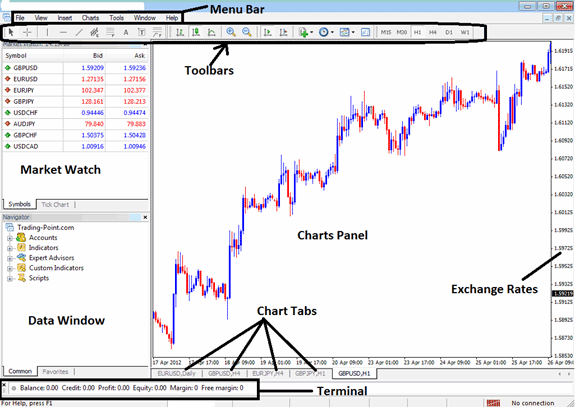
How to Use MT4 Commodity Software - How to Use MetaTrader 4 Tutorial for Commodity Beginners
Introduction - Learn How to Use MetaTrader 4 Commodity Software
- Learn Commodity Trading MetaTrader 4 Platform Introduction
- Installing MetaTrader 4 Online Commodity Trading Platform
File - Learn How to Use MT4 Commodity Trading Software
- Opening a Practice Account Procedure
- Open a Commodities Trading Chart
- Opening Offline Chart
- Opening a Deleted Chart
- Saving a Profile
- Login to an Account
- Printing Commodities Trading Charts
View - Learn How to Use MetaTrader 4 Commodity Trading Software
- Changing Language
- Tool Bars
- Connection Bars
- Charts Bar
- Market Watch
- Data Window
- Navigator
- MT4 Terminal Window
- Strategy Tester
Insert - Learn How to Use MT4 Commodity Trading Software
- Indicators Insert Menu
- Insert Line Studies
- Placing Channels
- Gann Lines
- Placing Fibonacci Lines
- Insert Shapes
- Placing Arrows
- Insert Andrew's Pitchfork, Cycle Lines, Text Label
Charts - Learn How to Use MT4 Commodity Software
- Indicators List
- Objects List
- Bar Chart
- Line Chart
- Candlesticks
- Time frames - Periodicity
- Saving a Template
- Grid, Volumes, Auto Scroll and Shift
- Zoom in, Zoom Out & Commodity Trading Step by Step
- Setting Properties
Tools - Learn How to Use MetaTrader 4 Commodity Software
- Place New Commodity Trading Order
- History Center on Tools Menu
- Options Settings
- MetaEditor Custom Indicators
- MetaEditor Expert Advisors
Window Menu - Learn How to Use MT4 Commodity Trading Software
Help Menu - Learn How to Use MT4 Commodity Trading Software
ToolBars - Learn How to Use MT4 Commodity Trading Software
Advanced Topics - Learn How to Use MT4 Commodity Trading Software
- MQL5 Signals - Copy Top MT4 Commodity Traders
- Advantages MQL5 Signals
- Signal Seller Advantages
- MQL5 Commodity Trading Expert Advisors
Learn How to Use MetaTrader 4 Commodity Trading Software
- Accelerator Oscillator
- Accumulation Distribution
- Alligator
- ADX
- Average True Range Indicator
- Awesome Oscillator
- Bears Power
- Bollinger Bands Indicator
- Bulls Power
- Commodity Trading Channel Index
- Demarker
- Force Index
- Fractals
- Gator Oscillator
- Heiken Ashi
- Ichimoku
- MACD
- Market Facilitation Index
- Momentum
- Money Flow Index
- Moving Average Envelopes
- Moving Average Indicator
- Moving Average Oscillator
- On Balance Volume
- Parabolic SAR
- RSI
- RVI
- Standard Deviation
- Stochastic Oscillator Indicator
- Volumes
- Williams Percentage Range
- Zigzag
Learn How to Use MetaTrader 4 Commodity Platform - Learn MetaTrader 4 Commodity Software
How to Use MetaTrader 4 Tutorial for Commodity Beginners




