How Do You Use Ehlers MESA Adaptive Moving Average MetaTrader 4 Indicator?
Ehlers MESA Adaptive Moving Average Technical Indicator Technical Analysis Buy & Sell Signals
Mesa Adaptive Moving Averages was created by John Ehlers
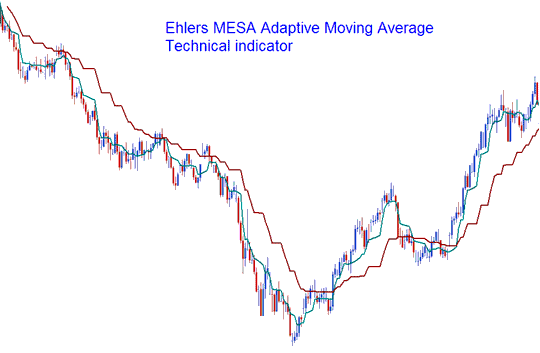
Ehlers MESA Adaptive Moving Average indicator looks like two moving averages. The difference is that the Ehlers MESA Adaptive Moving Average indicator moves in a staircase manner and not in a curved line like the forex moving average indicator. The example below shows this Ehlers MESA Adaptive Moving Average indicator drawn on a forex price chart.
How to Add MetaTrader 4 Ehlers MESA Adaptive Moving Average Technical Indicator on MetaTrader 4 Charts
Ehlers MESA Adaptive Moving Average indicator is a trend following forex indicator that adapts to the forex price action movement based on the rate of change of the forex price as measured and analyzed by the Hilbert Transform Discriminator. Ehlers MESA Adaptive Moving Average indicator will generate a forex trading signal when the two Ehlers MESA Adaptive Moving Average indicators cross one another - using the 2 Ehlers MESA Adaptive Moving Averages crossover forex trading strategy. Forex trades should be executed in the direction of the Ehlers MESA Adaptive Moving Average indicator.
This Ehlers MESA Adaptive Moving Average indicator crossover forex trading method features a fast Ehlers MESA Adaptive Moving Average and a slow Ehlers MESA Adaptive Moving Average so that the composite moving average rapidly follows behind the forex price and holds the average indicator value until the next forex price candlestick close occurs. Ehlers MESA Adaptive Moving Average indicator is less prone to forex whipsaw signals compared with the original forex moving average indicator. This is because of the formula used to calculate the Ehlers MESA Adaptive Moving Average indicator rate of change in relation to the forex price movement.
How to Add MetaTrader 4 Ehlers MESA Adaptive Moving Average Technical Indicator in MetaTrader 4 Charts
Step 1: Open MetaTrader 4 Software Navigator Window Panel
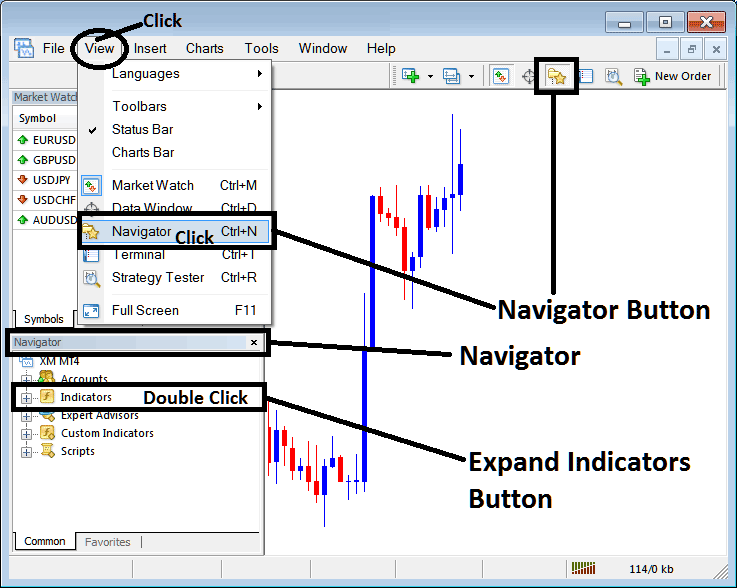
Open MT4 Navigator window as shown below: Go to "View" menu (click), then select "Navigator" window (click), or From Standard Tool Bar click the "Navigator" button or press keyboard MetaTrader 4 shortcut keys "Ctrl+N"
On MT4 Navigator window, select "Indicators", by Double Clicking
How Do You Use MetaTrader 4 Ehlers MESA Adaptive Moving Average Technical Indicator?
How to Add Ehlers MESA Adaptive Moving Average MetaTrader 4 Indicator
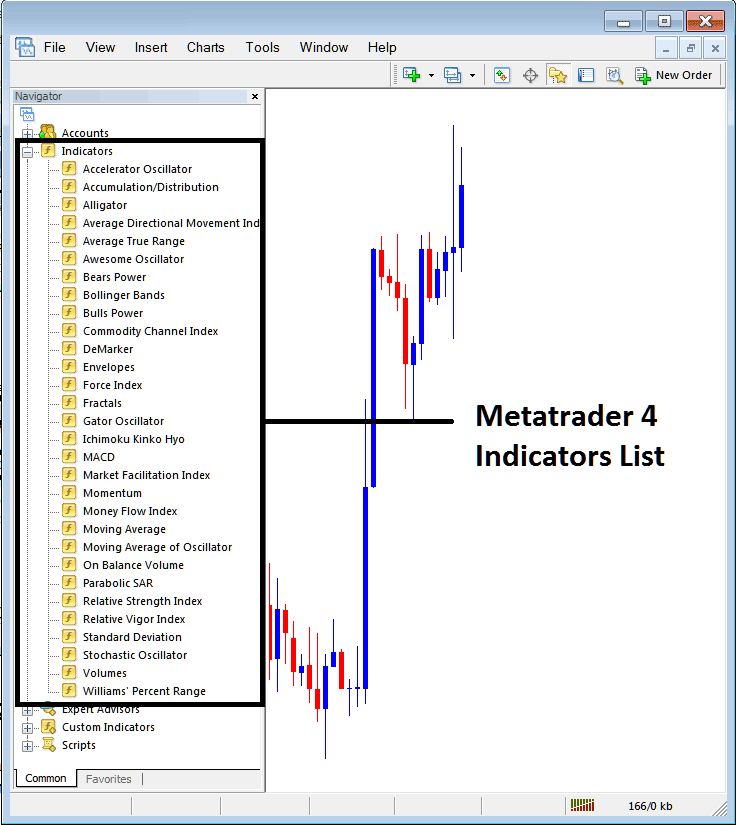
Expand the menu by clicking the expand button (+) or double click the "indicators" menu, after this the button will appear as (-) and it will then display a list of MetaTrader 4 indicators as shown below - choose the Ehlers MESA Adaptive Moving Average technical indicator from this list of MetaTrader 4 indicators so that you can add the Ehlers MESA Adaptive Moving Average MetaTrader 4 indicator on the MetaTrader 4 forex chart.
How Do You Use MetaTrader 4 Ehlers MESA Adaptive Moving Average Technical Indicator?
How Install and Add Custom Ehlers MESA Adaptive Moving Average Technical Indicator on MetaTrader 4?
If the MetaTrader 4 indicator that you want to add on the MetaTrader 4 charts is a custom MT4 indicator - for example if the Ehlers MESA Adaptive Moving Average indicator that you want to add is a custom MetaTrader 4 indicator you will need to first add this custom Ehlers MESA Adaptive Moving Average MetaTrader 4 indicator on the MetaTrader 4 platform and then compile this custom Ehlers MESA Adaptive Moving Average technical indicator so that this newly added Ehlers MESA Adaptive Moving Average MetaTrader 4 forex custom indicator appears on the custom technical indicators list on the MetaTrader 4 software.
To learn how to add Ehlers MESA Adaptive Moving Average indicators on MT4 platform - how do you add Ehlers MESA Adaptive Moving Average indicator window to MT4 platform? - how do you add Ehlers MESA Adaptive Moving Average forex custom indicator on MT4 platform? - How to add a custom Ehlers MESA Adaptive Moving Average custom forex indicator on MetaTrader 4.
How Do You Use MetaTrader 4 Ehlers MESA Adaptive Moving Average Technical Indicator?




