How Do You Set Gold Pending Orders in MetaTrader 4 Online?
How Do You Set Gold Pending Orders on MT4?
There are two types of xauusd pending gold trade orders:
These are Limit orders & Stop orders as explained below:
Limit Gold Orders on MT4
To set up these limit xauusd orders on MT4 software use the following procedure described:
- Right click on xauusd chart
- Choose 'Trading' Option on the Menu
- Then Choose 'New' Order Option on the Pop-up widow that pops up
- Then on the trade setup pop up panel that appears (illustrated below), under the label 'Type' choose the option of "Pending XAUUSD Order" instead of 'market execution' order
- Under the pending xauusd order options select the pending xauusd order type: for This trade choose "Buy Limit XAUUSD Order" or "Sell Limit Gold Order" so as to set a pending limit xauusd order
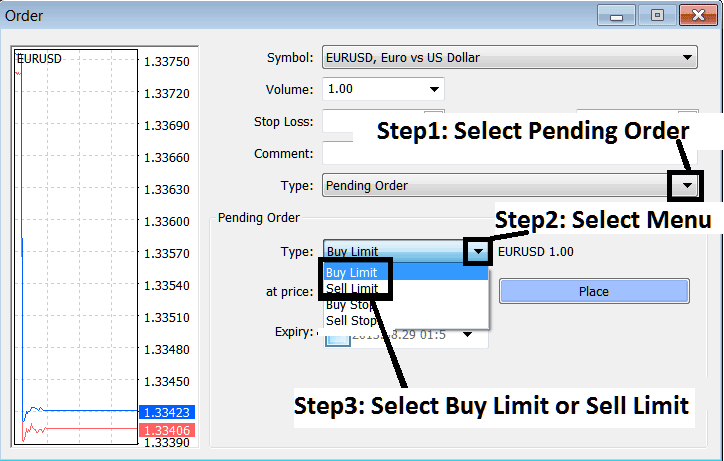
How Do You Set Gold Pending Orders in MetaTrader 4
Stop Gold Orders on MT4
- Open a XAUUSD XAUUSD Trading Chart
- Right-Click on Chart to open the Trade 'Order' Window
- On the Trade Order Panel, Choose Pending XAUUSD Order as shown below
- Select Pending Order Type as Buy Stop or Sell Stop Gold Order as Shown below
- After selecting Buy Stop XAUUSD Order or Sell Stop Gold Order - Click 'Place' Order & specify the sell stop gold price level where the order will be opened
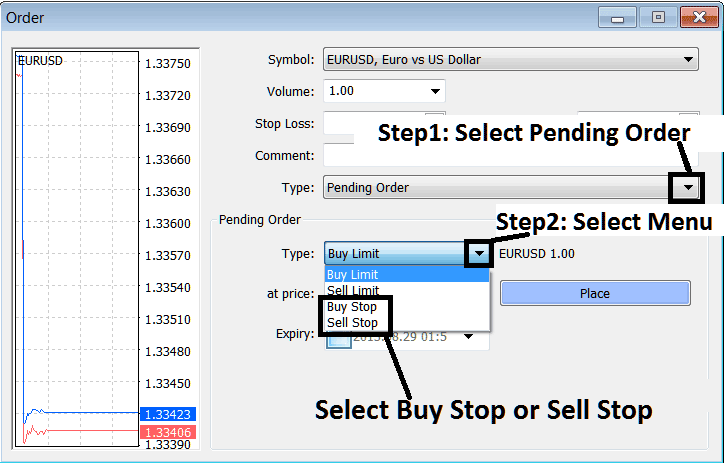
How Do You Set Gold Pending Orders in MetaTrader 4?
Interpret & Set Gold Pending Orders on XAUUSD MT4 Trading Software?




