How Do You Set XAUUSD Sell Orders in MetaTrader 5 Gold Charts?
How Do You Set XAUUSD Sell Orders in MetaTrader 5 XAUUSD Charts?
To set a new xauusd trading Sell order in MT5 platform use the procedure explained below:
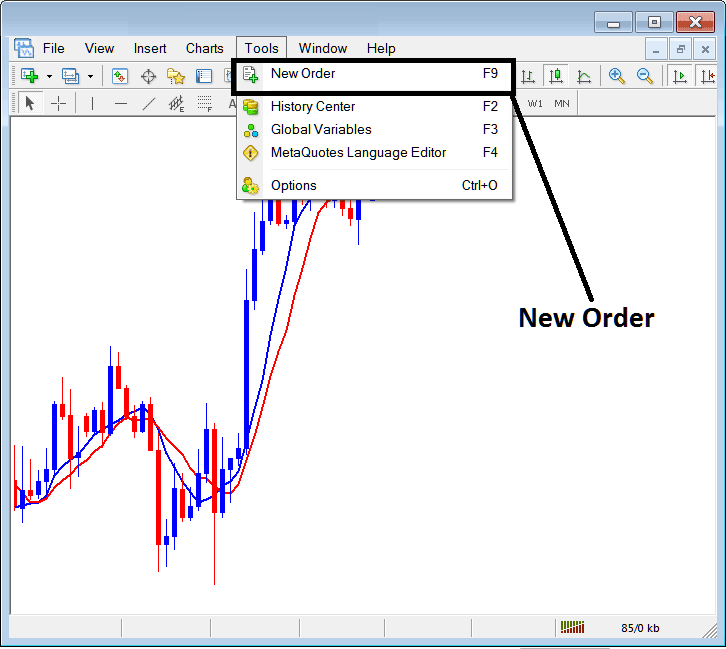
Place New Sell Order on Tools Menu in MetaTrader 5
A new xauusd trading Sell order to buy or sell a trade can be found on the tools menu that is found in the MetaTrader 5 XAUUSD Trading Software as illustrated below. New order button key for placing a new trade transaction is shown below. (MT5 Short Cut Keyboard Keys "F9")
How Do You Set XAUUSD Sell Orders in MetaTrader 5 XAUUSD Charts
Placing a New Sell Gold Order
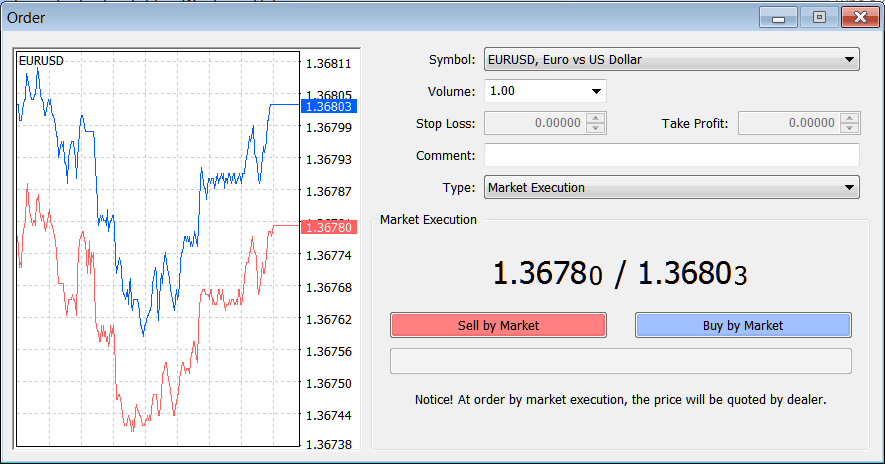
Once you select the new xauusd order button as illustrated above the following gold order popup window will appear.
This pop-up includes settings for placing a new gold trading Sell order.
How Do You Set XAUUSD Sell Orders in MetaTrader 5 XAUUSD Charts?
The Following Order Setting are specified for setting a new xauusd trading Sell order:
Sell by Market - Open a Sell XAUUSD Trade
To Sell at current gold price & open new xauusd order choose the Sell by Market xauusd order button as shown above.
How Do You Set XAUUSD Sell Orders in MetaTrader 5 XAUUSD Charts




