How to Add MT5 Rate of Change, ROC Indicator in MetaTrader 5 Charts
Step 1: Open MetaTrader 5 Software Navigator Window Panel
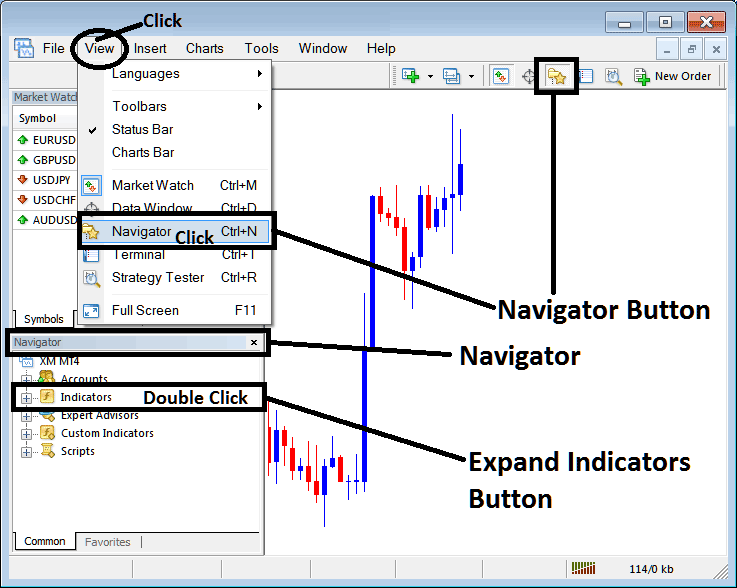
Open MetaTrader 5 Navigator window as explained on the MT5 example below: Go to "View" menu (click), then choose the "Navigator" window (click), or From Standard Tool Bar click the "Navigator" button or press keyboard MT5 shortcut keys "Ctrl+N"
On MT5 Navigator window, select "Indicators", by Double Clicking
How Do You Use MT5 Rate of Change, ROC Technical Indicator in MT5?
How to Add Rate of Change, ROC MT5 Indicator
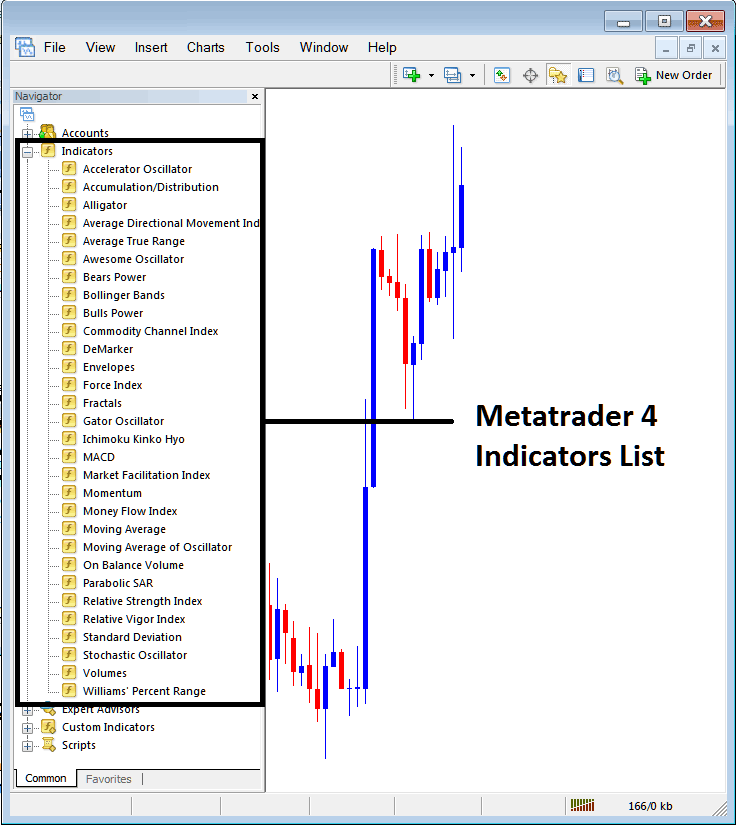
Expand the menu by clicking the expand button (+) or double click the "indicators" menu, after this the button will be displayed as (-) and will now display MT5 indicators list as explained on the MT5 example below - select the Rate of Change, ROC technical indicator from this list of MT5 indicators so that you can add the Rate of Change, ROC MT5 technical indicator on the MT5 forex chart.
How Do You Use MT5 Rate of Change, ROC Technical Indicator in MT5?
How to Place Forex Custom Rate of Change, ROC Indicator on MT5
If the MT5 indicator that you want to add on the MT5 charts is a custom MT5 technical indicator - for example if the Rate of Change, ROC technical indicator that you want to add is a custom MT5 technical indicator you will need to first add this custom Rate of Change, ROC MT5 technical indicator on the MT5 platform & then compile custom Rate of Change, ROC technical indicator so that the newly added Rate of Change, ROC MT5 custom indicator pops up on the list of custom technical indicators on the MT5 platform.
To learn how to add Rate of Change, ROC indicators on MT5 platform - how do you add Rate of Change, ROC indicator window to MT5 platform? - how do you add Rate of Change, ROC forex custom indicator on MT5 platform? - How to add custom Rate of Change, ROC custom forex indicator on MT5.
How Do You Use Rate of Change, ROC MT5 Indicator?
Rate of Change Technical Indicator Technical Analysis Buy & Sell Signals
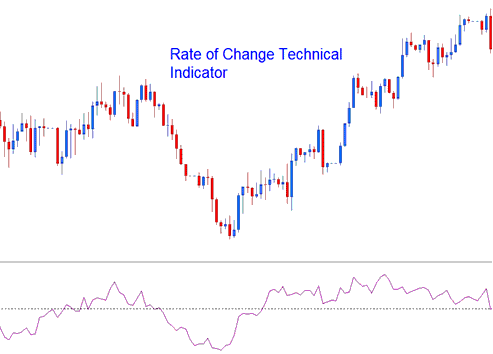
Rate of Change, ROC indicator is used to calculate how much forex price has changed within a specified number of forex price periods. It calculates the difference between the current candlestick and the forex price of a chosen number of previous candles.
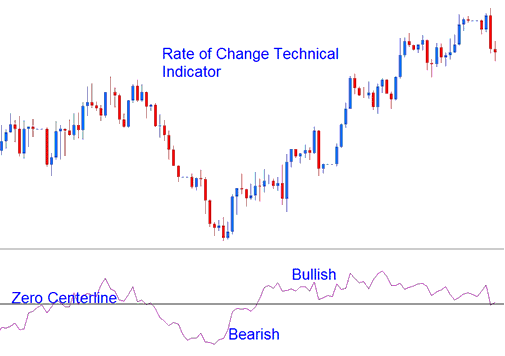
The difference can be calculated using Points or Percents. Rate of Change moves in an oscillation manner, where it oscillates above and below a zero center-line level. Levels above zero are bullish while those below zero center-line level are bearish.
The greater the changes are in the forex prices the greater the changes in the ROC.
How to Add MetaTrader 5 Rate of Change, ROC Indicator in MetaTrader 5 Charts
How to Generate Buy and Sell Signals
Rate of Change, ROC indicator can be used to generate trading forex signals using a number of forex technical analysis methods - the most common forex technical analysis methods are:
Crossover Signals
Forex Buy Signal - a buy trading forex signal is generated when the Rate of Change, ROC indicator crosses above the zero center line mark.
Forex Sell Signal - a sell trading forex signal is generated when the Rate of Change, ROC indicator crosses below the zero center line mark.
Bullish Trend Bearish Trend Technical Indicator
Overbought and Oversold Levels:
Bullish Trend Bearish Trend Technical Indicator
Overbought levels - The higher the Rate of Change, ROC indicator reading the more overbought a forex instrument is. Rate of Change, ROC indicator values that are above the overbought level signal that the forex market is in overbought regions and there is likely to be a pending forex price correction
Oversold levels - The lower the Rate of Change, ROC indicator reading the more oversold a forex instrument is. Rate of Change, ROC indicator values below the oversold level signal that the forex market is in oversold regions and there is likely to be a pending forex price rally.
However, during strong forex trending markets the forex price will remain in the Overbought and Oversold Levels for a long time and rather than the forex price reversing its direction the forex price trend will continue in its direction for quite some time. It is therefore best to use the Rate of Change, ROC indicator crossover forex signals as the official buy and sell trading forex signals for this forex indicator.
Forex Trading Trend Line Breaks
Forex trend lines can be drawn on Rate of Change, ROC indicator just the same way trend lines can be drawn on the forex price charts. Because The Rate of Change is a leading forex indicator, the trend lines on the Rate of Change, ROC indicator will be broken before the trend lines that are on the forex price charts. A forex trendline break on the Rate of Change, ROC indicator is a signal of a bullish forex trend reversal or bearish forex reversal signal.
- Bearish Forex Trend Reversal Signal - Rate of Change, ROC indicator readings breaking above a downwards forex trend line signals of a likely bullish forex trend reversal.
- Bearish Forex Trend Reversal Signal - Rate of Change, ROC indicator readings breaking below an upwards forex trend line signals of a likely bearish forex trend reversal.
Divergence Trading Forex
Rate of Change, ROC indicator can be used to trade forex divergence trading setups, and to identify potential forex trend reversal signals. There are four types of divergences: classic bullish forex divergence, classic bearish forex divergence, hidden bullish forex divergence and hidden bearish forex divergence.
How Do You Use MT5 Rate of Change, ROC Technical Indicator in MT5? - Rate of Change, ROC MT5 Indicator Setting
