How to Add MT5 Kurtosis Indicator in MetaTrader 5 Charts
Step 1: Open MetaTrader 5 Platform Navigator Panel
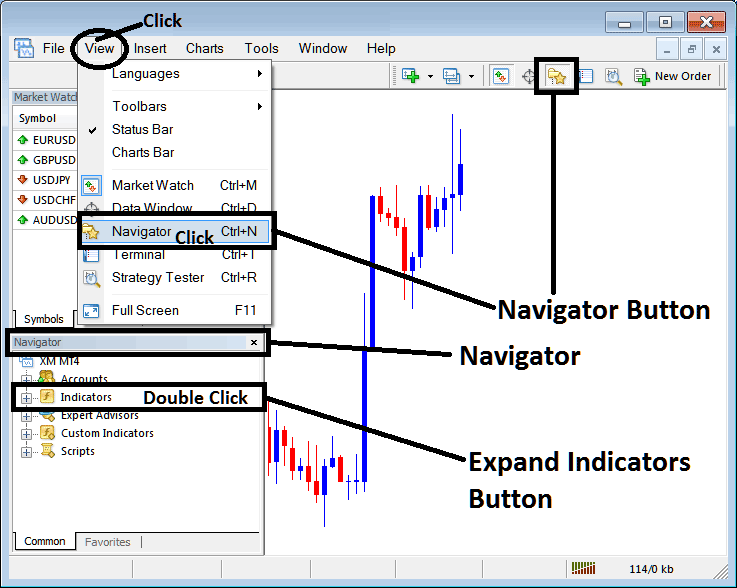
Open MetaTrader 5 Navigator window as explained on the MT5 example below: Go to "View" menu (click), then choose the "Navigator" window (click), or From Standard Tool Bar click the "Navigator" button or press keyboard MT5 shortcut keys "Ctrl+N"
On MT5 Navigator window, select "Indicators", by Double Clicking
How Do You Use MT5 Kurtosis Technical Indicator in MT5?
How to Add Kurtosis MT5 Indicator
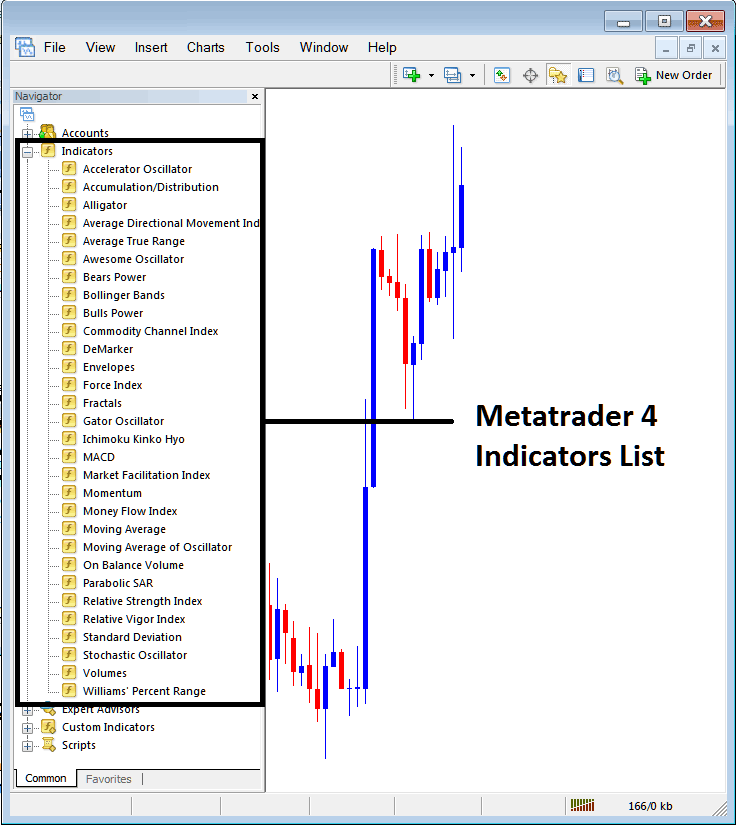
Expand the menu by clicking the expand button (+) or double click the "indicators" menu, after this the button will be displayed as (-) and will now display MT5 indicators list as explained on the MT5 example below - select the Kurtosis technical indicator from this list of MT5 indicators so that you can add the Kurtosis MT5 technical indicator on the MT5 forex chart.
How Do You Use MT5 Kurtosis Technical Indicator in MT5?
How to Place Forex Custom Kurtosis Indicator on MT5
If the MT5 indicator that you want to add on the MT5 charts is a custom MT5 technical indicator - for example if the Kurtosis technical indicator that you want to add is a custom MT5 technical indicator you will need to first add this custom Kurtosis MT5 technical indicator on the MT5 platform & then compile custom Kurtosis technical indicator so that the newly added Kurtosis MT5 custom indicator pops up on the list of custom technical indicators on the MT5 platform.
To learn how to add Kurtosis indicators on MT5 platform - how do you add Kurtosis indicator window to MT5 platform? - how do you add Kurtosis forex custom indicator on MT5 platform? - How to add custom Kurtosis custom forex indicator on MT5.
How Do You Use Kurtosis MT5 Indicator?
Kurtosis Indicator Technical Analysis Buy & Sell Signals
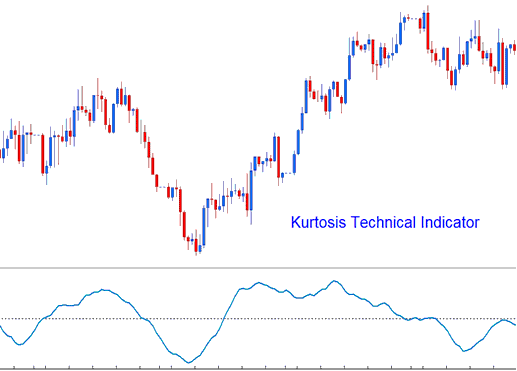
Kurtosis indicator is used to help determine the forex market sentiment.
Kurtosis indicator is calculated in 3 parts.
- Kurtosis portion
- Fast Kurtosis
- Fast/Slow Kurtosis
The Kurtosis portion is calculated using the formula:
K = n forex price periods momentum - n forex price periods momentum of 1 forex price bar before (the current forex price bar momentum value minus the previous forex price bar momentum value)
The Fast Kurtosis portion is calculated using the formula:
FK = n forex price periods moving average of K
Fast/Slow Kurtosis portion is calculated using the formula:
FSK = n forex price periods moving average of FK
How to Add MetaTrader 5 Kurtosis Indicator in MetaTrader 5 Charts
How to Generate Buy and Sell Signals
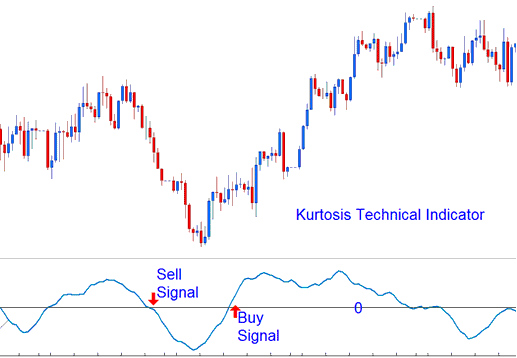
Forex Buy Signal - A buy trading forex signal is generated when the Kurtosis indicator crosses above zero center line mark.
Forex Sell Signal - A sell trading forex signal is generated when the Kurtosis indicator crosses below zero center line mark.
How Do You Use MT5 Kurtosis Technical Indicator in MT5?
