How to Add MT5 Linear Regression Slope Indicator in MetaTrader 5 Charts
Step 1: Open MetaTrader 5 Platform Navigator Panel
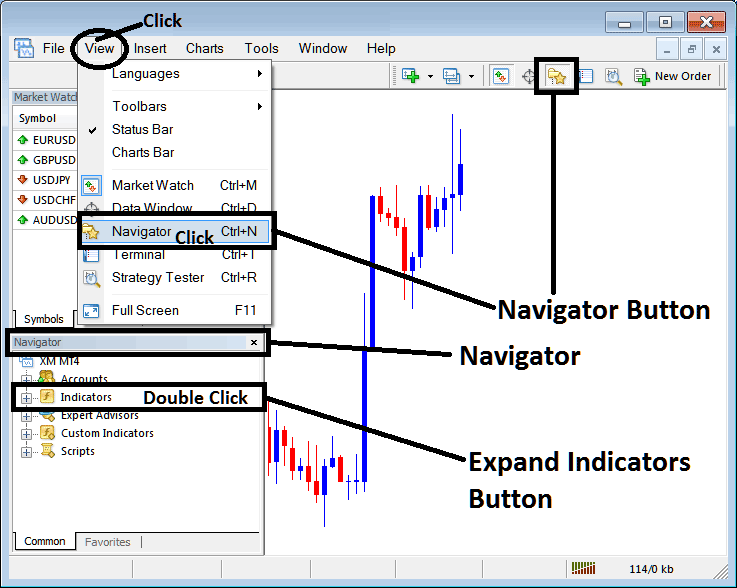
Open MetaTrader 5 Navigator window as explained on the MT5 example below: Go to "View" menu (click), then choose the "Navigator" window (click), or From Standard Tool Bar click the "Navigator" button or press keyboard MT5 shortcut keys "Ctrl+N"
On MT5 Navigator window, select "Indicators", by Double Clicking
How Do You Use MT5 Linear Regression Slope Technical Indicator in MT5?
How to Add Linear Regression Slope MT5 Indicator
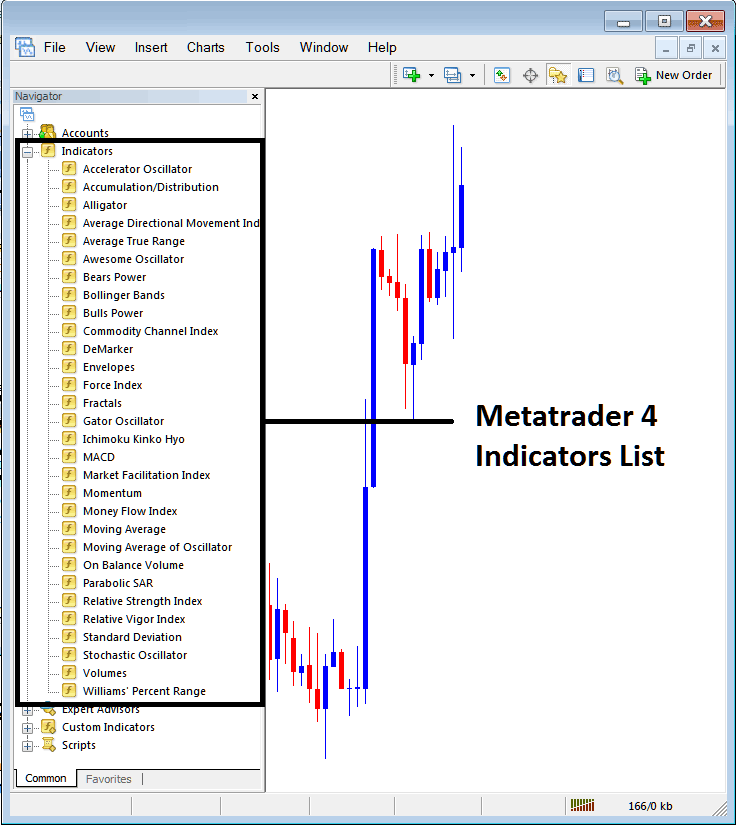
Expand the menu by clicking the expand button (+) or double click the "indicators" menu, after this the button will be displayed as (-) and will now display MT5 indicators list as explained on the MT5 example below - select the Linear Regression Slope technical indicator from this list of MT5 indicators so that you can add the Linear Regression Slope MT5 technical indicator on the MT5 forex chart.
How Do You Use MT5 Linear Regression Slope Technical Indicator in MT5?
How to Install and Place Custom Linear Regression Slope Indicator MT5
If the MT5 indicator that you want to add on the MT5 charts is a custom MT5 technical indicator - for example if the Linear Regression Slope technical indicator that you want to add is a custom MT5 technical indicator you will need to first add this custom Linear Regression Slope MT5 technical indicator on the MT5 platform & then compile custom Linear Regression Slope technical indicator so that the newly added Linear Regression Slope MT5 custom indicator pops up on the list of custom technical indicators on the MT5 platform.
To learn how to add Linear Regression Slope indicators on MT5 platform - how do you add Linear Regression Slope indicator window to MT5 platform? - how do you add Linear Regression Slope forex custom indicator on MT5 platform? - How to add custom Linear Regression Slope custom forex indicator on MT5.
How Do You Use Linear Regression Slope MT5 Indicator?
Linear Regression Slope Indicator Technical Analysis Buy & Sell Signals
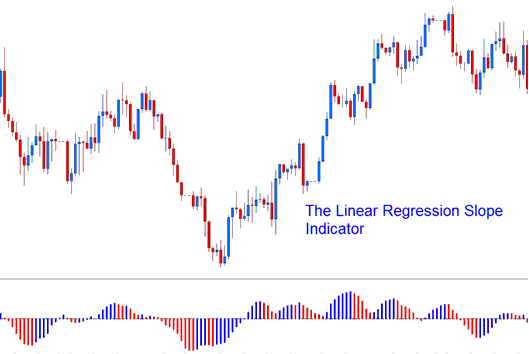
The Linear Regression Slope indicator calculates the gradient/slope value of regression lines which include the current forex price bar & the previous n-1 forex price bar (where n = regression forex price periods)
Linear Regression Slope indicator calculates this value and updates it for each forex price candlestick updated on the forex price chart.
Linear Regression Slope indicator is calculated from the Linear Regression indicator. The Linear Regression indicator draws the forex trend of the price chart over a specified time duration and this forex market trend is determined by drawing a Linear Regression Trend Line using the "least squares fit" method. The slope of this Linear Regression trend line is then calculated and this then forms the Linear Regression Slope indicator.
How to Add MetaTrader 5 Linear Regression Slope Indicator in MetaTrader 5 Charts
The Linear Regression Slope indicator values are then smoothed by multiplying the raw slope forex indicator values by 100 and then dividing this value by the forex price
Linear Slope Regression = (raw value of slope * 100 / forex price).
The smoothing of the Linear Regression Slope indicator slope values is essential when comparing forex markets that are volatile and forex market that trade within wide forex price ranges for each of the forex price candle. The smoothed slope value will show the percentage change in the forex price for each forex candlestick used to calculate the regression (best fit) line.
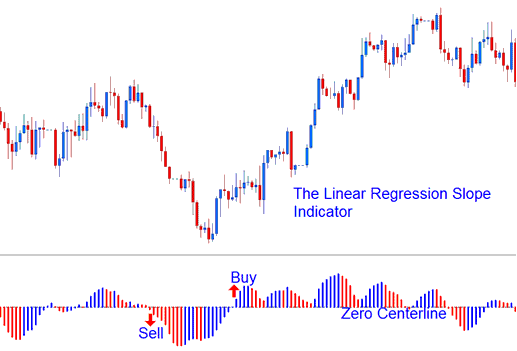
How to Generate Buy and Sell Signals
- If the smoothing of the Linear Regression Slope indicator is 0.30, then the regression line is rising and adjusting its movement at a rate of 0.30% for every forex price candlestick.
- If the smoothing of the Linear Regression Slope indicator is -0.30, then the regression line is going down and adjusting its movement at a rate of -0.30% for every forex price candlestick.
The Linear Regression Slope indicator is displayed as a bi color histogram that oscillates above and below the zero center line mark. The center line mark that is used to generate forex signals is set at 0 level.
- A rising Linear Regression Slope indicator slope (greater than the previous value of 1 forex candlestick ago) is displayed in the Blue/Upward Slope color,
- A declining Linear Regression Slope indicator slope (lower than the previous value of 1 forex price candlestick ago) is displayed in the Red/Downward Slope color.
How Do You Use MT5 Linear Regression Slope Technical Indicator in MT5?
