How Do You Use Recursive Moving Trend Average MT5 Indicator?
Recursive Moving Trend Average Indicator Technical Analysis & Buy & Sell Signals
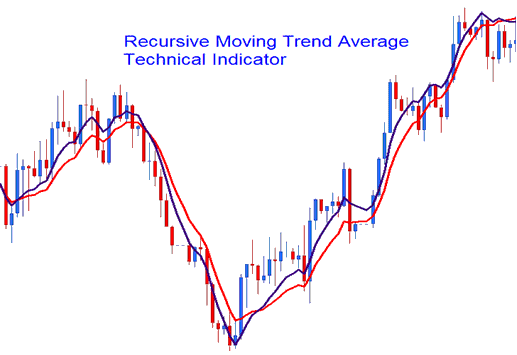
Recursive Moving Trend Average forex technical indicator is calculated using mathematical polynomial fit and the formula is referred as Recursive Moving Polynomial Fit.
The formula used to calculate the Recursive Moving Trend Average forex technical indicator only requires a small set of previous forex price data to calculate and predict the next likely forex market direction of forex price movement. The Recursive Moving Trend Average forex technical indicator example below shows two Recursive Moving Trend Averages combined to form a Recursive Moving Trend Average forex technical indicator crossover forex trading method.
How to Add MT5 Recursive Moving Trend Average Indicator on MetaTrader 5 Charts
How to Generate Buy and Sell Signals
The best forex technical analysis method to use for the Recursive Moving Trend Average forex technical indicator is the crossover forex trading method where you can combine two Recursive Moving Trend Average forex technical indicators, such as the 10 forex price and 15 forex price period Recursive Moving Trend Average forex technical indicator. When the two Recursive Moving Trend Averages crossover each other upwards - this is interpreted as a forex trading buy signal.
When the two Recursive Moving Trend Averages crossover each other downwards - this is interpreted as a forex trading sell signal.

Recursive Moving Trend Average Buy Forex Signal & Sell Signal
Recursive Moving Trend Average forex technical indicator looks similar to the moving average forex technical indicator - the only difference is that Recursive Moving Trend Average forex technical indicator is much smoother due to the method of its calculation and is much less prone to forex whipsaw signals.
How to Add MT5 Recursive Moving Trend Average Indicator on MetaTrader 5 Charts
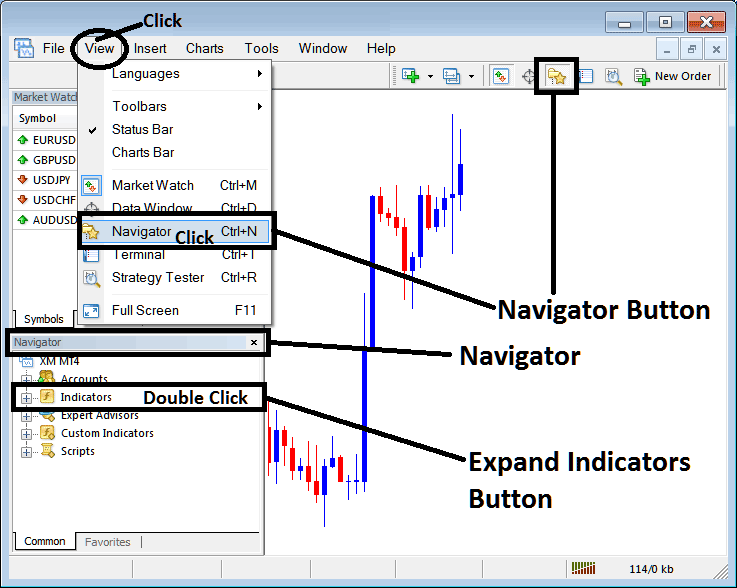
Step 1: Open MetaTrader 5 Platform Navigator Panel
Open MetaTrader 5 Navigator window as shown below: Go to "View" menu (click), then select "Navigator" window (click), or From Standard Tool Bar click the "Navigator" button or press keyboard MT5 shortcut keys "Ctrl+N"
On MT5 Navigator window, select "Indicators", by Double Clicking
How Do You Use MT5 Recursive Moving Trend Average Indicator?
How to Add Recursive Moving Trend Average MT5 Indicator
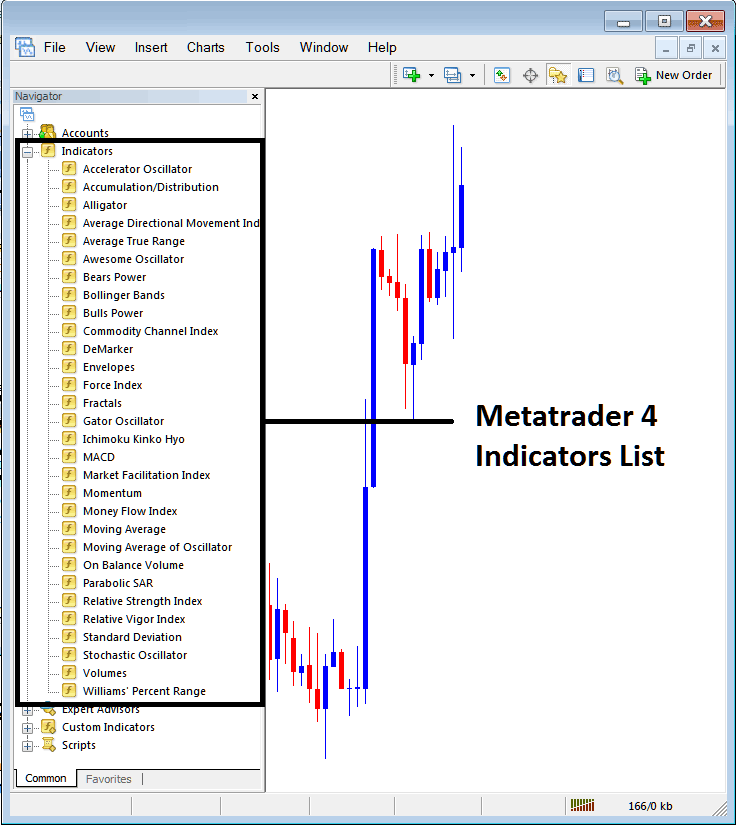
Expand the menu by clicking the expand button (+) or double click the "indicators" menu, after this the button will appear as (-) and will now display a list of MT5 technical indicators as shown below - choose the Recursive Moving Trend Average forex indicator from this list of MT5 technical indicators so that you can add the Recursive Moving Trend Average MT5 technical indicator on the MT5 forex chart.
How Do You Use MT5 Recursive Moving Trend Average Indicator?
How to Install and Place Custom Recursive Moving Trend Average Indicator MetaTrader 5
If the MT5 indicator that you want to add on the MT5 charts is a custom MT5 indicator - for example if the Recursive Moving Trend Average indicator that you want to add is a custom MT5 indicator you will need to first add this custom Recursive Moving Trend Average MT5 technical indicator on the MT5 platform and then compile this custom Recursive Moving Trend Average forex indicator so that this newly added Recursive Moving Trend Average MT5 forex custom indicator appears on the custom forex indicators list on the MT5 platform.
To learn how to add Recursive Moving Trend Average indicators in MT5 - how do you add Recursive Moving Trend Average indicator window to MT5 platform? - how do you add Recursive Moving Trend Average forex custom indicator on MetaTrader 5? - How to add a custom Recursive Moving Trend Average custom technical indicator on MetaTrader 5.
How Do You Use MT5 Recursive Moving Trend Average Indicator?




