XAUUSD Draw Fibo Projection on MetaTrader 5
XAUUSD Draw Fibo Projection on MT5 XAUUSD
Draw Gold Trading Fibonacci Projections
Steps to Place MetaTrader 5 Fibonacci Projection Levels indicator: Fib Projection Levels xauusd trading tool is not shown by default in MT5 settings, if the Fibonacci Projection Gold Indicator Tool does not appear on your MetaTrader 5 platform, (no need to download this MetaTrader 5 Fibonacci Projection indicator) then locate the "MetaTrader 5 Line Studies Toolbar" shown below and follow the steps below to add the MT4 Fibonacci Projection Levels trading xauusd Tool on MetaTrader 5:
1. MT5 Line Studies ToolBar - Draw MetaTrader 5 Fibonacci Projection Zones on MetaTrader 5?
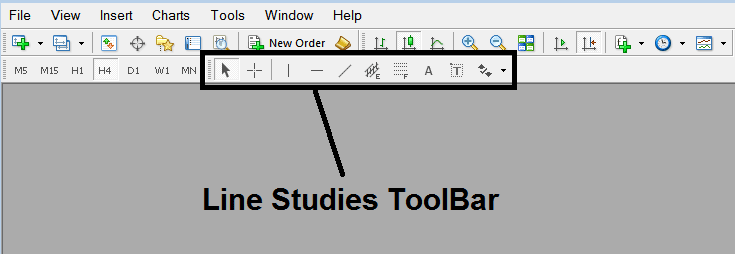
Draw Fibonacci Projection on MT5
2. Customize Line Studies Tool-bar - Draw MetaTrader 5 Fibonacci Projection Levels in MT5
Right click the Customize button key (illustrated and shown below) >>> A drop-down menu appears, Select Customize >>>
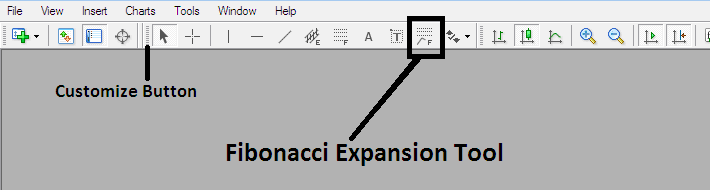
XAUUSD Draw Fibo Projection on MetaTrader 5
3. Place This MT5 Fibonacci Projection Tool on MT5 - Draw Fibonacci Projection Gold Indicator Tool on MT5 XAUUSD Charts
Select the MT5 Fibonacci Projection XAUUSD Indicator tool from the popup window which will then appear >>> Click Insert button >>> Click Close. (MetaTrader 5 Fibonacci Projection XAUUSD Indicator Shown Below)
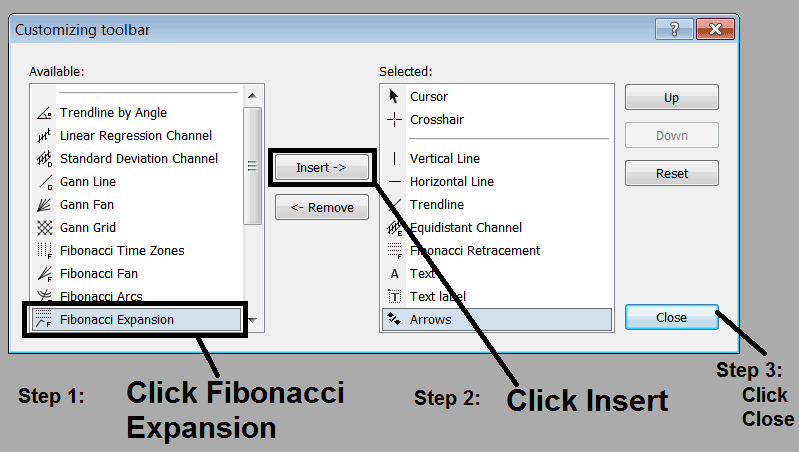
Place Fibonacci Projection Tool on MT5 - Draw Fibonacci Projection Gold Indicator Tool on MT5 XAUUSD Charts
4. Fibonacci Projection XAUUSD Indicator Added - Trading Gold Add MetaTrader 5 Fibonacci Projection Tool on MetaTrader 5>->
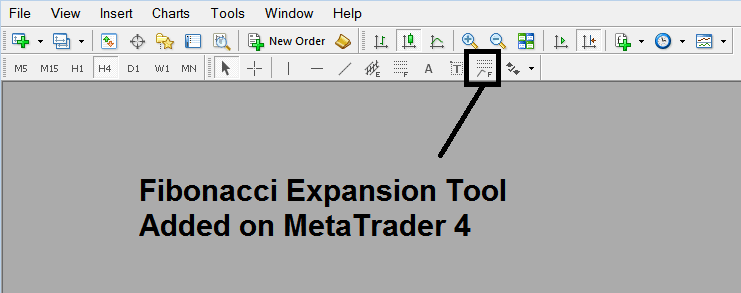
XAUUSD Draw Fibo Projection on MT5 XAUUSD?
Draw MetaTrader 5 Fibonacci Projection Indicator
A trader can then select the Fibo Projection Gold Indicator Tool shown above on the MetaTrader 5 platform & then use this Fibo Projection tool to place this trading gold technical indicator on the xauusd chart & use this Fibonacci Projection tool to determine the Fibonacci Projection Zones on the xauusd charts.
XAUUSD Draw Fibo Projection on MetaTrader 5




