XAUUSD Trading Test MQL5 Automated XAUUSD Robots Expert Advisors
How to Test MQL5 Automated XAUUSD Robots Expert Advisors
To test an MQL5 automated xauusd robot or strategy first login to your MQL5 account from your MetaTrader 5 platform as shown below.
How to log in to MQL5 Account from MT5 XAUUSD Platform - MQL5 Log-in.
- Open MT5 XAUUSD Platform.
- Select the "Tools Menu".
- Click "Options Menu".
- Select The 'MQL5 Forum Tab' Shown below.
- Type your MQL5 Log in Account Name and Password.
Trading XAUUSD Test MQL5 Automated XAUUSD Robots - MQL5 Account Login
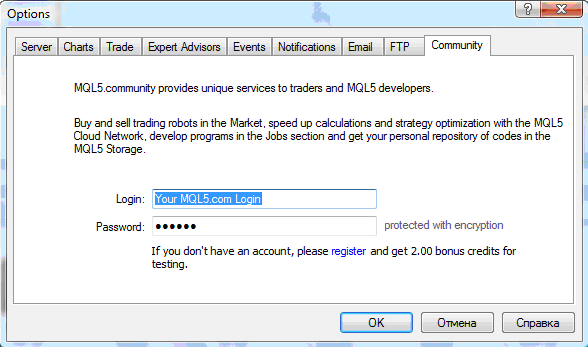
Trading Gold Sign in to MQL5 Account and Access MQL5 XAUUSD Expert-Advisors Market Robots
Once you login to this MQL5 account navigate to the Market Tab on the MetaTrader 5 platform as shown below.
Trading XAUUSD Select an Automated XAUUSD Bots
All EA XAUUSD EAs are listed on the MT5 automated xauusd platform have snap-shots and a brief review that one can click and find more information about Expert Advisor.

Trading XAUUSD Select an Automated XAUUSD Robots - MQL5 EA Bots
Trading XAUUSD Select an Automated Gold Robot
Upon clicking on any of these automated xauusd robots, one can read the review the trading data of the automated Expert-Advisor which will include even history of the xauusd trades made.
A XAUUSD Trader can then select an automated xauusd robot from the list of the Automated trading Expert Advisors provided depending on the EA that is most profitable & suitable for them based on their gold trading strategy.
These automated xauusd EA XAUUSD Trading Bots can also be used to trade other financial instruments.
MT5 Robots Demo Download Version
Before buying an automated xauusd robot, there is an option to test it out and find the automated xauusd robots that work for you before buying - by downloading the demo version of the automated xauusd robot that you want and testing it out and get an illustration of how the Automated Trading Bot works before purchasing it. This way you can try out the automated xauusd Expert-Advisor you want by testing its strategy using MT5 strategy tester window.
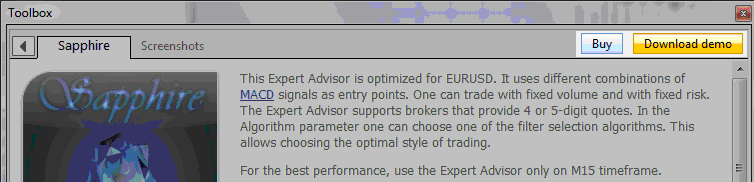
MetaTrader 5 Bots Demo Download Edition - MQL5 XAUUSD Expert Advisors Market XAUUSD Robots Testing
From the above examples, screenshot shows you how to setup an Expert Advisor from the MT5 toolbox by buying it from the MQL5 XAUUSD EA Market using your credit points or by first downloading the demo automated robot download version to test out how the automated xauusd Expert Advisor Robot works.
All these automated xauusd robots are available from MQL5 XAUUSD EA Market and they can also be accessed from the MT5 XAUUSD Software. Once a trader obtains an Automated XAUUSD Robot they can then activate and launch this application from 3 different Computers.
XAUUSD Trading Test MQL5 Automated XAUUSD Robots Expert Advisors




