How to Get Into XAUUSD using Practice Account
How to Register for a Demo XAUUSD Practice Account
Trading XAUUSD open XAUUSD Trading demo account MT4 - procedure of how to register for a demo xauusd account described:
How to Register for a XAUUSD Demo Practice Account
To Register for a Demo Account open the MT4 software.
On the top left corner of MetaTrader 4 platform: click File button then click "Open an Account" button as shown below.
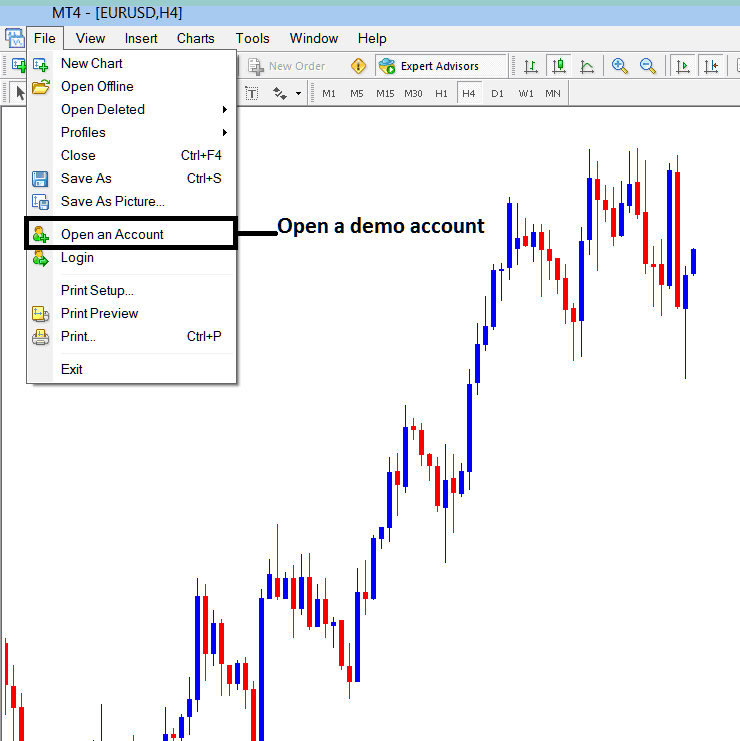
How to Register for a XAUUSD Demo Trading Practice Account - XAUUSD Demo Account MT4
Once you click open practice xauusd account link you will be taken to your xauusd MetaTrader broker web site where you can register for practice xauusd account details of a XAUUSD Trading demo practice xauusd account - xauusd trading demo account MT4 practice gold trading account.
Next step is to fill the following xauusd trading MT4 demo xauusd account registration form shown below, the required information is:
- Your first name
- Last name
- Country
- City or town
- Phone number
- E-mail address.
After filling these xauusd demo sign up account details on the form below, click the open practice xauusd account button.
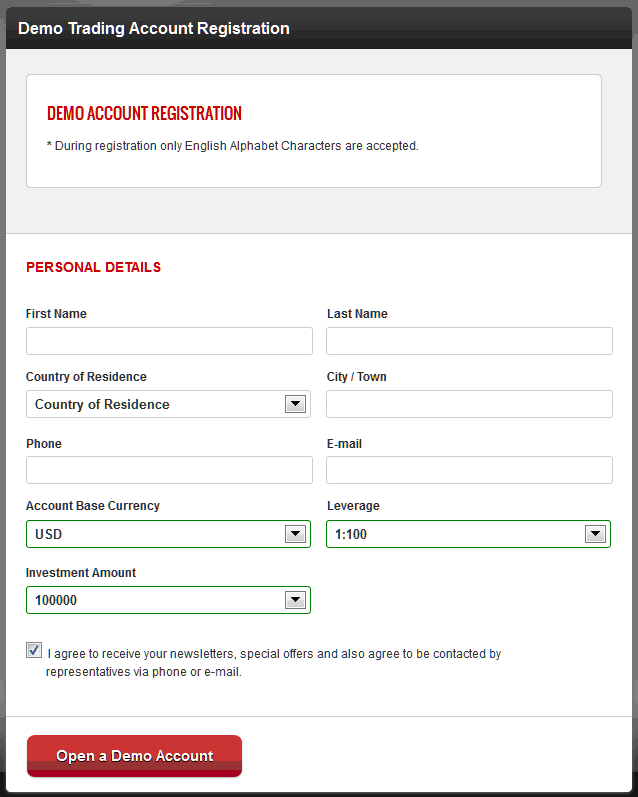
MT4 XAUUSD Demo Trading Account Registration - How to Register for XAUUSD Trading Demo Practice Trading Account?
Trade XAUUSD Trading with Demo Account - XAUUSD Trading Register for a Demo XAUUSD Practice Account




