Trading Bitcoin Interpret and Use Fibonacci Retracement Areas on MetaTrader 5
How Do I Trade Bitcoin and Use Fibonacci Retracement Areas on MetaTrader 5?
Procedure on how to use Fibonacci Retracement Areas Technical Indicator on MetaTrader 5 is explained below:
Fibonacci Retracement Areas Technical Indicator on the MetaTrader 5 platform will automatically draw the bitcoin price retracement levels on a cryptocurrency chart once this Fibo retracement levels cryptocurrency indicator is placed on the bitcoin chart.
To add this Fibonacci Retracement Levels bitcoin indicator on the MetaTrader 5 platform, you can use the following MetaTrader 5 platform short cut method:
1. Click Insert 2. Click Fibonacci 3. Click Retracement
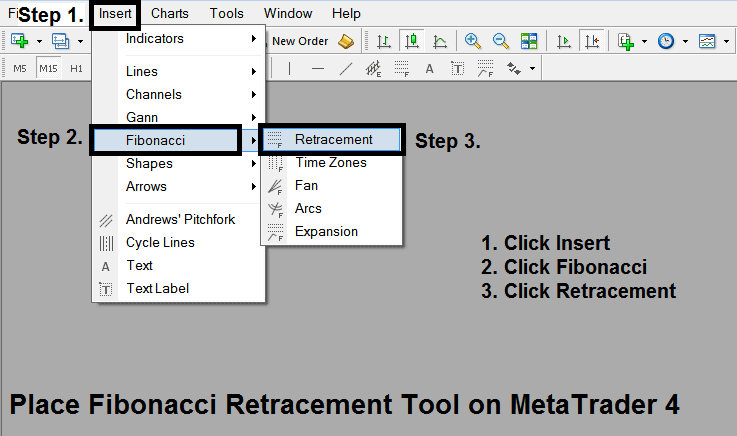
Trading Crypto Interpret and Use Fibonacci Retracement Areas on MetaTrader 5
After adding Fibonacci Retracement Areas Technical Indicator on the MetaTrader 5 platform this cryptocurrency technical indicator can then be accessed from 'MT5 Line Studies Tool Bar' as shown on the cryptocurrency trading example illustrated below.
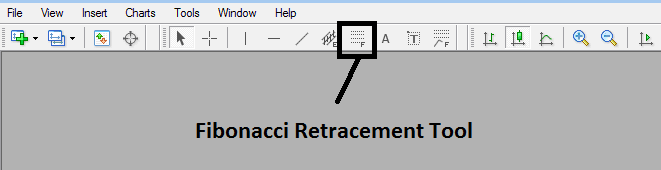
How Do I Use Fibonacci Retracement Areas on MT5 Bitcoin Trading?
This Fibonacci Retracement levels bitcoin trading tool is located on MT5 platform (Line Studies Tool Bar) - to go to this MetaTrader 5 line studies tool bar click 'View' button at top left corner of MetaTrader 5 platform next to file, then click 'Toolbars' - Then Check 'Line Studies'.
How Do I Use Fibonacci Retracement Areas on MT5 Bitcoin Trading?