Trading Stocks Read and Open a Stocks Trading Chart on MetaTrader 4
Stocks Trading Open a Stocks Trading Chart on MetaTrader 4
To trade on the Stocks MT4 software you will need to start with the basic tutorials used to learn about the MT4 Stocks Software Setup. These courses are illustrated below:
- Opening a MetaTrader 4 Stocks Practice Account Procedure
- Open a Stocks MetaTrader 4 Chart
- Sign in to a MT4 Trading Account
Trading Stock Open a Stocks Trade Chart in MetaTrader 4 Platform
Once you have opened a demo account the next step is to open a Stocks chart so as to start trading.
For this example let's start with a blank screen on the MT4 interface.
To open a new chart from the stocks example illustrated and explained below, click the "File" tab at the tops left corner as shown below, then select the option "New Chart".
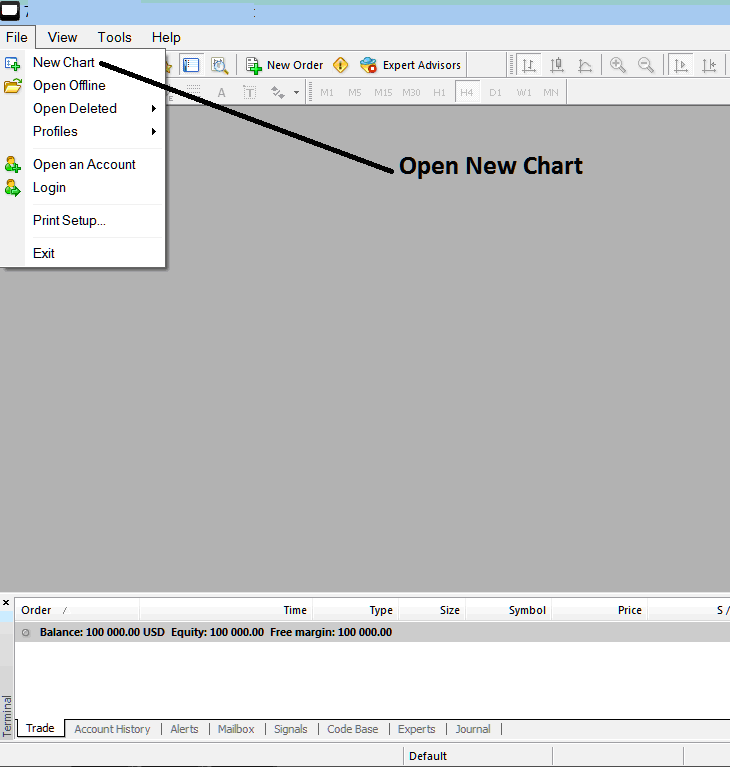
Read and Open a Stocks Trading Chart in MT4 Platform - Open a Stocks Trading Chart in MT4?
After clicking "New Chart" a drop-down menu will appear with a list of instruments that as a trader you can choose which to open.
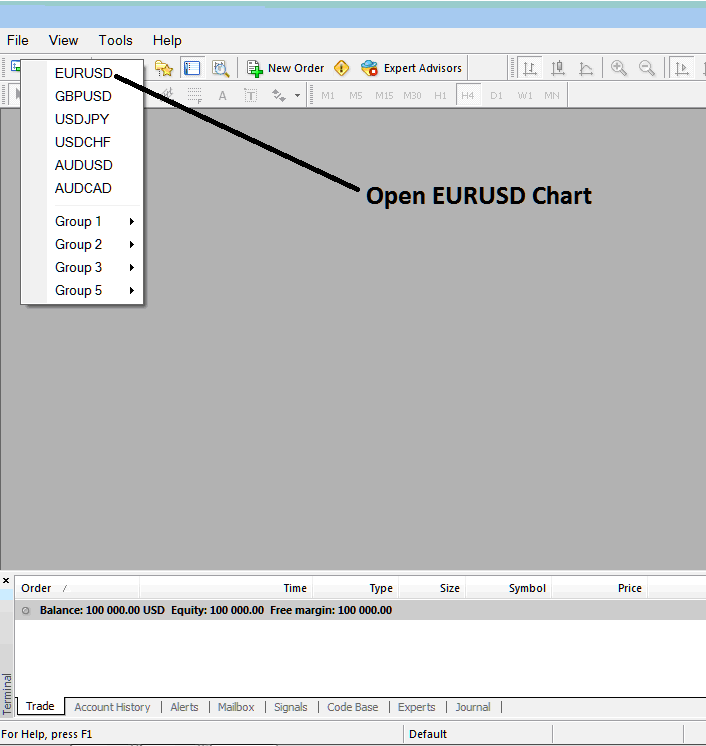
Read and Open a Stocks Trading Chart in MT4 Platform - Open a Stocks Trading Chart in MT4?
Read and Open a Stocks Trading Chart on MetaTrader 4




