Trading XAUUSD Open a Real XAUUSD Account from MetaTrader 4 XAUUSD Platform
To open a real xauusd account from the MetaTrader 4 platform - go to the profiles menu, Select File, then select open an account.
Once you select the open account option you'll select the practice xauusd account if you want to open a MetaTrader 4 practice xauusd account or you will choose the real account option if you want to open a MetaTrader 4 real gold trading account.
How to Open a XAUUSD Practice Account or XAUUSD Real Account from MetaTrader 4 XAUUSD Platform
To open a xauusd account from MetaTrader 4 software. Use the xauusd step by step procedure below explaining how to open a real account or a demo xauusd account using the MT4 platform example shown below.
Using the MT4 software, on the tops left corner: click File then click "Open an Account" button as displayed below.
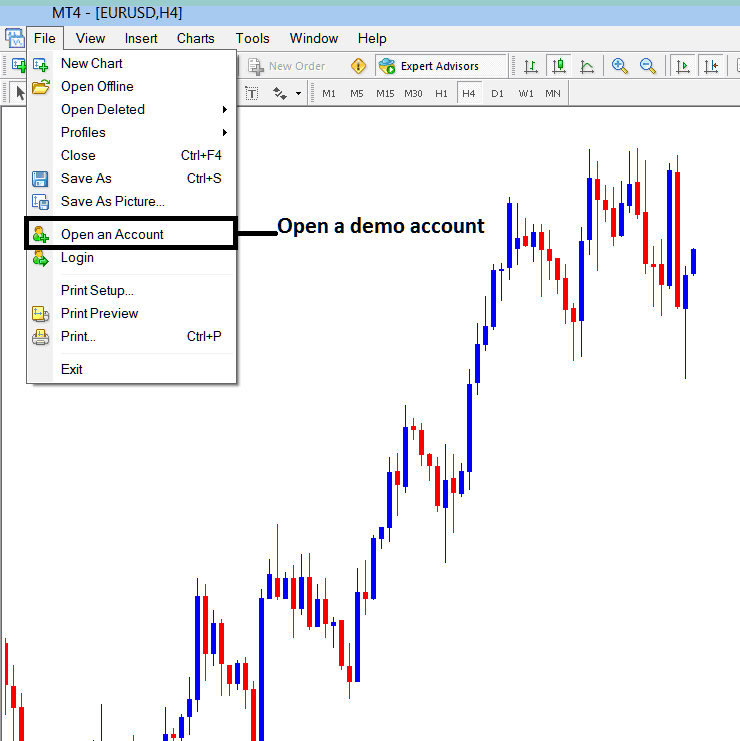
Choose Open a Practice Account or Select Open a Real Account Option on the MetaTrader 4 Platform
Once you select the MT4 xauusd account type that you want to open you will then fill out the xauusd account opening form.
Once you fill out the xauusd account opening form and your MT4 xauusd account is registered you will then get an account sign in number & account login password. You will then use this xauusd account sign in number & account login password to login to your MetaTrader 5 gold trading account.
Once you login to your MetaTrader 4 xauusd account you can open xauusd charts, select the xauusd that you want to trade and then open gold trades from this MT4 software.
The MT4 platform will connect to your xauusd broker servers & place your trades online through your xauusd broker.




