Commodity Trading Trend Technical Indicators
Pivot Points are used by traders to find support and resistance levels based on the previous day's commodity price action.
Pivot Points indicator is a very useful tool that use the previous bars' highs, lows and closings to project support & resistance levels for future bars.
Pivot Points indicator provides an idea of where key support and resistance should be. Place the pivot points on your commodities charts and commodity price will bounce off one of these levels. These levels are used by traders to determine market tops, market bottoms or commodity trend reversals.
- Daily pivots points are calculated from previous day's high, low, close
Pivot Points indicator is shown below
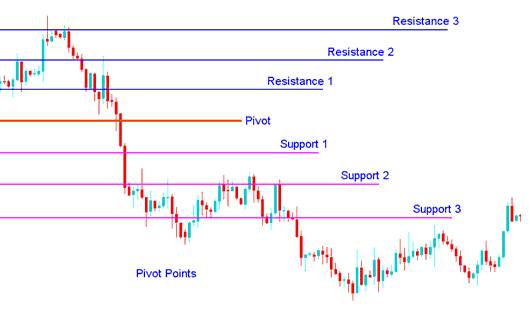
Technical Analysis in Commodity Trading
The central pivot itself is the primary level, which is used to determine the trend
The other support & resistance levels are also important in calculating areas that can generate significant market movements.
Pivot Points indicator can be used in 2 ways
The first way is for determining overall Commodity Trading trend: if the pivot point is broken in an upward movement, then the commodities trading market is bullish, and vice versa. However, pivot levels are short term commodity trend indicators, useful for only one day until they need to be recalculated.
The second method is to use these points to enter and exit the commodities trading markets. Pivot Points indicator is a useful tool that can be used to calculate the areas that are likely to cause commodity price movement.
These points should be used conjunction with other forms of technical analysis such as Moving averages, MACD & stochastic oscillator.
Pivot Points indicator can be used in many different ways. Here are a few of the most common methods for utilizing them.
Commodity Trading Trend Direction: Combined with other technical analysis techniques such as overbought/oversold oscillators, volatility measurements, the central point may be useful in determining the general trending direction of the market. Trades are only taken in the direction of the Commodity Trading trend. Buy signal occurs only when the commodities trading market is above the central pivot and sell signal occur only when the commodities trading market is below the central pivot.
Commodity Trading Price Breakouts: A bullish signal occurs when the commodities trading market breaks up through the central pivot or one of the resistances (typically Resistance 1). A bearish signal occurs when the commodities trading market breaks down through the central point or one of the supports (typically Support 1).
Commodity Trading Trend Reversals:
- A buy signal occurs when the price moves towards a support level, gets very close to it, touches it, or moves only slightly through it, & then reverses and moves back in opposite direction.
- A sell signal occurs when the price moves towards a resistance level, gets very close to it, touches it, or moves only slightly through it, & then reverses & moves back in opposite direction.
Stop loss and/or Limit Profit Values Determined by Support/Resistance: Pivot Points indicator may be potentially help-ful in determining suitable stop-loss &/or limit profit placements. For example, if trading a long break out above the Resistance 1 it may be reasonable to position a stop-loss.
Combining with Moving Average Crossover System
A good indicator to combine and trade reversal commodity trading signals is the moving average crossover which can be used to confirm the direction of a reversal commodity signal.
An investor can then open an order once these 2 technical indicators give a signal in same direction.
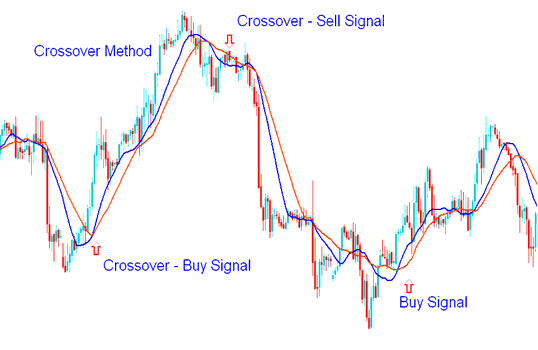
Moving Average Crossover Technique
Moving average crossover method that can be combined with this indicator to come up with a trading system for generating buy & sell signals.
To download Pivot points:
https://c.mql5.com/21/9/pro4x_pivot_lines.mq4
Once you download it open it with MQL4 Language MetaEditor, Then Compile the technical indicator by pressing Compile Button Key & it'll be added to your MetaTrader 4.
Note: Once you add it to your MetaTrader 4, the technical indicator has additional lines named MidPoints, to remove the additional lines open MQL4 Meta Editor(shortcut keyboard key - press F4), and change line 16 from:
Extern bool midpivots = true:
To
Extern bool midpivots = false:
Then Press Compile again, and it will then appear as exactly illustrated on this web site.




