How to Add MT4 Chande Dynamic Momentum Index
Step 1: Open MetaTrader 4 Platform Navigator Panel
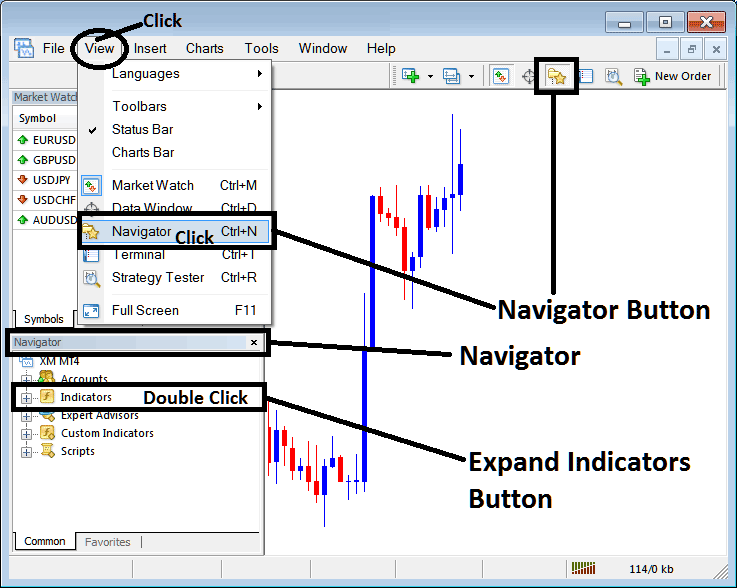
Open MetaTrader 4 Navigator window as shown on example below: Go to 'View' menu (click), then choose the 'Navigator' window (click), or From Standard Toolbar click the 'Navigator' button or press keyboard MT4 shortcut keys 'Ctrl+N'
On MT4 Navigator window, select "Indicators", by Double Clicking
How Do You Use MT4 Chande Dynamic Momentum Index - DMI Indicator in MT4?
How to Add Chande Dynamic Momentum Index FX Trading to a Chart
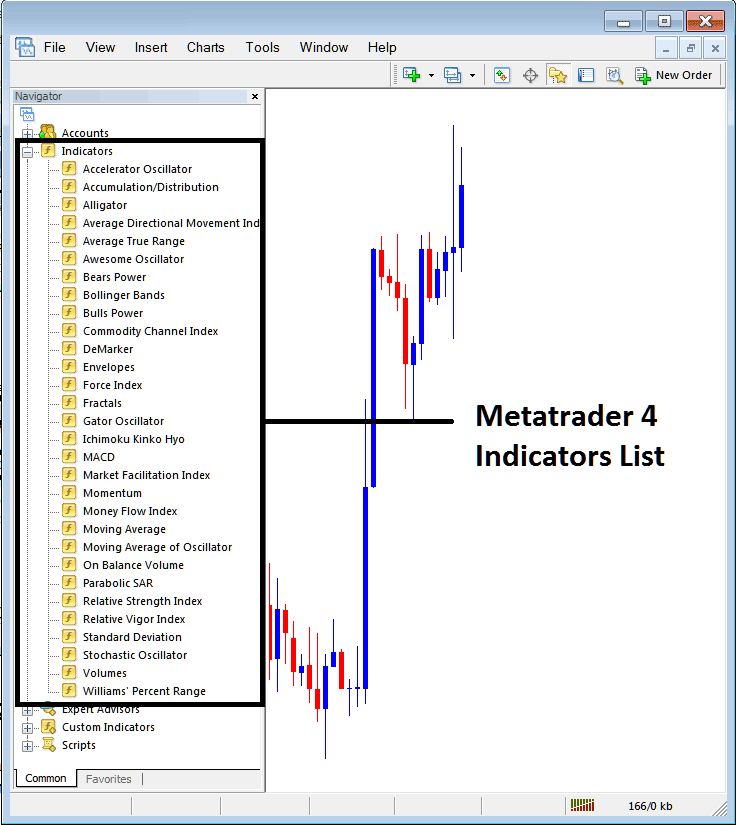
Expand the menu by clicking the expand button marker (+) or double click the 'indicators' menu, after this the button will appear as (-) and will now display a list of MT4 indicators as shown on example below - select the Chande Dynamic Momentum Index - DMI forex indicator from this list of MT4 indicators so that you can add the Chande Dynamic Momentum Index - DMI MT4 indicator on MetaTrader 4 forex chart.
How Do You Use MT4 Chande Dynamic Momentum Index - DMI Indicator in MT4?
How Install and Add Custom Chande Dynamic Momentum Index? - DMI Indicator on MT4
If the MT4 indicator that you want to add on the MT4 charts is a custom MT4 indicator - for example if the Chande Dynamic Momentum Index - DMI indicator that you want to add is a custom MT4 indicator you will need to first add this custom Chande Dynamic Momentum Index - DMI MT4 indicator on MetaTrader 4 platform & then compile custom Chande Dynamic Momentum Index - DMI forex technical indicator so that the newly added Chande Dynamic Momentum Index - DMI MT4 custom indicator pops up on the list of custom indicators in MetaTrader 4 software.
To learn how to add Chande Dynamic Momentum Index - DMI indicators on MT4 - how do you add Chande Dynamic Momentum Index - DMI indicator window to MT4 platform? - how do you add Chande Dynamic Momentum Index - DMI forex custom indicator on MT4? - How to add a custom Chande Dynamic Momentum Index - DMI custom forex indicator in MetaTrader 4.
How Do You Use Chande DMI MT4 Indicator?
Chande Dynamic Momentum Index Indicator Technical Analysis Buy & Sell Signals
Developed by Tushar Chande
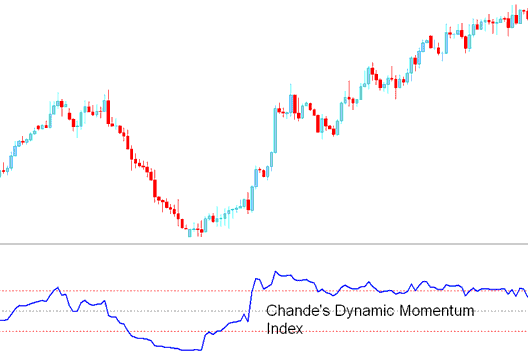
Chande Dynamic Momentum Index indicator is similar to Welles Wilder’s Relative Strength Index indicator - RSI indicator, however, there is one very important difference.
Relative Strength Index indicator uses a fixed number of forex price periods while the Chande Dynamic Momentum Index indicator uses a variable amount of forex price periods adjusted as forex market volatility changes.
The number of forex price periods used by Chande Dynamic Momentum Index indicator decreases as forex market volatility increases. This allows the Chande Dynamic Momentum Index indicator to be more responsive to forex price changes.
The Chande Dynamic Momentum Index indicator is more accurate than the RSI indicator and has less whipsaws and is less Choppy compared to the RSI indicator
How to Add MT4 Chande Dynamic Momentum Index
How to Generate Buy & Sell Signals
Buy Forex Signal
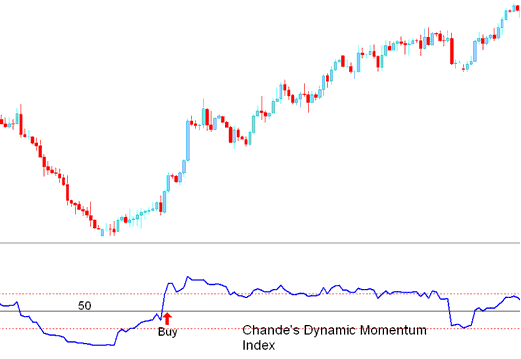
A buy signal is generated when the Chande Dynamic Momentum Index indicator crosses above 50 level center mark.
Buy Forex Signal generated Chande Dynamic Momentum Index Indicator
Sell Forex Signal
A sell signal is generated when the Chande Dynamic Momentum Index indicator crosses below 50 level center mark.
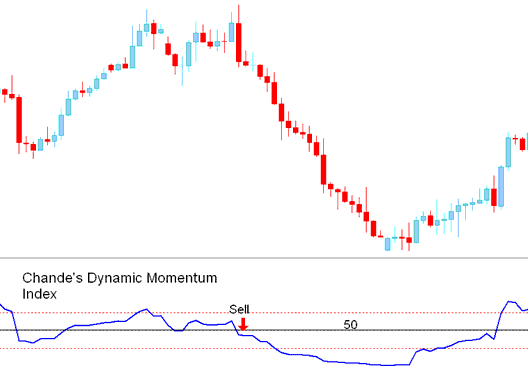
Sell Forex Signal generated Chande Dynamic Momentum Index Indicator
How Do You Use MT4 Chande Dynamic Momentum Index - DMI Indicator in MT4 - Chande Dynamic Momentum Index - DMI MT4 Indicator Settings in MetaTrader 4
