How to Add MT4 Bears Power Indicators in MetaTrader 4 Chart
Step 1: Open MT4 Software Navigator Window Panel
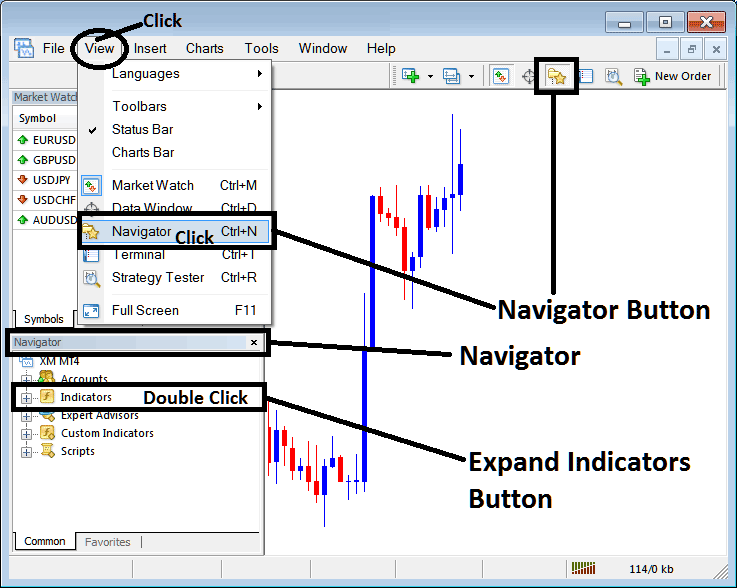
Open MetaTrader 4 Navigator window as shown on example below: Go to "View" menu (click), then choose the "Navigator" window (click), or From Standard Tool Bar click the "Navigator" button or press keyboard MT4 shortcut keys "Ctrl+N"
On MT4 Navigator window, select "Indicators", by Double Clicking
How Do You Use MT4 Bears Power Indicator in MT4?
How to Add Bears Power MT4 Indicator
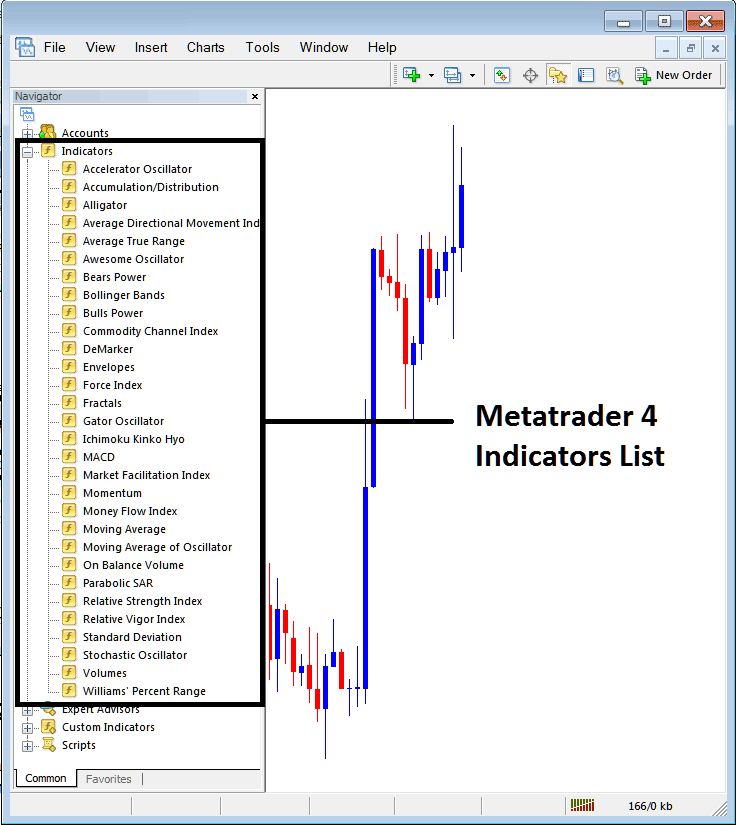
Expand the menu by clicking the expand button marker (+) or double click the "indicators" menu, after this the button will appear as (-) and will now display a list of MT4 indicators as shown on example below - select the Bears Power indicator from this list of MT4 indicators so that you can add the Bears Power MT4 indicator in MetaTrader 4 forex chart.
How Do You Use MT4 Bears Power Indicator in MT4?
How Install and Add Custom Bears Power Indicator on MT4?
If the MT4 indicator that you want to add on the MT4 charts is a custom MT4 indicator - for example if the Bears Power indicator that you want to add is a custom MT4 indicator you will need to first add this custom Bears Power MT4 indicator in MetaTrader 4 platform & then compile custom Bears Power technical indicator so that the newly added Bears Power MT4 custom indicator pops up on the list of custom indicators in MetaTrader 4 software.
To learn how to add Bears Power indicators on MT4 - how do you add Bears Power indicator window to MT4 platform? - how do you add Bears Power forex custom indicator on MT4? - How to add a custom Bears Power custom forex indicator in MetaTrader 4.
How Do You Use Bears Power MT4 Indicator?
Bears Power Technical Indicator Technical Analysis & Bears Power Buy & Sell Signals
Created by Alexander Elder
Bears Power indicator is used to estimate power of the Bears (Forex Sellers). Bears Power indicator estimates the balance of power between the forex bulls and forex bears.
Bears Power indicator aims at identifying if a bearish forex trend will continue or if the forex price has reached a level where it might reverse.
Calculation
A Forex Price Candlestick bar has 4 parameters: the Opening Forex Price, Closing Forex Price, High Forex Price and Low Forex Price of the forex price candlestick bar.
Each Forex Price bar either closes higher or lower than the previous forex price bar.
The highest forex price will signal the maximum power of the Forex Bulls within a forex chart time period.
The lowest forex price will signal the maximum power of the Forex Bears within a forex chart time period.
Bears Power indicator uses the Low of the forex price & a Moving Average (Exponential Moving Average)
The moving Average represents the middle ground between forex sellers and forex buyers for a certain forex chart time period.
Therefore:
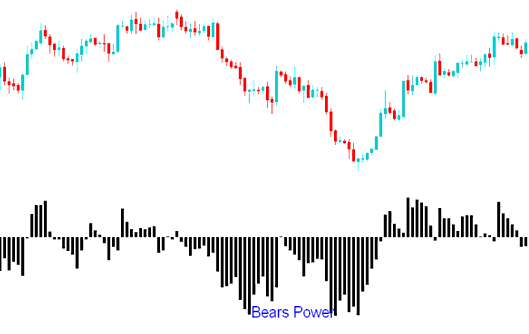
Bears Power = Low Price - Exponential Moving Average
How to Add MT4 Bears Power Indicators in MetaTrader 4 Chart
How to Generate Buy and Sell Signals
How Do You Use MT4 Bears Power Indicator in MT4?
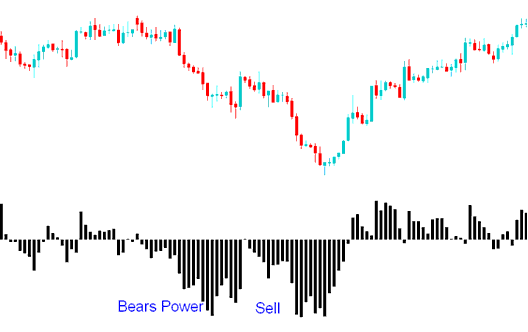
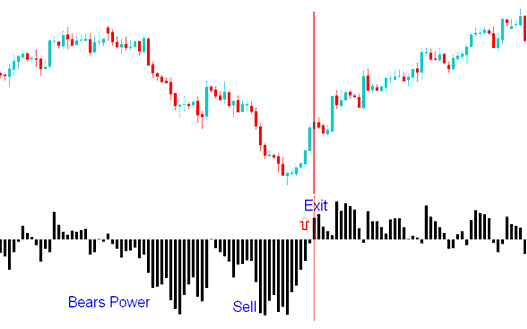
A sell signal is generated when the Bears Power indicator oscillator moves below Zero center mark.
In a downward forex trend, the LOW is lower than EMA, so the Bears Power indicator is below zero and Bears Power indicator Histogram/Oscillator is located below zero center line.
How Do You Use MT4 Bears Power Indicator in MT4?
Exit Forex Signal
If the LOW moves above the EMA then it means that forex prices are starting to rise - the Bears Power indicator histogram then rises above the zero center line mark.
How Do You Use MT4 Bears Power Indicator in MT4?
The Triple Screen method for Bears Power indicator suggests identifying the forex price trend on a higher forex chart timeframe (like daily chart time frame) and applying the Bears Power indicator forex trading signals on a lower forex chart timeframe (like hourly chart time frame). Bears Power indicator signals are then traded according to the lower forex chart time frame but only in the direction of the long term forex trend in the higher forex chart time-frame.
How Do You Use MT4 Bears Power Indicator in MT4?
