How Do You Learn How to Use MT4 Demo Account on MetaTrader 4?
How to Open a Demo MT4 Account - How to Open MT4 Demo Account
MetaTrader 4 software Tutorial - Learn how to trade & how to use the free MetaTrader 4 Practice Demo Trading Account provided in MetaTrader 4 platform.
To begin trading forex online a beginner trader needs to place a buy or sell orders. A trader needs to first analyze the direction of a forex instrument. This is why all good forex platforms such as the MT4 provide technical tools such as forex price charts, technical indicators & various different timeframes from which one-can analyze FX price moves using the chart timeframes of their choice.
To learn all these features of the MT4 Platform a trader will need to first open a demo forex account which will be used to learn & practice trading on this MT4 platform for free using virtual money. Trader can learn how to trade the market without investing their own money and this MT4 practice account is designed to help the trader learn the forex platform provided by their broker before opening a real account.
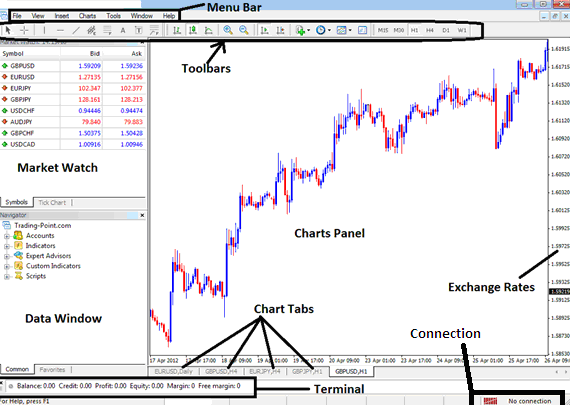
How Do You Learn How to Use MT4 Demo Account on MetaTrader 4?
From the above MetaTrader 4 software inter-face, summary of all information required by a trader is provided on this trading interface
- MT4 Connection - connectivity to the broker servers
- MT4 Charts - forex price graphs that display forex prices
- MT4 Toolbars - tool bars to add tools & technical analysis technical indicators
- MT4 Market Watch - for displaying available forex trading instruments
- MetaTrader 4 Data panel - provides account data & other indicator data
- MT4 Exchange rates - shows current market forex price of a forex trading instrument
- MT4 Menu bar - Shows all menu items on the platforms
Where Can I Learn How Do You Use MT4 Demo Account - MT4 Practice Demo Account
How to Open a Demo MT4 Forex Account - How to Open Demo MT4 Account - How to Open MT4 Practice Account




