How to Add a Download MetaTrader 5 Cryptocurrency EA on MetaTrader 5
How Do I Add a Download MetaTrader 5 Crypto EA on MetaTrader 5?
Trading Bitcoin Install a MetaTrader 5 Crypto EA on the MetaTrader 5 Software?
Procedure for installing a Download Bitcoin EA on the MetaTrader 5 platform is explained below:
How to Add a Download MT5 Bitcoin Expert Advisor
If you download an automated cryptocurrency Expert-Advisor bot from a source on the inter-net, for example from www.tradeforextrading.com, then it is now on your computer, to add it, follow the steps below so as to install the MetaTrader 5 Automated Trading EA on your MetaTrader 5 platform:
Step1 : On the File Menu of MetaTrader 5 MetaEditor , Choose 'Open'
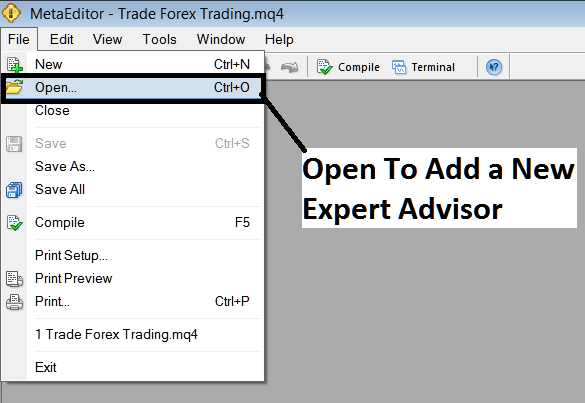
How to Add a Download MetaTrader 5 Crypto EA on MetaTrader 5?
Step2: Find Download Folder location from MetaTrader 5 Popup window panel that pops up as illustrated below
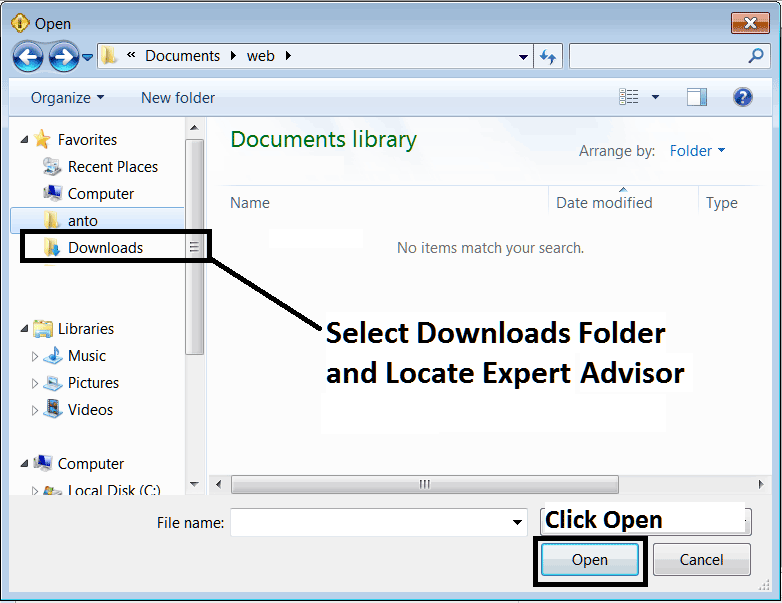
How to Add a Download MetaTrader 5 Cryptocurrency EA on MT5 Software?
Step3: Once you Open the EA it will be displayed on the MetaTrader 5 MetaEditor and then follow the procedure for compiling Bitcoin EA Robots on MetaTrader 5, once it is compiled without errors, Restart Your MetaTrader 5 Bitcoin Platform and the MetaTrader 5 Automated Crypto EA cryptocurrency trading robot will now be added to the MetaTrader 5 platform and you can start to trade with it on your MT5 Bitcoin Platform.
How to Add a Download MetaTrader 5 Cryptocurrency EA on MT5 Bitcoin Trading?