Best RSI Settings for BTCUSD Day Trading
How to Add RSI Bitcoin Indicator on MetaTrader 4
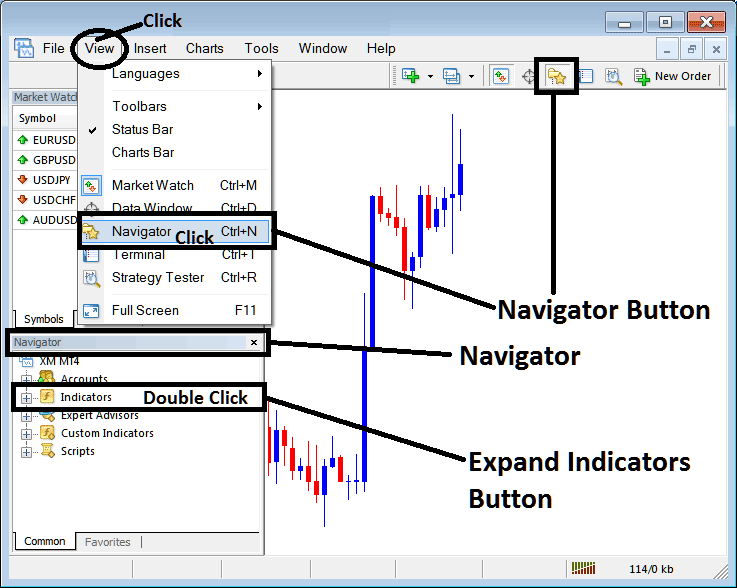
Step 1: Open MetaTrader 4 Platform Navigator Window Panel
Open the MetaTrader 4 Navigator window as shown below: Navigate to 'View' menu (click) & then choose 'Navigator' window (click), or From the Standard Tool Bar click on the 'Navigator' button key or use keyboard short cut keys 'Ctrl +N'
On the MetaTrader 4 Navigator window panel, choose "Technical Indicators", (DoubleClick)
Best RSI Setting for 1 H BTCUSD Chart - Best RSI Setting for 4 H BTCUSD Chart
Adding RSI MT4 Indicator
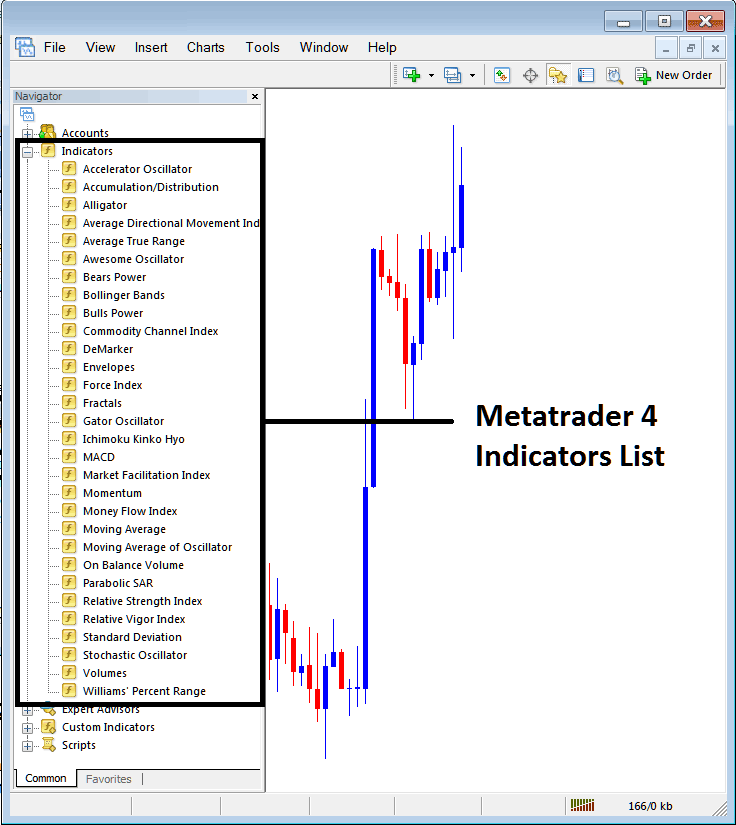
Expand the menu by clicking the expand button marker (+) or double click the 'indicators' menu, after this the button will appear as (-) and will now display a list as shown below - select the RSI indicator from this list of MT4 cryptocurrency indicators so as to add the RSI indicator on the bitcoin chart.
Best RSI Setting for 1 H BTCUSD Chart - Best RSI Setting for 4 H BTCUSD Chart
How to Add Custom RSI Bitcoin Indicator on MetaTrader 4 and How to Install RSI MT4 Indicator
If the bitcoin RSI technical indicator you want to add is a custom MT4 indicator - for example if the RSI technical indicator you want to add is a custom RSI indicator you will need to first add this custom RSI indicator on the MT4 software and then compile custom RSI indicator so that the newly added RSI custom bitcoin indicator appears on the list of custom cryptocurrency indicators on the MT4 software.
To learn how to setup RSI indicators on MetaTrader 4, how to add RSI indicator window to MT4 platform and how to add RSI custom MT4 indicator on MetaTrader 4 - How to add a custom RSI indicator on MetaTrader 4.
BTCUSD Trading RSI Cryptocurrency Technical Indicator
Relative Strength Index Bitcoin Technical Analysis and RSI Trading Signals
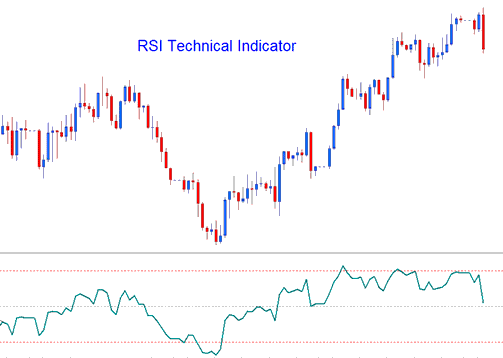
RSI is one of the most popular bitcoin indicator & it is a momentum oscillator and a bitcoin price trend following indicator. RSI indicator compares a trading bitcoin price movement magnitude of the recent bitcoin price gains against its magnitude of recent losses bitcoin price losses and draws this data on a scale of values which ranges between 0-100.
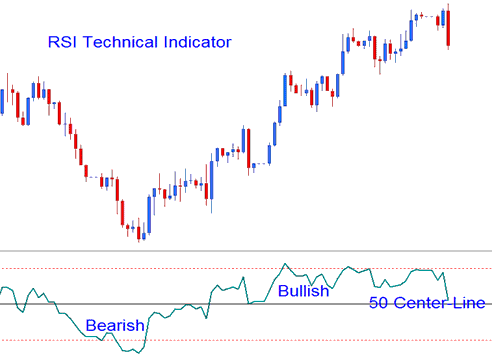
RSI technical indicator measures the momentum of bitcoin price: indicator values above RSI 50 center line level signify bullish momentum while values below RSI 50 center line level signify bearish momentum.
Best RSI Setting for 1 H BTCUSD Chart - Best RSI Setting for 4 H BTCUSD Chart
- RSI is drawn as a green-line
- Horizontal dashed lines are plotted to spotting over bought and oversold levels are - RSI 70 & RSI 30 levels respectively.
RSI Bitcoin Technical Analysis & How to Generate BTCUSD RSI Trading Signals
There are several strategies used to trade RSI, these are:
50 center line Crossover Signals
- Buy Bitcoin Signal - when the RSI indicator crosses above 50 a buy bitcoin trading signal is given.
- Sell Bitcoin Signal - when the RSI indicator crosses below 50 a sell bitcoin trading signal is given.
Best RSI Settings for BTCUSD Swing Trading - Best RSI Settings for Crypto Best RSI Settings for Scalping BTCUSD Trading
RSI Bitcoin Technical Indicator Trading Patterns
Traders can draw trend lines & identify cryptocurrency chart patterns on the RSI indicator. The RSI often forms cryptocurrency patterns such as head & shoulders cryptocurrency chart pattern which might not have formed clearly on the bitcoin price chart - but forms on the RSI technical indicator.
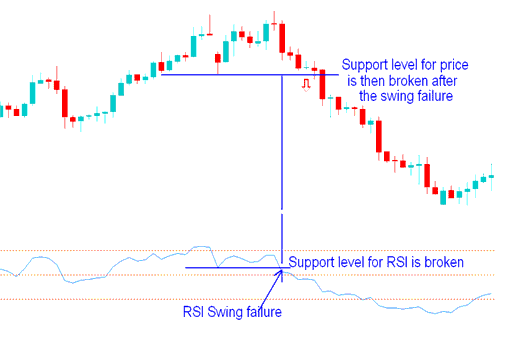
Trading Support and Resistance BTCUSD Price Breakouts
RSI indicator is a leading bitcoin indicator & can be used to predict Support and Resistance Breakouts before bitcoin price breaks its support and resistance level. RSI indicator uses the swing failure bitcoin signal to predict when the bitcoin price is about to break support and resistance areas.
Best RSI Settings for BTCUSD Swing Trading - Best RSI Settings for Crypto Best RSI Settings for Scalping BTCUSD Trading
Overbought & Oversold Levels on Technical Indicator
- Overbought - RSI levels above 80
- Oversold - RSI levels below 20
These Overbought and Oversold levels can be used to generate bitcoin signals such as when RSI turns up from below 20 after oversold is a buy cryptocurrency signal - and sell bitcoin signal is when RSI crosses to below 80 after overbought - RSI sell bitcoin trading signal.
Divergence RSI BTCUSD Trading Setups
Divergence bitcoin trading is one of the bitcoin technical analysis strategies used to trade bitcoin price trend reversals of the bitcoin price trends. There are 4 types of RSI divergences that can be traded with this RSI indicator explained in the bitcoin divergence trading lesson on this learn bitcoin trading web site.
Best RSI Setting for 1 H BTCUSD Chart - Best RSI Setting for 4 H BTCUSD Chart - Best RSI Setting for BTCUSD Day Trading - Best RSI Settings for BTCUSD Swing Trading - Best RSI Settings for Cryptocurrency Best RSI Settings for Scalping BTCUSD Trading