How Do I Load a Stocks Template in MT4?
MT4 Chart Template
MT4 Stocks Platform Tutorial - Trading Stocks Load Chart Templates on MetaTrader 4
Open the stocks charts you wish to trade. Once you're ready to load a template on these stocks trading charts.
- Click "Charts" Menu.
- Select "Templates".
- Select "Load Template".
- Enter the name of "Saved Template".
Trading Stocks Load Stocks Trading Chart Templates to MT4 Platform
How to Load a Template on a Stocks Trading Chart on MetaTrader 4
To load a stocks chart template, go to the charts menu select the templates button key & select the sub menu item for load chart template. This will load the named stocks chart template on to the new stocks trading chart as is shown below.
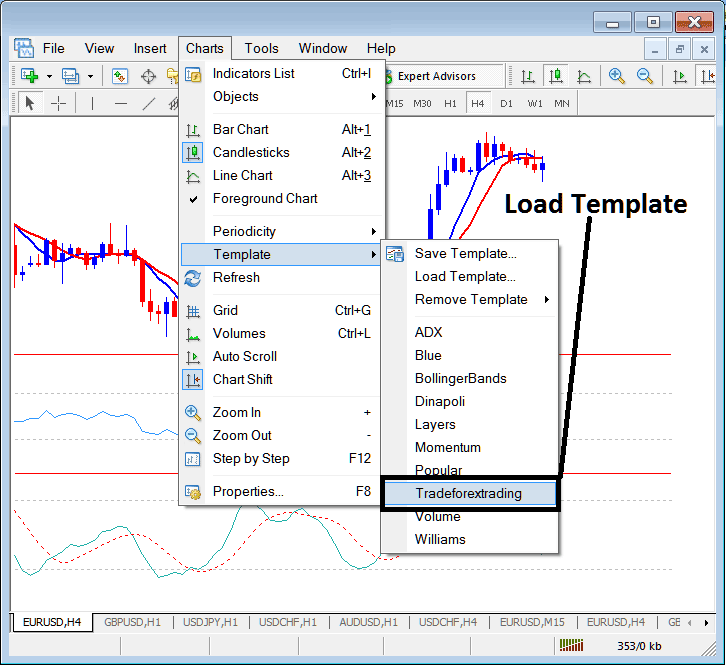
How Do You Load a Stocks Template on MetaTrader 4 Platform? - How Do I Load a Stocks Template on MT4?
The named stock chart template is shown on the list above - this is a short cut for finding the available trading system templates that have been saved within the platform. Another alternative or option is to use the "Load Template", which is the second option marked as "Load Template" on the template menu sub items.
Trading Stocks Remove a Stocks Chart Template from MetaTrader 4 Stocks Platform
Third option in the Charts template sub menus is "Remove Template": you can use this sub menu item to remove any stocks chart template loaded on the selected stock trading chart.
How Do You Load a Stocks Template on MetaTrader 4 Platform? - How Do I Load a Stocks Template on MT4?




