Trading Stocks Read and Hide Stocks Symbols on MetaTrader 4
Stocks Trading Hide Stocks Trading Symbols on MetaTrader 4
To hide stocks Quotes in MetaTrader 4 platform use the MT4 "Market Watch" Window.
To Open the MT4 Market Watch Window, Click "View" Menu next to "File" Menu at the tops left corner of MetaTrader 4 platform, then from the drop down menu select "Market Watch" button so as to open the "Market Watch" on the MT4 stocks trading Platform.
Once you open the Market Watch window the list of available trading instrument symbols will be displayed on MT4 software.
As a trader you may want to hide some of the instrument quotes available on MT4 platform so as only to be left with the instruments that you're only trading with.
If you want to hide stocks trading Symbols price quotes on this Market Watch window, Right Click within the Market Watch window & a Pop Window appears - from this pop up window choose the option - "Hide All" - this will then close all the stocks symbols that you're not trading with - only stocks symbols that you have opened stocks charts to trade with will be left on this display of stocks trading symbols.
To hide stocks Quotes in MetaTrader 4 platform use the stocks step by step procedure described below:
To Save Internet Bandwidth, (Especially if you are using mobile trader, or pay per MB internet)
To save inter-net band width choose a list of all the instruments you will be trading by opening charts for only these stocks symbols, say example, 5 stocks instruments, after choosing these stocks symbols by opening their charts, then tap and click "Hide All" button, this will then hide all the trading quotes that you do not require to trade with and this will save you inter net band width.
Even if you don't want to save internet bandwidth, you can select the option to "Hide All" stocks symbols on the MT4 platform, this will save computer processor resources and RAM, especially if you trade with a broker that provides hundreds of stocks trading instruments, stocks symbols and stocks trading instruments, there no need to have all these 100 or 200 stocks symbols and stocks trading instruments streaming stocks price quotes on your MetaTrader 4 software after all you need only about 10 to 20 trading instruments or a few stocks trading financial instruments to trade with. You can always "Show All" stocks symbols >>> then Select a new trading instrument quote by opening its chart, >>> Then "hide all" after you've selected the new stocks symbol, your newly selected stocks quote will be added on this minimized list of symbols in the MetaTrader 4 software.
Hide All Stocks Quotes on MetaTrader 4 Market Watch Options
Shown Below is an explanation of market watch window Hide All stocks trading symbols option, Download MT4 platform and click the MT4 Market Watch button below to get an illustration of the explanations made on this learn stock MT4 Tutorial.
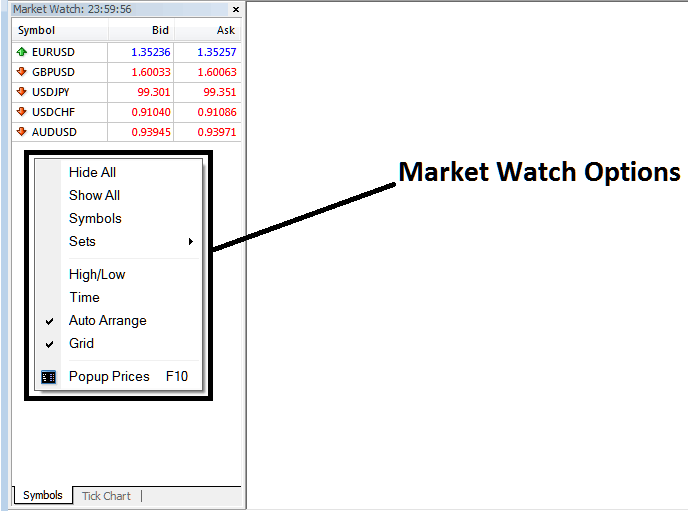
Read and Hide Stocks Quotes on MetaTrader 4 Platform - Hide Stocks Quotes in MetaTrader 4?
Stocks Symbols Options - Stocks Quotes option can be used to also add or hide a pair based on a group of stocks trading instruments. You can download MT4 & click symbols to see how you can add or remove instruments using this MetaTrader 4 stocks chart trading option.
Read and Hide Stocks Quotes in MT4




