Trading Stock Read and Activate a MetaTrader 5 Stock Expert Advisor in MT5 Platform
How Do I Activate a Stocks MetaTrader 5 Trading EA on Stocks MT5 Trading Platform?
Steps on Trading Stocks Activate Stock Trading Expert-Advisor in MT5.
- Select the Tools Menu
- Select The Expert-Advisors Tab
- Click the Check Box "Enable Expert Advisors"
- Click the Check Box "Allow Live Trading"
Procedure on how to activate an MetaTrader 5 Stock Expert-Advisor
Options Settings in Tools Menu in MetaTrader 5 Software
The options settings button key is used for a variety of many different tasks on the MetaTrader 5 stock platform. Option settings button is listed within tools menu in the MT5 as shown below. MT5 Shortcut key for this - "Ctrl+O".
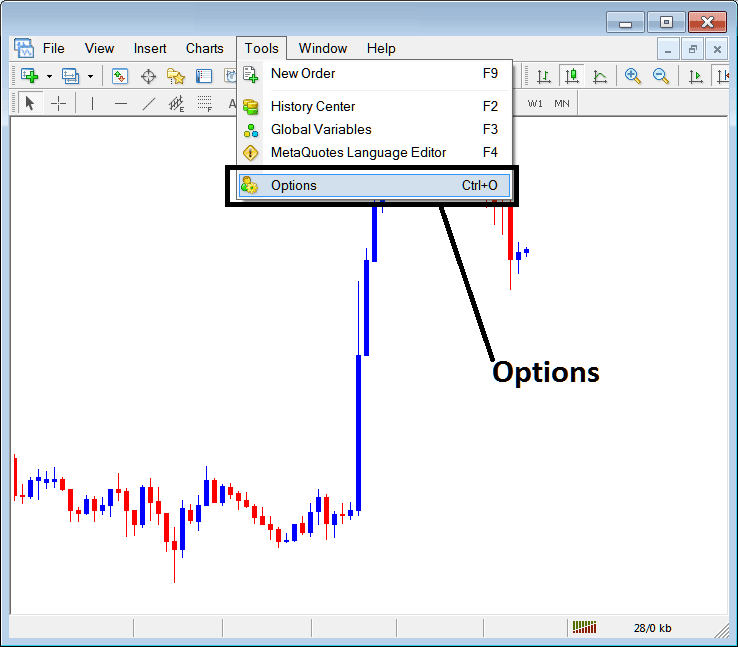
How Do You Activate Stocks MetaTrader 5 Expert Advisor on MT5
MetaTrader 5 Options Settings
These settings on MT5 are illustrated below: list of various button keys are displayed as tabs as shown on screenshot below. As a trader to edit anything on this panel just click on any of the buttons & then change the settings.
MetaTrader 5 Stock Expert Advisors Tab
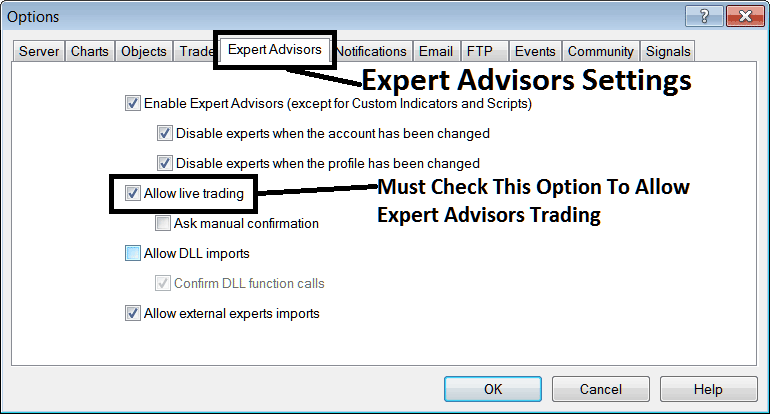
The Stocks Trading Platform Expert-Advisors window panel is shown below:
How Do You Activate Stocks MetaTrader 5 Trading EA on Stocks MetaTrader 5 Platform?
The following options are used for MetaTrader 5 Stock Expert-Advisors Automated Trading:
Enable MetaTrader 5 Stock Expert Advisors - Allow for expert advisor to be placed on chart for automated trading execution purposes
Disable experts when accounts have been changed - sign in to a different account deactivates MetaTrader 5 Stock Expert-Advisors
Disable Experts when profile has been change - When you change profiles the Expert advisors setting for allowing trading in new profile is deactivated until you allow and manually place an MetaTrader 5 Stock Expert Advisor on this new opened stock trading chart.
Allow Live Trading - Give Permission to the MetaTrader 5 Stock Expert Advisor to open trades on the live stocks market.
(Ask Manual Confirmation - no needs for this if you are using MetaTrader 5 Stock Expert-Advisors, leave this as it's displayed without checking it.)
Allow DLL imports - Dynamic Link Libraries, which are external, unless required this should be left unchecked/unticked. (External means that these are libraries that are referenced from external sources outside your PC computer, therefore you should be careful with this one)
Confirm DLL functions calls - Exercise manual permission for every function call, either allow it or disallow it depending on your stocks trade parameters.
Allow External Experts imports - This is used to allow your MetaTrader 5 Stock Expert Advisor to reference some data from another MetaTrader 5 Stock Expert Advisor that is in another place, away from your computer, (External means these MetaTrader 5 Stocks Expert-Advisors are referenced from an external source outside your Desktop computer PC, so be careful with this option).
MQL5 MetaTrader 5 Stocks Expert Advisor Expert-Advisor Community
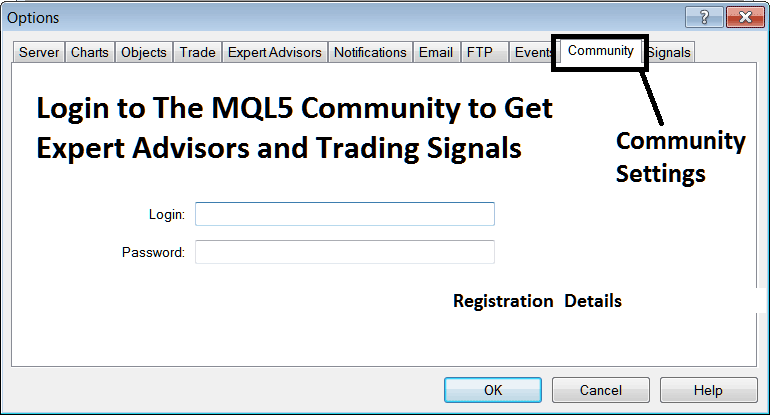
The MQL5 EA robots community is a community where stock traders can find other stocks traders and Exchange MetaTrader 5 Stock Expert Advisors and Stocks Trading Signals with each other.
Stocks Traders have to register to this MQL5 MetaTrader 5 Stock Expert-Advisors community & can then access services from their MetaTrader 5 platform directly. To get details on how to access and register in this community, login to your MetaTrader 5 stock software and go to the window shown below & follow the instructions.
How Do You Trade and Activate a MetaTrader 5 Stocks Expert-Advisor in MT5?
Read and Activate a MetaTrader 5 Stocks Expert-Advisor on MetaTrader 5 Platform?




