How Do You Draw Upward Forex Channel on MT4 Software?
How Do I Draw Upward Forex Trading Channel in MT4 Platform?
An upwards forex channel is drawn on the MetaTrader 4 platform by drawing a line that is parallel to the upward trend line & then adjusted to touch the top boundary of the forex price movement. This then forms a forex channel and as long as a price stays between these 2 forex channels the bullish forex trend movement will continue heading upward - upward forex trend.
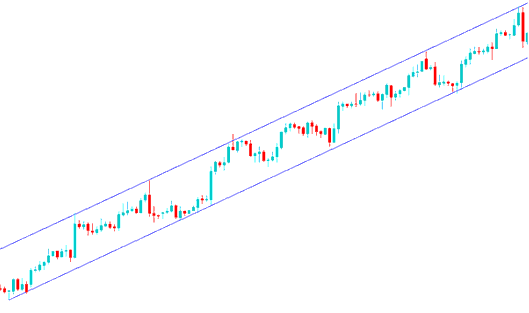
How Do You Draw Upwards Forex Channel on MT4 Software?
How Do You Draw MetaTrader 4 Upward Forex Channel?
Forex Analysis of Upwards Channel in MT4 Charts - This MetaTrader 4 upward forex channel is used by traders to show forex price levels where it best to take profits. Traders will take some profit once the forex price touches the upper channel and wait for another forex price retracement before opening a buy forex trading again.
How Do You Draw MetaTrader 4 Forex Channel?
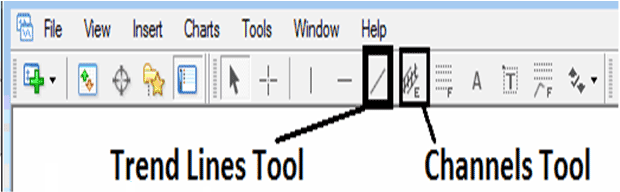
The MT4 forex channel drawing tools to draw these a forex upwards channel in MT4 platform are located on the MetaTrader 4 forex chart drawing toolbar within the MetaTrader 4 platform, To get this MetaTrader 4 chart toolbar if it is not activated on your MT4 platform, Click in "View" Next to "File" menu at the tops left corner of MT4 platform and click View, Then Click on Tool-bars, Then Check "Lines Tool Bar" by clicking on it.
Shown Below is examples of MetaTrader 4 Forex Channel Drawing Tool on MT4 Charts Tool Bar. To draw a forex channel on MT4 forex chart click this MT4 Forex Channel Tool and select the MetaTrader 4 chart point where you want to plot the upwards forex channel in MT4 forex chart.
MetaTrader 4 Forex Channel Drawing Indicator
How Do You Draw Upwards Forex Trading Channel in MT4 Software?
How Do You Draw Upwards Forex Channel on MT4 Software?




