How Do You Add a Forex Trend-line in MetaTrader 4 Platform?
How Do You Add a Forex Trend-line in MetaTrader 4 Platform?
To add MT4 Forex Trendlines in MT4 platform - use MT4 forex trend lines drawing indicator tool.
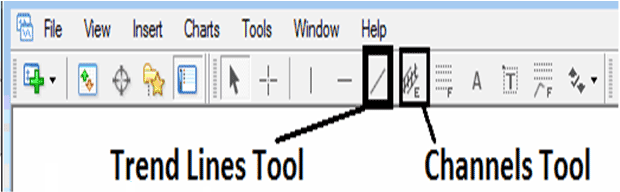
Select the MetaTrader 4 forex trend-line plotting tool as shown on the MetaTrader 4 forex trading example below - then select MetaTrader 4 chart point 1 where you want to start drawing the MetaTrader 4 forex trend line then select MetaTrader 4 chart point 2 where you want to connect the MetaTrader 4 forex trend line & then extend the trend line into the future forex prices.
MetaTrader 4 Forex Tools for Drawing MetaTrader 4 Forex Trend Lines
The MT4 forex trading tools to draw these MetaTrader 4 forex trend lines are located on the MetaTrader 4 forex trend line drawing toolbar within the MetaTrader 4 platform - To access this MetaTrader 4 toolbar if it is not activated on your MT4 platform, Click in "View" Next to "File" menu at the tops left corner of MT4 platform and click View, Then Click on Tool-bars, Then Check "Lines Tool Bar" by clicking on it.
Shown Below is example of MT4 trend-line plotting tool on MT4 charts toolbar. To draw a trend-line on MT4 forex chart click this MT4 forex trend-line plotting tool and select the forex MetaTrader 4 chart points where you want to draw this MetaTrader 4 forex trend lines.
How Do You Add a Forex Trend-line in MetaTrader 4 Software?
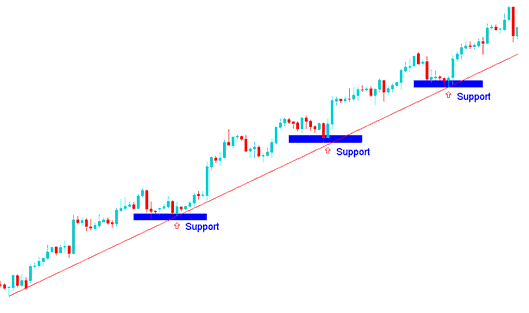
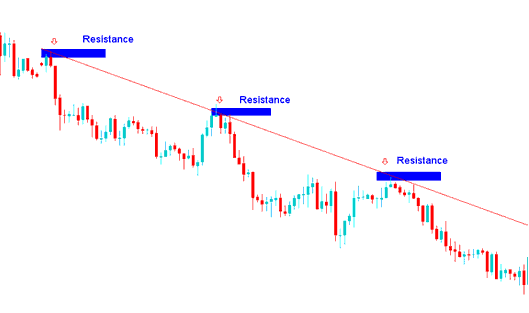
The direction of the trend line can either be upward or downwards depending on the current forex trend.
How Do You Add a Forex Trading Trend Line in MT4 Software?
MetaTrader 4 Tutorial: How Do You Add an Upward MetaTrader 4 Forex Trend Line in MT4
How Do You Add a Forex Trend-Line on MT4 Software?
How Do You Add a Forex Trend-Line on MT4 Software?
MetaTrader 4 Tutorial:How Do You Add a Downward MetaTrader 4 Forex Trend Line in MT4
How Do You Add a Forex Trend-Line on MT4 Software?
How Do You Add a Forex Trend-Line on MT4 Software?




