How Do I Analyze MT5 Downwards Forex Trend Line on MT5?
How Do I Trade MT5 Downwards Forex Trend Line on MT5?
MT5 Forex Platform Trend Line Drawing Tools on MetaTrader 5 Trading Charts
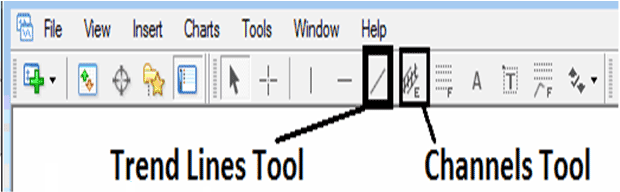
The MT5 trend line plotting tools used to plot forex trend lines in MT5 are located on the MT5 charts toolbar within MT5 software, To access this MT5 charts tool-bar if it isn't activated on your MetaTrader 5 platform, Click in 'View' Next to 'File' at the tops left corner of MT5 platform & click 'View', Then Click on 'Tool bars', Then Check 'Lines Tool-bar' by clicking on it.
Shown Below is the example of forex MT5 trend-line drawing charts tool-bar. To draw a downward trendline on a forex chart click on this forex trend-line drawing tool & choose point where you want to plot the downward forex trend line.
How Do I Analyze MetaTrader 5 Downwards Forex Trend Line on MT5?
Drawing a Downwards Forex Trend-line in MT5 Platform
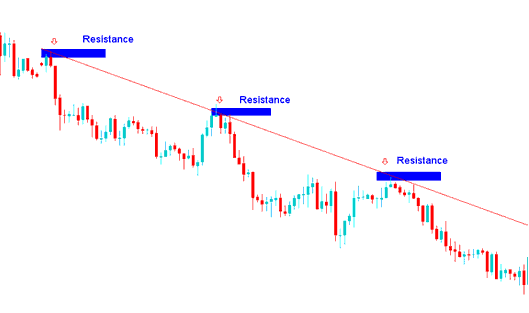
When it comes to learning how to plot the downwards forex trend lines on forex charts, you need to know that when the forex market is bearish it forms lower lows & lower highs forming a downwards general forex price trend direction. These are the chart points that are used to plot the downward forex trend line in MetaTrader 5 forex trading charts.
To draw downwards forex trend lines we use resistance levels and to draw a downward forex trend-line correctly two resistance levels are needed as illustrated and shown on downward forex trend line example below.
How Do I Read MT5 Downwards Forex Trend Line on MT5?
How Do I Analyze MetaTrader 5 Downwards Forex Trend Line on MT5?
