How Do I Analyze Kase DevStop 2 Technical Indicator Buy Forex Signal & Sell Trading Signal?
Kase DevStop 2 How to Analyze Indicator Buy Signal
How Do I Analyze Buy Forex Signal Using Kase DevStop 2 Indicator?
Steps on how to analyze forex buy signals using Kase DevStop 2 forex indicator:
This Kase DevStop 2 forex indicator buy signal lesson gives an explanation of how to analyze forex buy signals using the Kase DevStop 2 forex indicator as shown on example below:
How Do You Interpret Buy Forex Signals Using Kase DevStop 2 Technical Indicator
Kase DevStop 2 How to Analyze Indicator Sell Signal
How Do I Analyze Sell Forex Signal Using Kase DevStop 2 Indicator?
Steps on how to analyze forex sell signals using Kase DevStop 2 forex indicator:
This Kase DevStop 2 forex indicator sell signal lesson gives an explanation of how to analyze forex sell signals using the Kase DevStop 2 forex indicator as shown on example below:
How Do You Interpret Sell Forex Signals Using Kase DevStop 2 Technical Indicator
How Do I Analyze Kase DevStop 2 Indicator?
How Do I Analyze Kase DevStop 2 Indicator Buy Forex Signal & Sell Signal?
How Do I Analyze Kase DevStop 2 Technical Indicator Buy Forex Signal & Sell Trading Signal?
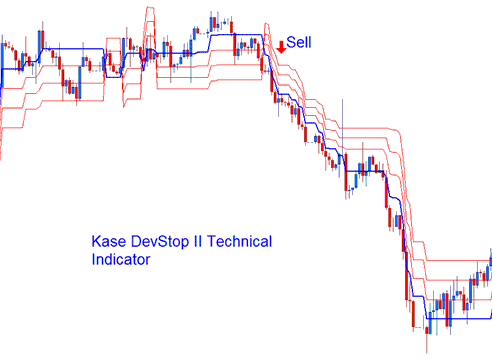
Kase DevStop 2 forex indicator is used to determine the realistic exit points for forex trades based on volatility, variance of the forex price volatility and the volatility skew. Kase DevStop 2 forex indicator plots 4 lines. 4 lines are described as a Warning Line & 3 Standard Deviation Lines of 1, 2 and 3. These lines allow Forex traders to take profit or cut forex trading losses at the levels where the probability of a forex trade remaining profitable is very low, at the same time without taking more of a trading loss or cutting forex profit any time sooner than it is necessary.
How Do You Interpret Kase DevStop 2 Indicator?
The three red lines are used by traders to set exit levels or stop loss order levels. Kase DevStop 2 is a trend following forex indicator.
How Do You Interpret Kase DevStop 2 Indicator?




